This week, Apple released iOS 26.3. It is mostly just a security update, but there are a few new features, as noted by Juli Clover of MacRumors. However, I was most interested in iOS 26.3 moving into the rear view mirror because, as Zac Hall of 9to5Mac reports, the rumors have been that the next release, iOS 26.4, will include Apple’s major AI updates to Siri. My enthusiasm waned when I saw Mark Gurman of Bloomberg report that the major Siri improvements could be delayed even more, and as John Gruber of Daring Fireball notes, Gurman’s prior reporting on Siri delays has been accurate. On the other hand, Jennifer Elias of CNBC reports that (perhaps in response to the Gurman report), Apple told CNBC that the company is still on track to launch the new Siri in 2026. Suffice it to say that I don’t recommend placing any bets on exactly when the new Siri will be released. And now, the news of note from the past week:
Juli Clover of MacRumors shares 10 iPhone tips. For example, she shared a shortcut that lets you search the Messages app for messages with text within a specific date range, which is something that I did not know was possible.
If you are heading to a protest—and we are certainly seeing more and more of those these days—Philip Michaels explains in a post for Six Colors why you might want to turn off Face ID.
There have been lots of rumors about how Apple might improve its Health app on the iPhone, such as using AI and/or introducing a Health+ product. Wesley Hilliard discussed what he would like to see Apple unveil in the future in this post on his HilliTech blog.
Brett Burney and I are teaching a two-hour online CLE for myLawCLE on February 18, 2026, on the topic of using an iPad in a law practice. It is not designed for power users—for example, we start with advice on how to select the right iPad and then cover the best apps to get—but if you or someone that you know wants an introduction to using an iPad as a lawyer, this might be right up your alley.
If you are like Joel McHale—or, at least, the character he plays on TV—you may not know that you can recover a photo after you delete it in the Photos app. In a post for Six Colors, Philip Michaels explains how.
According to Joe Rossignol of MacRumors, the next seven states to gain support for storing a digital driver’s license in Apple’s Wallet app will be Arkansas, Connecticut, Kentucky, Mississippi, Oklahoma, Utah, and Virginia—although the timing for those states is not yet announced.
As reported by Devindra Hardawar of Engadget, YouTube has finally released an app for the Vision Pro. Until now, I have been watching YouTube videos in the Safari web browser, and while Apple used some tricks to make that as pleasant as possible, I’m glad there is now a dedicated app, especially since it supports 360, 3D, and VR 180 content. I tried this new app out last night, and I like it.
Nellie Andreeva of Deadline has an extensive report on the Apple TV show Severance. The big news in this report is that Apple has now acquired all rights and will produce the show in-house. However, I especially enjoyed the article because it shares tons of behind-the-scenes details of how shows like this are made, including how even a successful show can lose money for a studio. I recommend the article, but note that show creator Ben Stiller posted on X: “Do not believe everything you read. Please. That article is all [hearsay] and [has] no sources attributed.” So some of the details certainly could be wrong.
And finally, here is a new video from Apple that shows off the new selfie feature of the iPhone 17 Pro (and also the iPhone 17, although that isn’t mentioned in this video) that automatically shifts between portrait and landscape mode depending upon who is in a selfie picture:
Apple is selling more iPhones than ever right now, and Brett and I begin this week’s episode of the In the News podcast discussing theories on why that is happening. We also discuss iPhones in space, managing potentially unwanted phone calls on an iPhone, a new portable 3-in-1 charger from Anker with a fan, whether you should take RAW photographs, and more.
In our In the Vision segment, we discuss the new Retrocade app for the Apple Vision Pro, which allowed me and my son to travel back in time to the early 1980s and play arcade games such as Frogger.
In our Where Y’at? segment, we discuss both how police can use Apple devices to investigate crimes and Apple’s second-generation AirTag.
In our In the Know segment, Apple describes a new device that both charges your iPhone and lets you play retro handheld games, and I discuss Mardi Gras.
Most people know Savannah Guthrie as a Today show anchor, but she is also an attorney who graduated from Georgetown Law School. (She was a few years behind me.) She is going through a horrible ordeal right now because her mother is missing, and there is evidence that her mother may have been abducted. I mention all of this because there is an Apple technology connection to this story. As noted by Andrew Orr of AppleInsider, investigators were able to pinpoint the time when she may have last been in her home because she has a pacemaker that communicates with her Apple Watch, even when she is not wearing the Apple Watch. By noting when the data stopped syncing, authorities have some evidence of when she may have left the premises. With technology like an iPhone, Apple Watch, and AirPods that we often keep very close to our bodies, and with those devices syncing with other devices and capturing information such as heart rate and location, mobile technology can play a big role in recreating what may have happened in the past—something that is frequently an issue in civil and criminal lawsuits. And now, the news of note from the past week:
As I noted earlier this week, Apple just finished its best financial quarter ever, and Apple CEO Tim Cook said that “demand for iPhone was simply staggering.” One reason for that was a big increase in iPhone sales in China. Zeyi Yang of Wired explores some of the reasons why, including: (1) the baseline iPhone 17 model has a ton of features that used to only come in the Pro model, and (2) the baseline iPhone 17 model was priced low enough to qualify for a new Chinese government subsidy aimed at stimulating the economy. Those sound like valid reasons, but I’ve also heard it frequently said that many customers in China prefer a smartphone that stands out as looking different and new, and Apple is now selling an orange Pro phone and an iPhone Air, two models that definitely look like new models.
Two years ago this week, Apple released the Apple Vision Pro. Many news reports about this anniversary are similar to this one by Hartley Charlton of MacRumors in that they criticize the device as not yet being a blockbuster. I think they are missing the point. I was excited about this product when I bought one two years ago, and I still love using it today. But more importantly, the Apple Vision Pro is a preview of the future, and I’m thrilled that Apple is working on that future right now, just like the first Mac, first iPhone, and first iPad were all just a tease for much better products that would come later.
A fascinating Vision Pro game was released yesterday: Retrocade. As Giovanni Colantonio of Polygon notes, it brings a 1980s arcade into your home because you can play full-size arcade games as you stand in an immersive environment that looks like an arcade. I only played with it for a short period of time last night, but it was so much fun! One of my favorite games from the early 1980s was Frogger, and there I was, playing what looked like the actual Frogger game. The in-game graphics and sounds were perfect, and better yet, I could also look at all of the details on the cabinet of the arcade game. When I showed it off to my son, his first reaction was “What is Frogger?”—clearly, I have failed in my duties as a father if he doesn’t recognize that game, although he did recognize some of the other titles in the collection such as Space Invaders and Pac-Man—but minutes later, the two of us were taking turns helping the frog to dodge traffic and laughing at each other’s mistakes, just like I would do with my middle school friends way back when. Thanks, Apple, for the walk down memory lane. I look forward to playing with this one some more. (Although I do agree with Colantaonio—they should add Ms. Pac-Man, which was another one of my favorites.)
In a post for Six Colors, Shelly Brisbin discusses the Transit app, an app that provides lots of useful information when you need to ride a bus or train.
Eric Berger of Ars Technica reports that NASA will now let astronauts take their iPhones to the moon.
The title of this article by Andrew Zucker in the Wall Street Journal is a little bizarre—Call Screening Is Aggravating the Rich and Powerful—but the article does a decent job of describing how the new iOS 26 calls screening function can improve your experience with an iPhone.
You can instruct an iPhone to take pictures in both RAW and JPEG format. RAW format can be useful if you want to do advanced editing of the photo, but the RAW format takes up a lot more space than a picture in JPEG format. If you want to delete those RAW images while keeping the JPEG version, Glenn Fleishman of Six Colors explains how to do so.
I’m a big fan of the UGREEN 3-in-1 Foldable MagFlow Wireless Charger ($139.99 on Amazon) that I reviewed a few months ago. It can charge three devices, and it folds up for travel. Juli Clover of MacRumors reviews a new and similar device from Anker called the Anker Prime 3-in-1 Wireless Charging Station ($149.99 on Amazon). The Anker device includes a quiet internal fan to keep an iPhone cooler while charging, and in some circumstances, this could result in faster charging.
If you want to get some of Apple’s Apple Watch bands at an amazing 70% discount, Woot is once again selling $50 Apple Solo Loop bands for only $14.99 and $100 Apple Braided Solo Loop bands for only $29.99. I have taken advantage of these occasional sales on Woot many times in the past to try out different band colors and sizes.
In a post on Six Colors, Philip Michaels recommends using a $5 one-day Sling Day Pass when you want to watch a specific sporting event or other program on your Apple TV after you have “cut the cord” with a cable company.
Apple TV had a press day earlier this week, and Apple revealed lots of information about its upcoming shows. Wesley Hilliard of AppleInsider shares five new TV shows and six new movies that were announced, along with eight returning series.
One of the shows currently airing on Apple TV that I have been enjoying is Season 3 of Tehran. David Snow of Cult of Mac shares some reasons you should watch Tehran if you haven’t started yet.
Here is a great video from Apple called Humans of Apple TV. It’s a slideshow with some behind-the-scenes pictures taken from Apple TV productions. Nicely done.
Ryan Christoffel reports that you can add a subscription to Peacock—allowing you to watch the Super Bowl and the Olympics—to your Apple TV subscription for as little as $2/month.
And finally, Apple often sponsors filmmakers who create short films using an iPhone. A great one was created to celebrate the Chinese New Year called Glad I Met You. It runs about 11 minutes, and it is worth watching.
On April 30, 2021, Apple began selling the original AirTag. As I noted in my review, the product did a great job of helping you to find a lost (or stolen) item. In the almost five years since then, the device has gotten even more useful. There are now lots of third-party accessories that work with an AirTag, making it easy to attach an AirTag to almost any type of item. Also, you can now share an AirTag’s location with third parties that you trust, such as an airline. Apple recently announced that, according to “a leading IT provider for airlines … using Share Item Location has reduced baggage delays by 26 percent and reduced incidences of ‘truly lost’ or unrecoverable luggage by 90 percent.”
Last week, Apple started selling the second-generation AirTag. It is just like the original AirTag, but a little better, for the same price. I purchased a set of four of the new AirTags and compared them to the original AirTags that I’ve been using for years. Sure enough, the new ones are a little better because they make it easier to find a lost device.
Louder
If I cannot find an item with an AirTag attached, the first thing that I do is open the Find My app on my iPhone and tap the specific AirTag in the Items tab. A map shows me where the AirTag is located. It is typically in the same place that I am located—such as in my house—so the next thing that I do is tap Play Sound and listen for the beep. That is usually enough for me to remember that, for example, I left my car keys in my jacket instead of in their usual location.
Apple says that the new AirTag uses an updated internal design that makes it 50% louder. Sure enough, in my tests, the speaker is louder, and that makes it a little easier to locate the AirTag.
If playing a sound isn’t enough for me to locate an AirTag, the next thing that I do is tap the Find button, located right next to the Play Sound button, and then walk around. The Find My app will indicate when it can sense the AirTag and then, as you get closer, will display a huge arrow that points to the AirTag and says how far away it is.
For the original AirTag, that feature used Apple’s Ultra Wideband chip. For the new AirTag, the feature uses Apple’s second-generation Ultra Wideband chip, which Apple says will guide you to a lost AirTag frup up to 50% further away. In my tests, it definitely worked better.
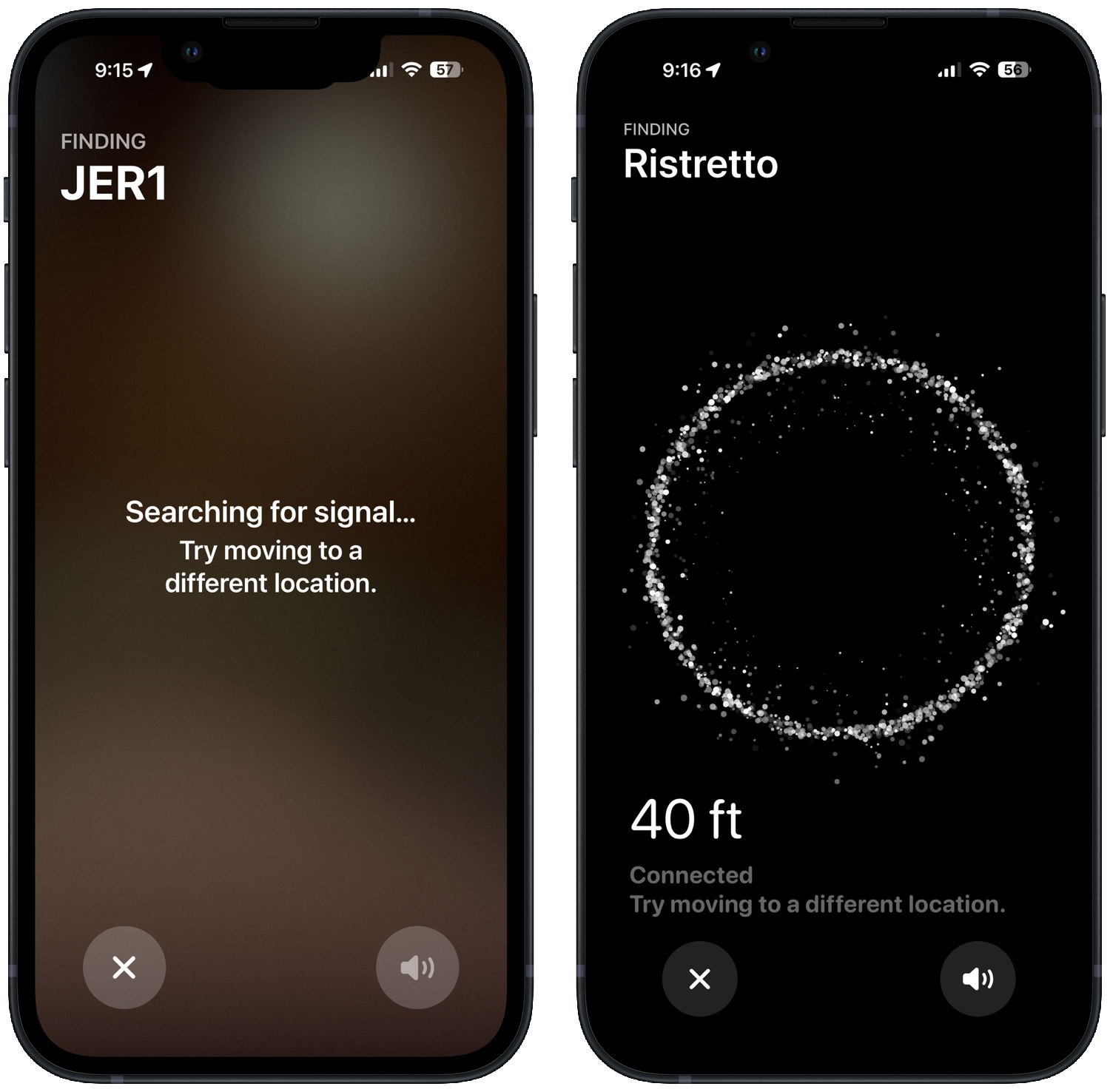
I ran some tests in which I “hid” an old and a new AirTag right next to each other. In the same spot where my iPhone would tell me that it was still searching for a signal from my older AirTag, my iPhone was able to get a signal from the newer AirTag and tell me how far away it was.
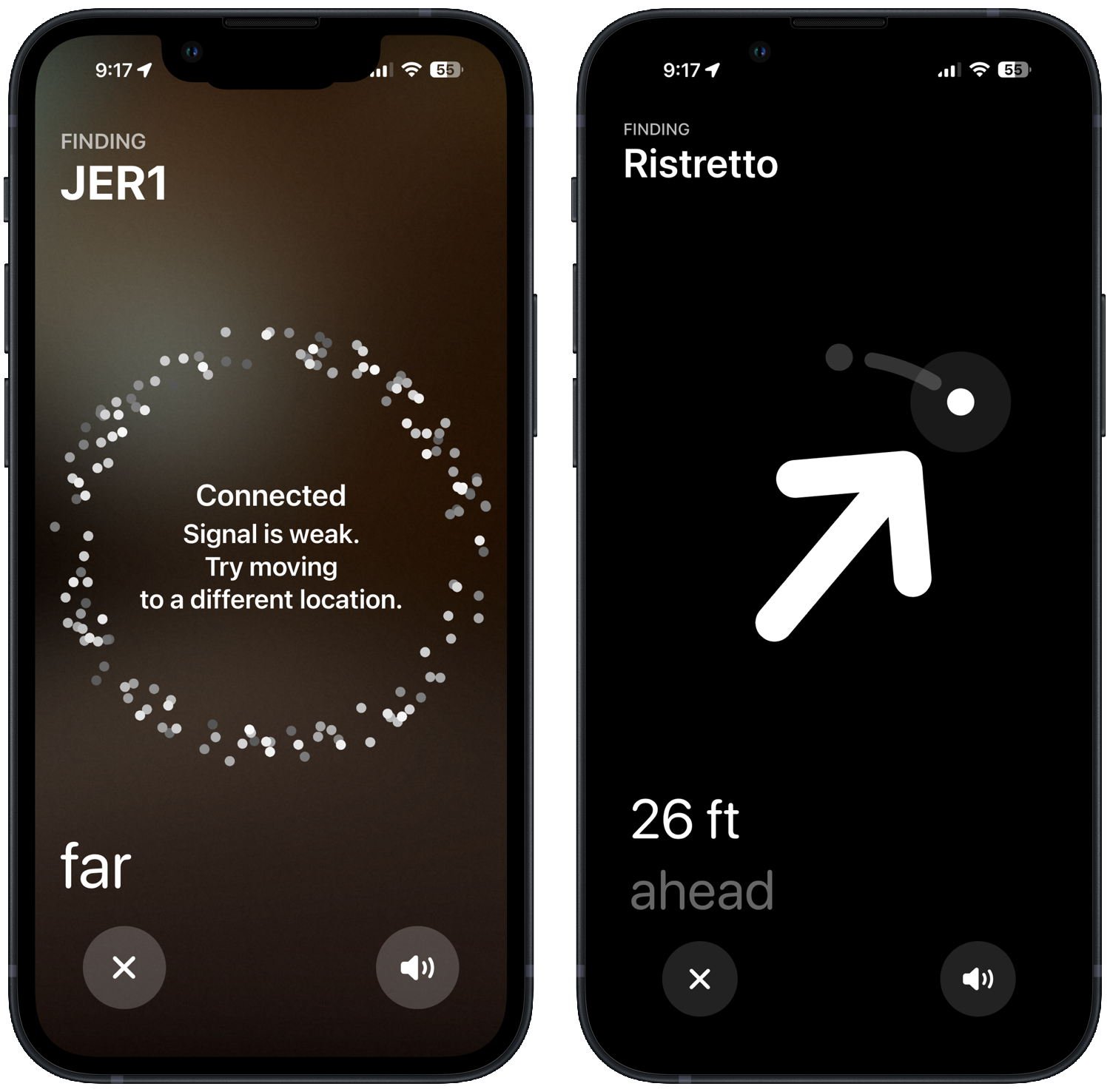
As I moved around even more, eventually the old AirTag would appear to my iPhone with a weak connection, whereas in the same spot, the newer AirTag showed me an arrow to lead me to the exact location.
I saw this result over and over again. Not only was it easier to find the new AirTag from farther away, but it was also easier to find it when there were walls between me and the AirTag. The radio in the new AirTag is better.
To be fair, I don’t mean to imply that I never would have found the older AirTag. I just needed to spend more time walking around my house until I got close enough to get a signal. And of course, if I was far enough away, my iPhone wouldn’t sense either the old or the new AirTag. The point is simply that the new AirTag was easier and faster to find. That’s nice.
Better Bluetooth
What if the item with an AirTag is located far away from you? For example, what if I left an item in my office and I am now back in my house?
Each AirTag has a Bluetooth radio in it, which means that it can talk to other Bluetooth devices that are within the vicinity. The AirTag sends out a number that changes from time to time, and if another iPhone passes within Bluetooth range of that device, it will notice the AirTag’s number and notify Apple that a certain AirTag number was seen at a certain place and time. Because there are so many iPhones in the world, when you use the Find My app to search for an item, there is a good chance that you will learn of the location simply because an iPhone has passed by it. All of this happens without alerting the owner of the iPhone that happened to sense your lost device, so there are no privacy concerns.
The original AirTag could often be sensed by an iPhone that was 30 to 50 feet away. Apple says that the new AirTag uses “an upgraded Bluetooth chip expands the range at which items can be located.” Apple didn’t provide any specific quantification on how much better the new AirTag works. I haven’t yet been able to tell how much of a difference this makes, and I haven’t yet seen any published reports in which anyone else has been able to quantify the difference. Nevertheless, I presume that there will sometimes be circumstances in which the original AirTag could not be found but the new AirTag can be found because of the Bluetooth improvement.
I disagree. By keeping the new AirTag the same size and shape, Apple ensured compatibility with all of the existing AirTag accessories. For example, I have been using a Belkin AirTag holder for my keys for almost five years, and it was simple to pop up my old AirTag and replace it with the new one. Suddenly, my keys became even easier to find.
I understand that sometimes it is nice to have something that works like an AirTag but is smaller. However, we already have that. Apple lets third parties make devices that work with Find My. For example, I use a thin device from Eufy that is about the size of a credit card in my wallet: the Eufy SmartTrack Card (my review), which is only $16.88 on Amazon.
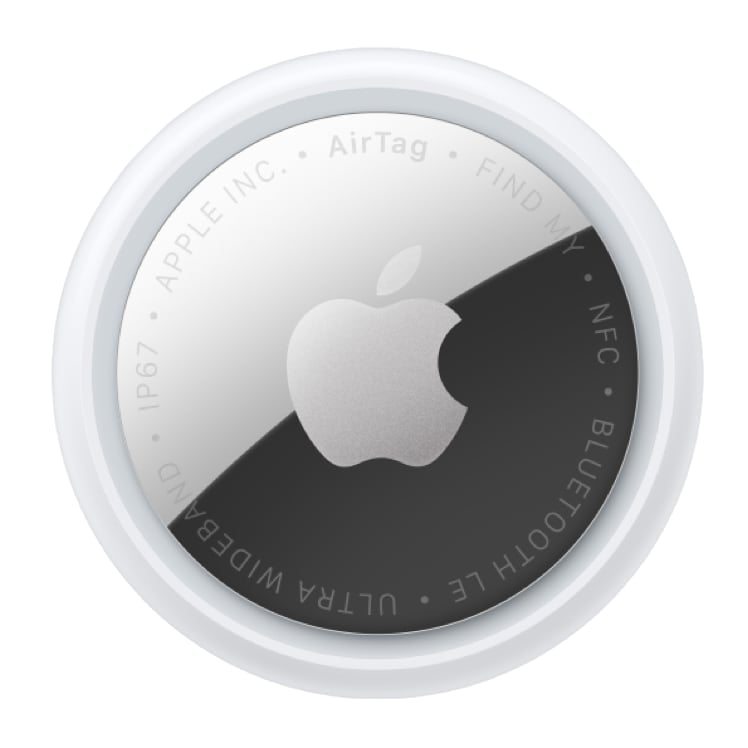
Accordingly, I consider it an advantage that a new AirTag looks essentially the same as an original AirTag. In fact, the only way to tell them apart is to look at the back of the AirTag. If you see text in UPPER CASE, it is a second-generation AirTag.
Apple Watch Precision Finding
With an original AirTag and the new AirTag, you can use the Find Items app on an Apple Watch to get directions to the general location of the AirTag. However, that app does not support Precision Finding—the feature where you get an arrow pointing in the direction you should walk and the distance in feet.
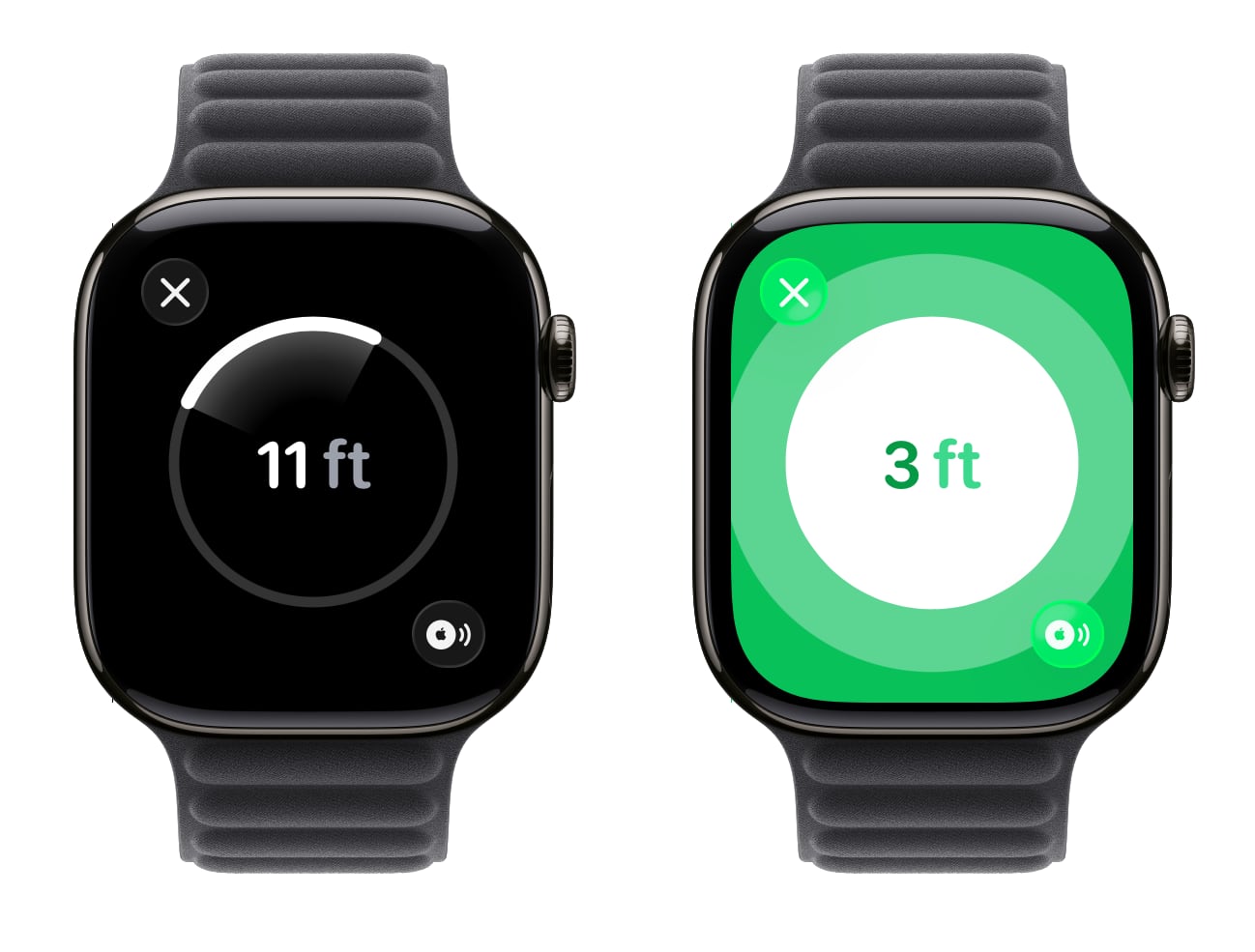
With the new AirTag and an Apple Watch Series 9 or later or Apple Watch Ultra 2 or later, you can now use Precision Finding on an Apple Watch, making it easier to find an item when your iPhone is not around. However, Apple did not add this support to the Find Items app on the Apple Watch, which seems bizarre to me. Instead, you need to follow the steps on this page of the Apple website to add a specific item to the Control Center of the Apple Watch, one for each second-generation AirTag. Then, to use Precision Finding, you swipe up from the bottom of an Apple Watch screen and select the Control Center item for that specific AirTag.
This new feature works. Instead of an arrow, you see a circle with an arc indicating which direction to walk to get closer to the second-generation AirTag. And when you get to within a few feet, the display changes, similar to the way it works on an iPhone.
I’m glad that Apple added this feature, but I cannot figure out why they put it in the Control Center instead of the Find Items app on the Apple Watch, which is where it belongs. I’m sure that many owners of a new AirTag will have no idea that this new feature even exists. My hope is that a future update to the Find Items app on the Apple Watch will add support for this feature.
Conclusion
I don’t think that you need to rush out and replace all of your original AirTags. The first-generation AirTags will continue to work just fine. But if there is an item that is especially important to you, something for which it would be helpful if the item could be even easier to find, it is nice to have the option to use the improved second-generation AirTag. I’ve already made that change for my keys and my Tom Bihn bag that I take to work every day. However, I’m going to continue using my first-generation AirTags in situations in which I don’t need the latest and greatest. After purchasing these new AirTags, I now have four additional AirTags in my possession, so I can use AirTags for even more items.
A few days ago, Apple released the results for its 2026 fiscal first quarter (which ran from September 28, 2025, to December 27, 2025, and did not actually include any days from calendar year 2026) and held a call with analysts to discuss the results. The fiscal first quarter is always Apple’s best quarter of the year because it includes holiday sales. This time, the fiscal first quarter was also Apple’s best fiscal quarter of all time, with a record revenue of $143.8 billion, up 16% percent from the 2025 Q1. That is just an astonishing number, and much higher than the last two record quarters: 2025 Q1 ($124.3 billion) and 2022 Q1 ($123.9 billion). But as impressive as the number is, the financial performance isn’t the real reason that these calls interest me. What interests me is that this is one of four times a year when Apple provides some indication of how well its products are selling and answers questions from a bunch of analysts. I’m always especially curious to discover what Apple has to say about the iPhone and iPad and related technologies. If you want to get all of the nitty-gritty details, you can listen to the audio from the announcement conference call on the Apple website, or you can read a transcript of the call prepared by Jason Snell of Six Colors. Snell also created a number of useful charts that put Apple’s financial announcements in perspective over time. Apple’s official press release is here. Here are the items that stood out to me.
iPhone
Apple CEO Tim Cook started the call by saying that “demand for iPhone was simply staggering, with revenue growing 23% year-over-year and all-time records across every geographic segment.” Specifically, iPhone revenue was $85.3 billion, making it by far the best iPhone quarter ever.
Cook said that Apple currently has its “strongest iPhone lineup we’ve ever had, and by far the most popular.” He mentioned all of the current models—iPhone 17 Pro, iPhone 17 Pro Max, iPhone Air, and iPhone 17—but did not identify how any specific models were selling. To be clear, Apple never releases that data, so outsiders just have to speculate on which models are the most popular.
Cook said that demand for iPhones is exceeding supply primarily due to constraints in processor manufacturing. (Apple designs the A19 and A19 Pro processors used in the latest iPhones, and they are manufactured by Taiwan Semiconductor Manufacturing Company (TSMC).) Cook said that Apple wasn’t willing to comment publicly on when supply is predicted to catch up with demand.
Cook said that Apple’s recent collaboration with Google and its Gemini AI model would be used to power a more personalized version of Siri.
Cook said that Visual Intelligence is one of the iPhone’s most popular AI features.
Cook said that Apple sees a future for both on-device AI and AI that uses Apple’s secure Private Cloud Compute servers. Cook said that both of those differentiate Apple from other companies because of Apple’s focus on user privacy.
Cook said that a big reason for the all-time record iPhone sales was strong demand in China, where Apple set an all-time revenue record. Cook cited a third-party report that iPhones were among the top three smartphones in urban China during the quarter.
Cook said that India is the second-largest smartphone market in the world. While Apple had its best-ever quarter in India, it still has only a modest market share of the overall market and thus sees significant growth opportunity in India.
iPad
iPad revenue was $8.6 billion, which is up 6% from this time last year.
Cook mentioned that there were more iPad upgrades in the past fiscal quarter than ever before.
Apple’s CFO Kevan Parekh said that AstraZeneca is rolling out over 5,000 M5-powered iPad Pros to its pharmaceutical sales team.
Other
Apple’s revenue in its services category was an all-time record $30 billion, which is up 14% from this time last year.
Cook said that Apple saw a 36% increase in people watching Apple TV compared to this time last year. Cook said that was because of its popular shows such as Pluribus.
Cook said that Apple Music reached an all-time high in the number of listeners and the number of new subscribers.
Cook asserted that, in the past year, Apple Pay eliminated more than $1 billion in fraud.
Cook said that App Store developers have earned more than $550 billion since 2008.
Parekh said that there are over 2.5 billion Apple devices currently in active use.
We begin this week’s episode of the In the News podcast discussing Apple’s new, second-generation AirTag. Next, we discuss the announcement that Apple is spending $2 billion to acquire the company Q.ai and analyze what this could mean for the future of Siri and Apple Intelligence. We also discuss the new Apple Creator Studio, which is now available for purchase (but free for the first three months), the top free and paid apps in the App Store, the latest Apple TV shows, and more.
In our In the Know segment, Brett shares a tip on using the Sign in with Apple service, and I explain why you should consider joining us at ABA TECHSHOW in March.
This week, Apple released its first new hardware product of 2026, the second-generation model of the AirTag. The original AirTag was released almost five years ago. The new model looks virtually identical—so it fits in all of the numerous AirTag cases that are currently on the market—but improvements to Bluetooth and an improved Ultra Wideband chip mean that you can find a lost item from even farther away and locate it with more precise arrows showing you where to go to find it. The speaker is also 50% louder, which also makes it easier to find a lost item. The price is the same as before ($29 for one, $99 for four), although I see that Costco will currently sell you five for $99.99, which is an excellent deal. I ordered a set from Apple and received mine last night. I’ll have more to say about them after I have put them through their paces, but so far, so good, and it is nice to start to see new Apple products for 2026. And now, the news of note from the past week:
Yesterday, Apple confirmed to Stephen Nellis of Reuters that it purchased an Israeli company called Q.ai. This startup was working on artificial intelligence technology for audio that would let a device understand audio even when something is said very quietly in a whisper, even when in a noisy environment. Nellis reports that this technology doesn’t rely solely on sound; Q.ai also has a patent for monitoring subtle facial movements to detect spoken words—it sounds to me like reading lips—and for monitoring heart rate and respiration.. The CEO of Q.ai sold another company to Apple in 2013 called PrimeSense, and Apple used that technology to introduce Face ID in 2017.
Ryan Christoffel of 9to5Mac notes that the Q.ai acquisition reportedly cost Apple $2 billion, which makes it the biggest acquisition in the history of Apple except for the $3 billion acquisition of Beats in 2014. Christoffel says that he hopes that Apple uses this technology to let you speak to an AI, such as a future version of Siri, in a very low voice so that you are not obnoxious to the people around you.
With this acquisition and the recent announcement that Apple is using Google’s Gemini AI technology, it seems obvious that Apple has plans to do something big with AI. In an article for Six Colors and Macworld, Jason Snell notes that Apple has traditionally been a company that excels at taking complicated technology and making it simple and accessible, and he hopes that Apple does the same for AI. I couldn’t agree with this more. I want Apple to deliver AI to me in a way that is useful and compelling, not just impressive from a technology standpoint.
Hartley Charlton of MacRumors notes the differences between the first-generation AirTag and the new second-generation AirTag.
Apple’s press release announcing the new AirTag notes that over 50 airlines can now use the Share Item Location feature to locate a lost bag that has an AirTag. It also says that this feature has “reduced baggage delays by 26 percent and reduced incidences of ‘truly lost’ or unrecoverable luggage by 90 percent.”
To support the new AirTag, this week Apple released iOS 26.2.1 and iPadOS 26.2.1, as noted by Juli Clover of MacRumors.
This week, Apple debuted the Apple Creator Studio. Jason Snell of Six Colors wrote an excellent, in-depth article to describe what is new. Note that when you sign up for Apple Creator Studio for either $13/month or $129/year, Apple gives you the first three months for free, and you can cancel before you are charged anything. So it is easy for everyone to decide if this bundle makes sense for you.
With the Apple Creator Studio, you can use a new app on the iPad: Pixelmator Pro. Ryan Christoffel of 9to5Mac describes what this app can do. So far, I’ve only spent a few minutes with this app, but I like what I see.
John Gruber of Daring Fireball shares Apple’s list of the top 20 free iPhone apps and top 20 paid iPhone apps of 2025.
In an article in The Times, Stephen Pollard describes how his Apple Watch saved his life. It did so in a way that I haven’t heard of before: it warned him about his heart rate rising to dangerous levels as a result of a bad interaction between drugs that he was taking. It is a well-written and compelling article, and I encourage you to read it.
Marko Zivkovic of AppleInsider reports on a new study confirming that an Apple Watch improves the detection of atrial fibrillation.
M.G. Siegler of Spyglass writes about how bad it looked for Apple CEO Tim Cook to travel to the White House to attend a screening of the documentary movie about Melania Trump on the same day that an ICE agent killed the ICU nurse Alex Pretti in Minnesota. Presumably, Cook realizes that President Trump is vindictive and will punish Apple—and, by extension, its shareholders and the users of its products—if Cook doesn’t show up for things like this. Indeed, Nicole Sperling and Brooks Barnes of the New York Times explain why the movie itself was essentially a bribe paid by Amazon to Trump. I understand the argument that this is all a necessary evil, and of course, each of us needs to find a way to get through the next three years, but that doesn’t make the situation any less frustrating. For what it is worth, Siegler notes in an addendum to his article that Cook subsequently wrote a memo to Apple employees to note that Cook tried to use the occasion to have a “good conversation with the president.”
There is a new Immersive Video from Apple available today for the Apple Vision Pro: Top Dogs. In this two-part video (15 minutes each), you “can get up close with cute, fiercely competitive canine stars (and their humans) as they face off at Crufts, the world’s biggest dog show.” Jason Snell of Six Colors got a sneak peek earlier this week, and he says that while some parts of it are great, the director also made some use of immersive video that Jason disagrees with, such as “distracting quick cuts” and “some vertigo-generating dramatic camera moves.” This is a brand new type of video, and people are just starting to figure out what works and what doesn’t work for immersive 3D movies.
February starts in a few days. In another article for 9to5Mac, Christoffel notes what is coming to Apple TV next month, including the movie Eternity, Season 2 of The Last Thing He Told Me, and Season 2 of Monarch: Legacy of Monsters.
And finally, here is a short video from Apple promoting the new Apple Creator Studio:
As you plan your CLEs for 2026, I encourage you to consider attending the American Bar Association’s TECHSHOW conference, which will be held in Chicago, March 25-28, 2026, at the Hyatt Regency McCormick Place. TECHSHOW is a great legal technology conference, and this will be my 12th time attending the conference since 2008. TECHSHOW is always a great place to learn about the best ways to use technology in a law practice and to keep track of emerging technologies. Plus, the EXPO Hall is always a fantastic place to see the leading vendors in legal technology and talk one-on-one with the people who make the products and services that you already use or might use in the future.
This year, I will be presenting two sessions, both on the morning of Friday, March 27. First, I’ll present the session Practical Tips & Tools for Today’s Mobile Lawyer along with Stephen Embry (publisher of the TechLaw Crossroads blog and one of last year’s co-chairs) and Reid Trautz (Senior Director of the American Immigration Lawyers Association (AILA) Practice & Professionalism Center, and also a past chair of this conference). This is going to be a fabulous session with tons of tips and practical advice for making the most of an iPhone and iPad in your law practice.
Second, I’ll present the session Wired for Justice: Wearable and Augmented Tech for a Law Practice along with Sean Harrington, the Director of the AI and Legal Tech Studio at Arizona State University College of Law. In this session, we will talk about the present and the future of all sorts of wearable devices—the Apple Watch, Apple Vision Pro, Ray-Ban Meta Glasses, and many other wearable devices—and how they can be a part of your law practice and will have an impact on lawyers. Given the recent rumor that Apple is working on a wearable AI pin, this session could not be more timely.
I am incredibly excited about both of these sessions, but I am just as excited about all of the other sessions this year. The problem I have every year at TECHSHOW is that when there are six different sessions offered at the same time, and I want to see more than one of them, how do I decide? I suppose it’s a good problem to have.
I know that the TECHSHOW conference is in excellent hands this year because one of the two co-chairs is Brett Burney, my co-host on the weekly In the News podcast. Brett knows so much about legal technology, and he also knows quite a bit about running a good legal technology conference since he previously chaired the 2015 TECHSHOW conference.
As if that were not enough, Brett and his co-chair, Patrick Wright, have done something unique for this year’s conference. Last year, when you walked from the hotel to the McCormick Place conference rooms being used by TECHSHOW, you had to walk past a lot of empty conference rooms. This year, those conference rooms will be dedicated to the Chicago Comic & Entertainment Expo, also known as C2E2. It’s the Chicago version of Comic-Con. Thus, the attendees of TECHSHOW will be mingling with the approximately 100,000 people attending C2E2. That is going to be a lot of fun. For example, while there is no dress code at TECHSHOW, C2E2 has a whole page of information about Cosplay and Prop Rules, such as:
Costumes: ALLOWED and encouraged
Shields: ALLOWED, but not if they have any sharp edges
Lightsabers: ALLOWED, unless they contain glass
Martial arts training weapons: NOT ALLOWED
Whips: ALLOWED, but must be kept coiled
I can only imagine the interesting sights that we will see as we walk back and forth to the conference throughout the day. Not to mention potentially seeing celebrity guests from tons of different movies and TV shows. Perhaps Brett and Patrick are not responsible for putting C2E2 right next to TECHSHOW this year, but they do get credit for giving TECHSHOW a comic book theme for this year’s conference, so it should all be one seamless, entertaining experience.
Early-bird discounted registration rates for TECHSHOW end on February 2, so act quickly if you want to get the best deal. [UPDATE 2/3/2025: That deadline was just extended to February 9.] After you register, look out for the sign-ups for the Taste of TECHSHOW dinners. Brett Burney and I are going to host one of those dinners again this year, and it is always a great way for us to interact with those of you who read iPhone J.D. and listen to the In the News podcast. You should know that in the past, all the spots for our dinner have been scooped up incredibly quickly, so be on the lookout for when the signups become available if you want to secure a spot. But even if you cannot join our dinner, there will be lots of opportunities for all of us to mingle during the conference.
If you are still on the fence about whether you want to attend, check out this post I wrote after last year’s conference. This year’s conference is sure to be even better—and, with C2E2 next door, will surely be the most memorable TECHSHOW ever.
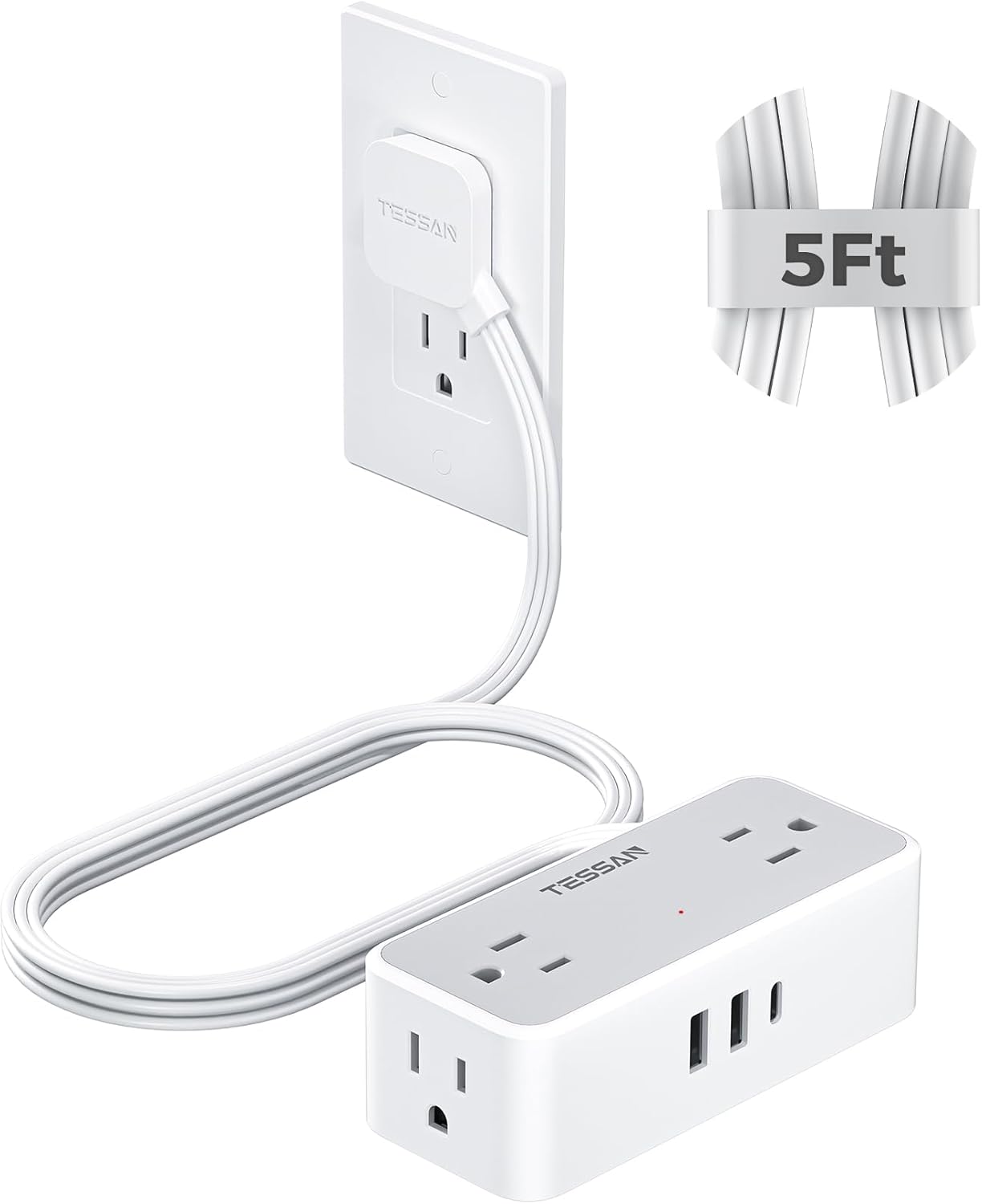
I recently discovered a product that is really useful, something that I did not previously know even existed. Perhaps this knowledge will be useful to you as well. The problem: I wanted to use an outlet in my office, but the outlet is behind a bookshelf that is against the wall. Plugging a power adapter into the outlet would normally mean that I would have to move the bookshelf out so far that it would no longer be flat against the wall. The solution: the TESSAN Flat Plug Extension Cord ($18.99 on Amazon).
This device has a flat plug attached to an extension cord. Thus, you can use the outlet but still have another object—like a bookshelf or a couch—very close to the wall.
The key to this device is the very flat plug. It is at a 45º angle, so the cord points down and away from the outlet. The plug is thin, only 0.31", so it doesn’t come out very much from the outlet.
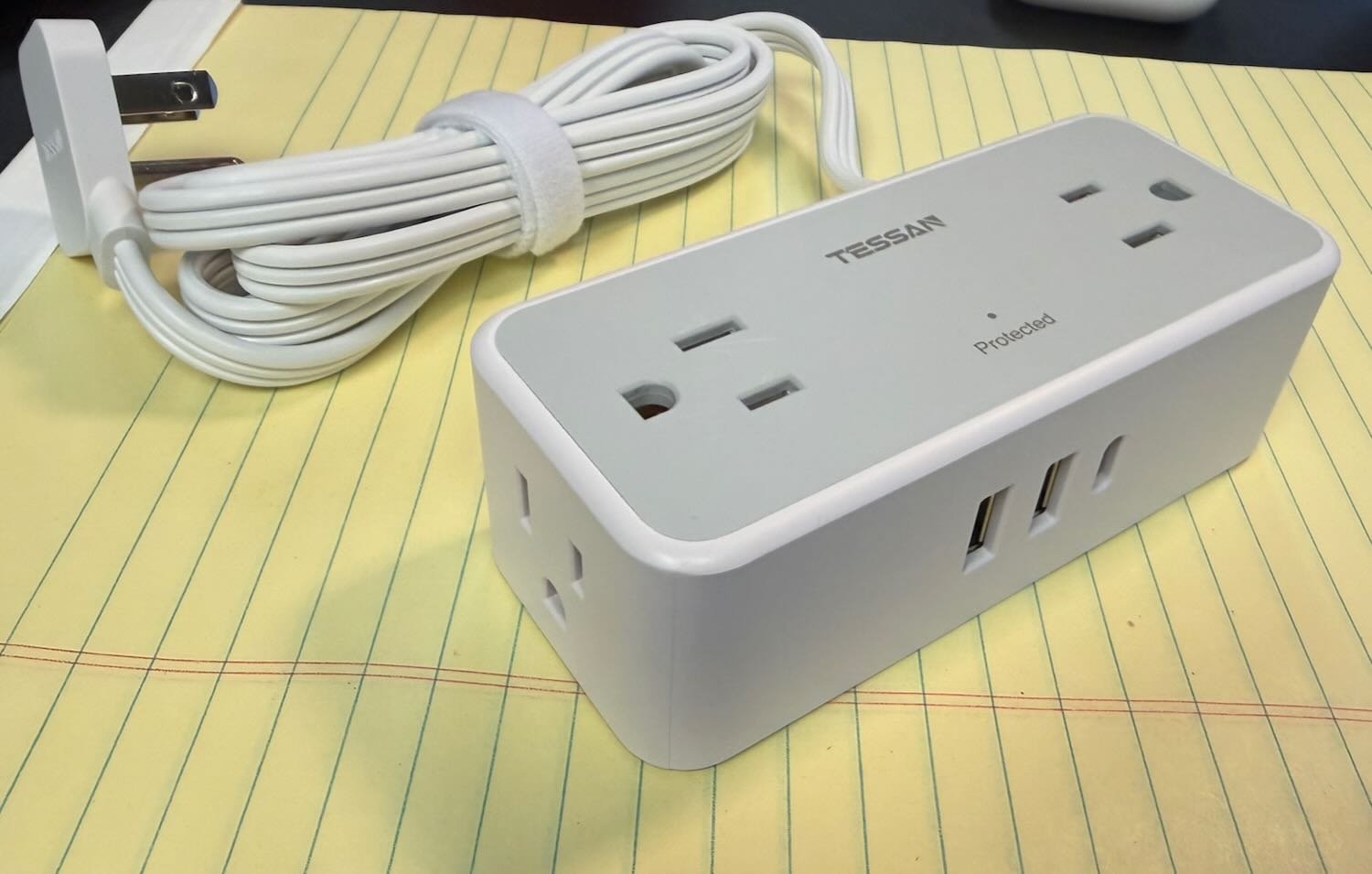
The plug is connected to a five-foot cord, which is plenty of space to get away from the back of your bookshelf or whatever else it is that you have against the wall. The end of the cord has a power strip with just about everything that you might want: four AC outlets, 2 USB outlets, and one USB-C outlet.
This device allows you to use an outlet that would otherwise be hidden and inaccessible. Plus, the power strip is really useful. I wanted to plug in devices that use traditional USB-A for power, and because there are two of them here, I didn’t need to also use a power adapter. For me, it worked to just put the power strip on the floor next to my bookshelf, but there are two hanging holes on the back of it if you want to hang it higher up on a wall. It is also nice that the four outlets are on three different sides of the power strip, so you can use whatever is most convenient for you.
This is a very useful device. It has worked great for me.
What’s the weather? That’s something we often want to know—especially during a weekend like this one—so using weather apps is the first topic we tackle in this week’s episode of the In the News podcast. Next, we discuss Apple Pay and why some stores resist using it, the upcoming Apple Creator Studio bundle, why it might make sense for Apple to come out with an AI wearable pin, how the camera on your iPhone can help you do more than take pictures and videos, dogs on the Vision Pro, and more.
In our In the Show segment, Brett explains what technology he is using to smoke brisket as we record the podcast, and I discuss the Apple Fitness+ Strength Basics in Three Weeks program.