
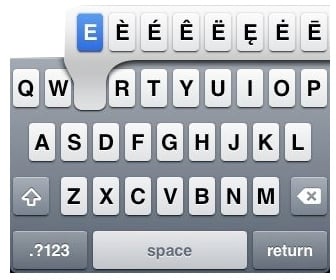
Last week at ABA TECHSHOW, one of the tips that I discussed in one of my iPhone presentations was the ability to hold down on a key on the iPhone U.S. keyboard to see a pop-up list of additional letters or symbols that are not on the main keyboard. For example, if you hold down the letter “E” you will see the following:
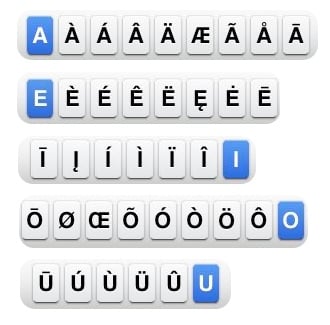
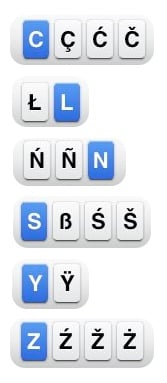
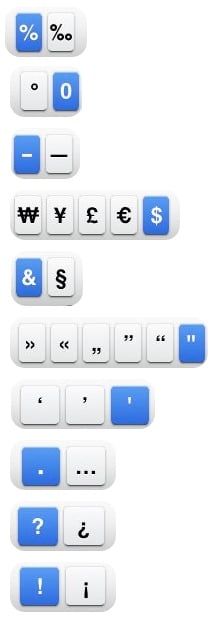
When I was preparing my slides, I couldn’t find a good comprehensive list of all of the additional letters and symbols that could be typed by holding down a key, so I created my own list for my presentation, and here it is for those of you who could not attend.
The vowels A, E, I, O and U:
The consonants C, L, N, S, Y and Z:
The punctuation marks and symbols:
Additionally, there are many characters that the iPhone is capable of creating or viewing that cannot be typed from the U.S. keyboard, even if you hold down a key. However, there is a simple web app called created by developer Neven Mrgan called Glyphboard that you can use to access some of those characters. (For example, I wrote this post last year about using Glyphboard to create an en dash.) To use Glyphboard, go to this address on your iPhone: http://mrgan.com/gb/ Then follow the on-screen directions and press the plus sign at the bottom of your Safari screen to Add to Home Screen. Then click on the icon that you just added to your home screen to start the web app, and you can copy a special character from Glyphboard and then paste it someplace else, such as in an e-mail. Glyphboard includes 48 special characters.
Note, however, that some of those characters may not display on a PC. The following characters can be created with Glyboard and should display on most PCs (although this can vary from browser to browser and setup to setup), so you are likely safe to add them to your e-mails and text messages if you want to be fancy:
☺ ♥ ♪ ♫⇧ ↑ ↓ ← → ♀ ♂ – © ™ ∞ ± ≠ π ² ¼ ⅓ ½ ¾ ¶ ♠ ♦ ♣
On the other hand, the following characters can be created and displayed on the iPhone using Glyphboard but are unlikely to display correctly on a PC (although again this can vary from system to system), so think about what kind of computer the other person is using before you include them in an e-mail.
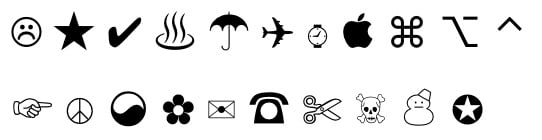
☹ ★ ✔ ♨ ☂ ✈ ⌚ ⌘ ⌥ ⌃ ☞ ☮ ☯ ✿ ✉ ☎ ✄ ☠ ☃ ✪
And just in case you are viewing this post on a PC and the above line looks like gibberish to you, here is an image of those characters that iPhones and Macs can see:
I hope that you find this list helpful.
Very good idea for a blog post, and I particularly love what you did with the pics.
I don’t know how many times I had to answer to a fellow lawyer or friend who just got an iPhone asking me how to type “è” or “ò” on the iphone.
If you give me permission, I’d love to translate your post and publish it in Italian on my blog http://www.iAvvocato.eu (needless to say, clearly stating that it is a translation, and linking the original source)?
It would really be great as next time somebody asks I would just refer them to the post, therefore fullfilling the main aim of opening my blog in the frist place: saving time!
[Jeff responds: Giovanni — permission granted; feel free to translate and republish!]
Done. Thanks a lot Jeff.
In case you are curious to see how your words look in Italian, this is how: http://www.iavvocato.eu/?p=198
We all know that Apple is very protective of its intellectual property. Given that mindset, one would think Apple would give us the ability to type ® and ™ with the iPhone so that its customers could protect their intellectual property. For example, I have registered AdvocatesLawFirm.com ® and include it in my iPhone signature block. To get the ® symbol, I had to copy and paste from emoji. I shouldn’t have to do that with something as important as protecting my legal rights. Hopefully Apple will correct this shortcoming in the next update.
What a cool post! I had no idea! Can’t wait to use the Section symbol!
I have but one lamp wait which my feet are guided; and that is the lamp of experience. I know of no way of judging of the future but by the past.
Love Glyphboard. Hope he adds ®.
I’m looking a way to type the following character: “—”. Note it is not a simply dash (-) it is a long bar obtained by press&hold the Alt left key, typing 0151 on a Num keypad and releasing the Alt key.
I write my iPhone J.D. posts on a Mac, where it is simple to create that character with an Option-Dash. But I agree, it is a pain to type it on a PC, especially if you are not using a software like MS Word that can do it automatically as you type. As you say, I think you need to use the Alt key on a PC to create an en dash or an em dash.
-Jeff
I was relying on copying and pasting symbols from an app (Evernote) for a long time, but I found it far too clunky so I didn’t bother most of the time. Then I thought of using keyboard shortcuts to achieve it. So for example I can now type ^2 and my iPhone or iPad will replace it with ². To set it up the ² symbol is copied into the “phrase” text field and “^2" is then typed into the “shortcut” text field. That and other symbols that the iPhone can handle but not type can be similarly set up for easy typing.
Full details (including screencast) about how to set this up are available at my blog if you’re interested to do it: http://wp.me/p4d3tP-6y.
I’ve just tried to use a dash as I have done many times before but since the last update to my iPad, the dash has disappeared.
I am trying to figure out how to type the overscore numbers for repeating decimals for any suggestions?
This is a character that the iPhone can handle, but you cannot directly make it. If you find someplace else on the Internet where there is such a character — such as the Wikipedia page for Overline — you can copy a character with an overline and then paste it. And then once you have done that the first time, you can create a shortcut with that character to make it easier to do the next time, much like I describe in this post where I talk about making a pilcrow (a paragraph mark):
https://www.iphonejd.com/iphone_jd/2014/12/sections-and-pilcrows.html
-Jeff