Apple’s traditional September presentation is just around the corner, so Brett and I begin this week’s episode of the In the News podcast discussing the latest speculation on what Apple may announce. After discussing upcoming hardware, we then discuss upcoming software, including the great new features coming to watchOS 26 and the changes coming to the Messages app in CarPlay. We also discuss the return of the blood oxygen sensor feature to the Apple Watch, the latest shows on Apple TV+, and the end of using a dial-up modem to access AOL or a BBS.
In our In the Know segment, Brett discusses the low power mode on the Apple Watch and iPhone, and I discuss some additional reasons to check out the new app called Cassette that I reviewed a few days ago.
Click here to listen to the audio podcast, or just listen using your podcast player of choice. You can also watch the episode on YouTube:
For the reasons I mentioned last week, my guess is that we are about three weeks away from Apple announcing new iPhones and more, such as perhaps a new Apple Watch. Jason Snell of Six Colors looks back at Apple’s history of taking a product that starts one way and then splitting the line into multiple products (such as regular size versus larger iPhones) and speculates on how Apple might do something similar this year to come out with a new version of a product. And what might be included in the Pro models of the iPhone, one of Apple’s highest-end products? Joe Rossignol of MacRumors has some ideas, and they include (1) an increase of RAM from 8GB to 12GB, which I suspect would help with AI, (2) up to 8x optical zoom, up from 5x on the current high-end iPhones, (3) an anti-reflective display, and (4) improvements to video recording. There were other predictions and revelations this week about what is coming soon because of some code discovered in beta software from Apple. For example, Benjamin Mayo of 9to5Mac says that the next version of the Apple TV 4K will include an A17 Pro chip—the same chip used in the iPhone 15 Pro—which may be included so that it can support Apple Intelligence. And now, the news of note from the past week.
Even if you don’t buy a new Apple device this Fall, you can still get a new feature for the Apple Watch. Or an old feature? I’m not sure. Chance Miller of 9to5Mac reports that after 18 months of Apple being unable to sell an Apple Watch in the United States with a blood oxygen feature, Apple has released iOS 18.6.1 and watchOS 11.6.1 to provide a “redesigned” version of this feature, while Apple continues to appeal the court ruling barring the original version of this feature.
John Gruber of Daring Fireball explains that the redesigned version of the blood oxygen feature works by taking blood oxygen measurements on your watch but then processing the data and displaying the results on your iPhone. Perhaps that is why Apple’s release notes call it a “Blood Oxygen experience” instead of a blood oxygen feature.
I installed the updates last night and took my first blood oxygen measurement since August 3, 2024—the date that my Apple Watch Series 7 broke, and I replaced it with a newer model that could not, per court order, have this feature enabled. The measurement part on the watch seems to work the same as before, but after the measurement is taken, my watch told me to look at the Health app on my iPhone. And my iPhone lock screen had a notification saying that I had a new blood oxygen recording. When I tapped the notification, I was brought directly to the Blood Oxygen part of the Health app, where I saw that my reading was 99%.
There is a new Messages app for CarPlay in the upcoming iOS 26, and Stephen Hackett is not a fan, for the reasons that he explains in his post on 512 Pixels. For example, unless a name is very short, it is truncated. I guess Apple hopes that you pay attention to the picture more than the letters in the name.
Ryan Christoffel of 9to5Mac reports that two of the shows currently streaming on Apple TV+—Chief of War and Platonic—are some of the best-reviewed shows of the service. I’m enjoying Chief of War, and while I haven’t started Platonic yet, I did like the first season.
And finally, if you are of a certain age, you can close your eyes and imagine the sound of a modem making a connection to a service such as America Online. Surprisingly, dial-up access to AOL has continued to work even in recent years, but as repoted by Yan Zhaung of the New York Times, this week we learned that the AOL dial-up access service will end on September 30, 2025. Roman Loyola of Macworld explains that Apple actually played a role in the creation AOL because of its cooperation in 1988 with a company called Quantum Computing Services. Quantum Computer Services had previously created a service called Quantum Link (Q-Link), which was an online service for the Commodore 64 that I used when I was in high school in the mid-1980s. I suspect that it won’t surprise you that I also ran a BBS in the 1980s, which meant that I couldn’t use my Commodore 64 to access Q-Link if someone was using my BBS because they were tying up my computer and my phone line. I didn’t see any interesting new videos to share at the end of this post this week, so here is an old one, a movie called BBS The Documentary from 20 years ago that is now available on YouTube. It addresses the rise and fall of the BBS community in the 1980s and 1990s. If you lived through that like I did, this is a bit of a walk down memory lane. Here is Part 1 of 8 of the documentary:
I spend a lot of time thinking about ways to use technology to be more productive as an attorney, and that is the source of inspiration for most of my posts on iPhone J.D. But sometimes, you just want to have some fun. I often enjoy looking at photos and videos that I have taken over the years using the Photos app on my iPhone or iPad, so when I heard about a new app called Cassette that you can use to watch your own videos, my first thought was, why would anyone need that when we have the Photos app? But then I tried the app, and I got it. You know how looking at an old video—such as a video of your teenage kids back when they were cute toddlers—can bring a smile to your face because of the nostalgia? Why not have an app to play videos with an interface and functionality that is full of nostalgia. That is Cassette.
From the 1980s to the 2000s, home videos were typically watched using a VHS or VHS-C cassette tape. You would put it in the VCR and watch the video. There was no way to drag the playhead to jump ahead ten minutes like you can with a digital video on YouTube. Sometimes, the video would abruptly jump from one scene (like Christmas) to another scene (like New Year’s Eve) because we would use the same tape in the video camera until the tape was full.
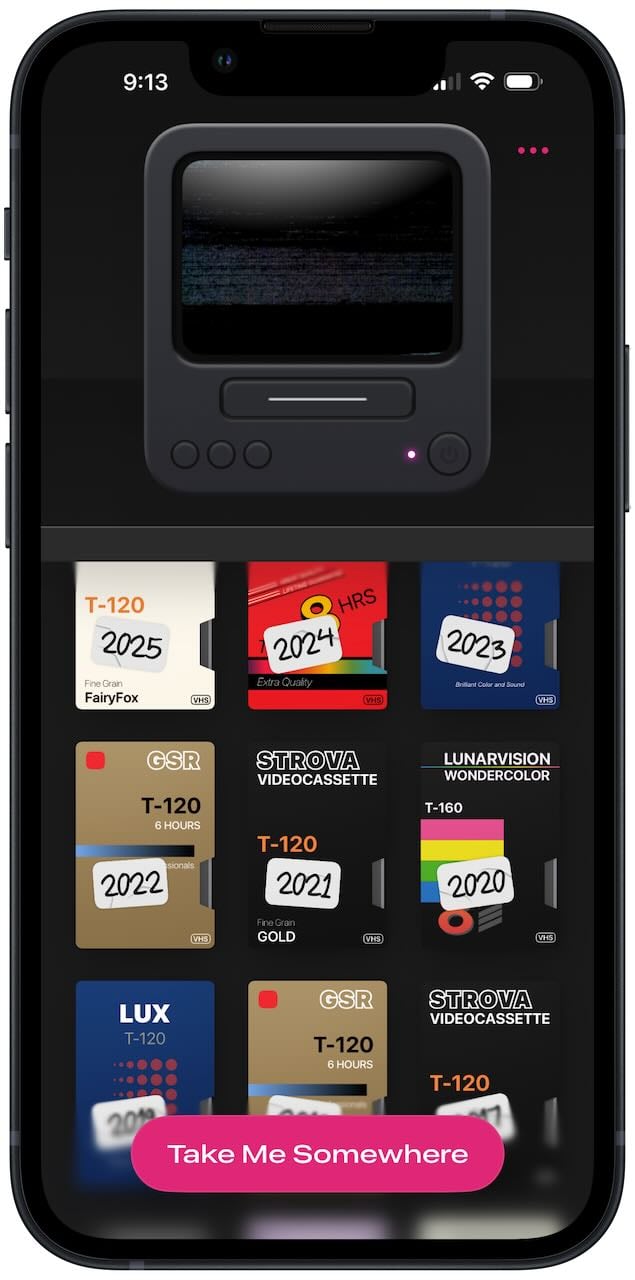
The Cassette app recreates some of that experience in an iPhone and iPad app. Each year of your videos is represented by a single cassette tape. When you tap a tape to play it, you see the tape inserted into a virtual VCR—which is a cute animation.
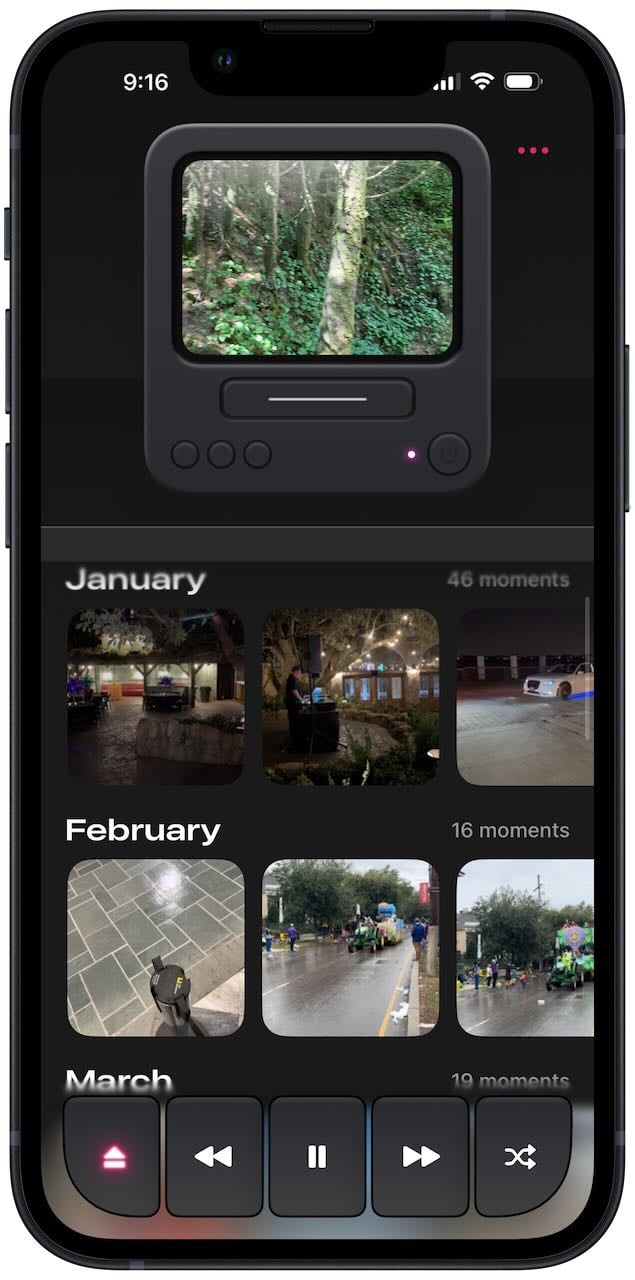
Next, you see the videos on that cassette (i.e., from that year).
You can play a video either in the small representation of an old TV, or you can tap the TV to make the video larger. Virtually all of my videos are taken in landscape orientation, so this feature works much better on my iPad than my iPhone because, for now at least, the app doesn’t let you turn an iPhone to landscape mode and play the video that way. (I hope this is fixed in a future update.) [Update: The creator of this app told me that this feature is planned.]
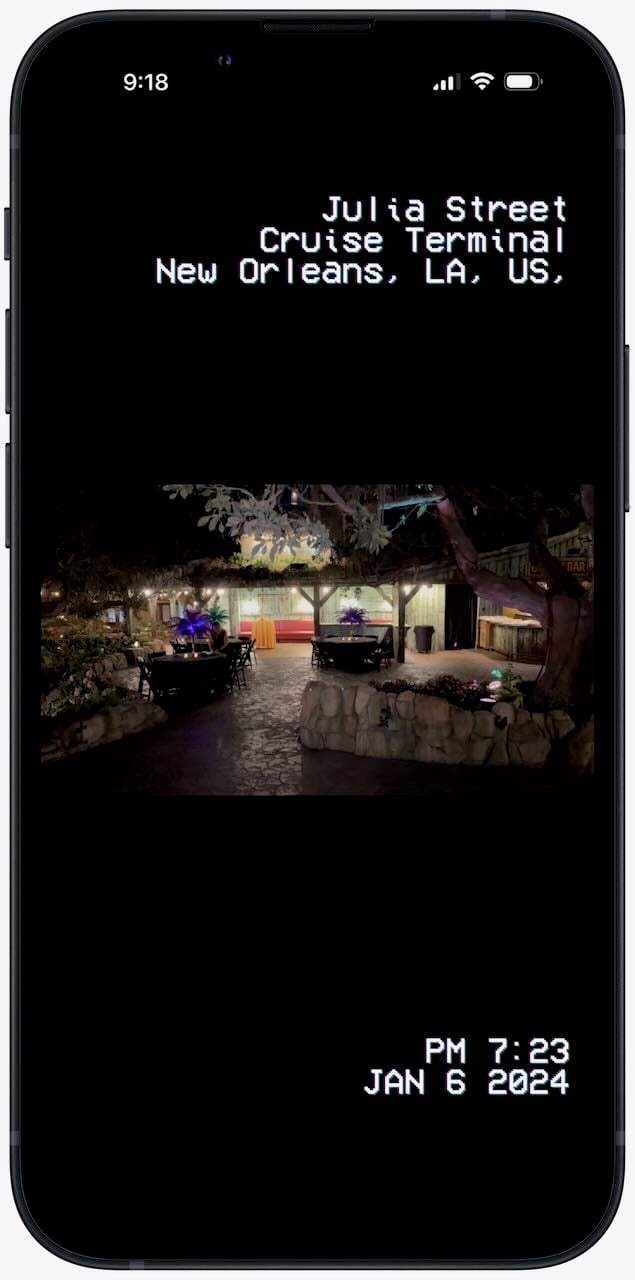
You cannot jump around in a video, but you can make the video rewind or fast forward, just like a VCR would do. And the location and date of the video are displayed using letters and numbers that look very much like what an old video camera would superimpose on a video.
When a video is done, it moves on to the next video in your camera roll.
Yes, you can use the Photos app on your iPhone or iPad to view a single video in your camera roll, but the experience is less fun than what the Cassette app provides. Moreover, the main screen of the Cassette app has a large button that says “Take Me Somewhere.” Tap that to play a random video—something that almost always makes me smile as I say, “oh yeah, I forgot about that one.” The Photos app doesn’t have a way to play a random video (although it does have the Memories feature, which can also do a good job of surfacing a video that might delight you).
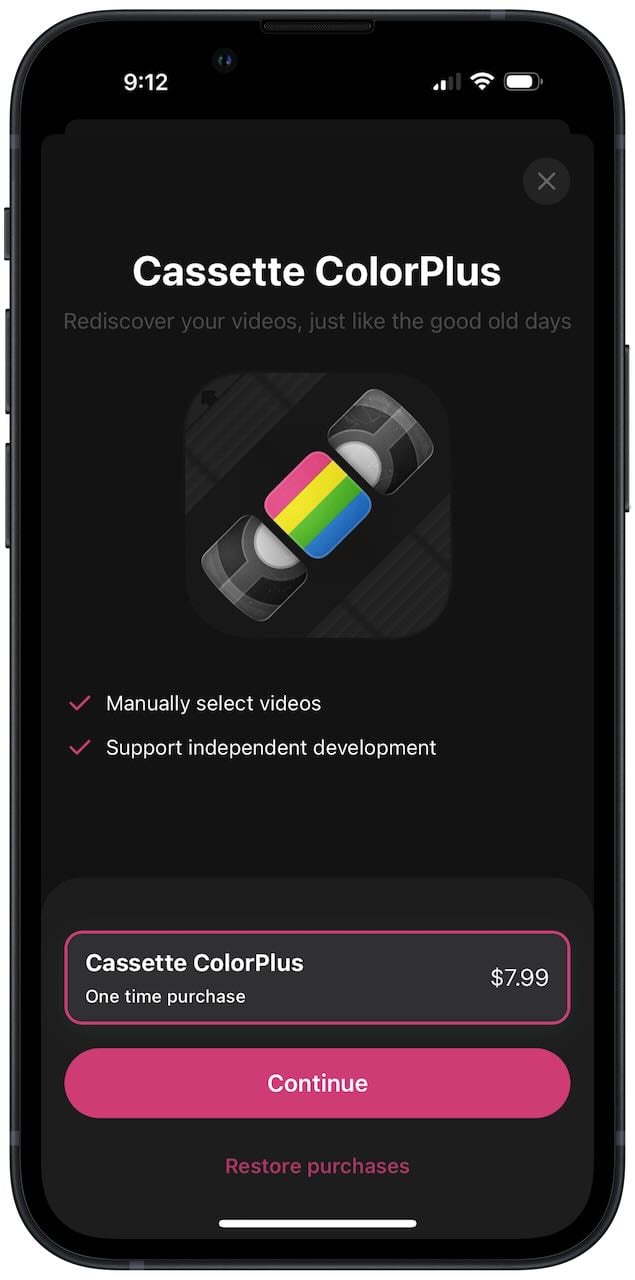
You can use almost all of the app’s features for free. But if you pay the one-time price of $7.99, you can upgrade to Cassette ColorPlus, which lets you manually select a specific video to start watching. It also gives you the satisfaction of knowing that you helped the developer. It only took me a few minutes of using this app to decide that I wanted to pay.
The creator of this app is Devin Davies, an iOS developer in New Zealand who is known for his popular recipe organizer and meal planner app called Crouton (which won an Apple Design Award in 2024). As Apple acknowledged with that award, Davies knows how to create a delightful design, and he has done it again with this app.
I was going to end this review with a link to one of the best scenes of the great show Mad Men, but then I saw that just a few hours ago, John Gruber of Daring Fireball had the same idea and beat me to it in his own post about this app. As Don Draper might say, an app like this “takes us to a place where we ache to go again.”
If you ever record video on your iPhone, I encourage you to check out Cassette and play around with the Take Me Somewhere feature. It is sure to bring a smile to your face.
We start this week’s episode of the In the News podcast taking a look back at the seven people who have served as CEO of Apple since 1977, especially Steve Jobs and Tim Cook. We then look forward to who might replace Tim Cook whenever he retires. Next, we look forward to September 9, when we expect Apple to introduce the 2025 iPhone models. We also discuss Maps and CarPlay in iOS 26, a product from Belkin that could be a good replacement for the excellent MagSafe Battery Pack from Apple, immersive orangutans, and more.
In our In the Show segment, we discuss some great shows that are currently airing on Apple TV+, some of the things that we are looking forward to on Apple TV+ this Fall., and one of our favorite scenes from Season 2 of Severance (but don’t worry, no spoilers).
In our In the Know segment, we both talk about the Apple Watch. Brett discusses the water lock and eject water feature, and I discuss countless ways that an Apple Watch is incredibly useful when you are taking a Summer vacation.
Apple has had seven CEOs since the company was founded in 1977, but I cannot help but think of Steve Jobs as the CEO of Apple. And yet, as Harley Charlton of MacRumors notes, August 1, 2025, was the 5,091st day that Tim Cook was the CEO of Apple—surpassing the 5,090 days that Steve Jobs was Apple’s CEO from 1997 to 2011. (At first, Steve Jobs was the interim CEO, but as reported by Michael Kanellos of CNet on January 5, 2000, Steve Jobs announced during his keynote address at the Macworld 2000 San Francisco convention that he was becoming the permanent CEO.) By almost any metric, Cook has done an amazing job as Apple’s CEO since 2011. At 64 years old, I’m curious how much longer he will want the difficult job. William Gallagher of AppleInsider recently speculated on who might replace Cook as CEO one day. I feel certain that it will be someone who is working at Apple right now. And now, the news of note from the past week:
When will Apple reveal the 2025 version of the iPhone? As noted by Tim Hardwick of MacRumors, there were rumors this week that the announcement will be on September 9. But regular readers of iPhone J.D. already knew that. As I noted a full year ago, Apple has been mostly following a pattern for a while now, and based on that pattern, I predicted that new iPhones would be introduced on the same date—September 9—in 2024, 2025, and 2026. Suffice it to say that if you are in the market for a new iPhone right now, I recommend that you wait another month.
If you are a lawyer, then you probably know how useful it was when Westlaw added the ability to locate jurisprudence using a natural language search. Ryan Christoffel of 9to5Mac reports that Apple is doing something similar in the Maps app in iOS 26. Just use your own words to tell the Maps app what you are looking for—such as “find cafes with free Wi-Fi”—and the app will use AI to understand what you are looking for and give you search results.
I have good news for what I’m sure is the very large number of iPhone J.D. readers who drive a Lotus car—or more specifically, the electric Eletre and Emeya models. Zac Hall of 9to5Mac reports that the British sports car maker is bringing Spatial Audio support to CarPlay so that drivers can enjoy immersive 3D sound in Dolby Atmos from the 23 speakers.
No matter what kind of car you drive, if you have CarPlay, one of the improvements coming in iOS 26 is that phone call notifications won’t take over your entire screen. As Ryan Christoffel of 9to5Mac shows, this means that a call notification won’t get in the way of your navigation.
If you go to iPhoneJD.com/appleimmersive, I keep an updated page listing all of the immersive video content from Apple for the Apple Vision Pro. It has been quite a few weeks since Apple released new content. On May 30, 2025, Apple released Bono: Stories of Surrender, and on June 19, 2025, Apple released a short video associated with the F1 movie. Today, Apple is releasing a new episode of its immersive series Wild Life. The new episode is called “Orangutans,” and Apple’s description is: Bond with young orangutans at an extraordinary rehab center in Borneo as they grow, play, and learn the ropes of jungle life. I watched this video just a few minutes before publishing this post, and it is incredible, one of my favorites of all of Apple’s immersive videos. Primarily, this is because of the subject matter. I enjoy watching the orangutans at a zoo because they are often funny and cute. That is true in this video, and it is even better because they are right there in front of you. Additionally, there is some incredible photography in this immersive video that does a fantastic job of showing the height of the trees that the orangutans climb on the island of Borneo in Southeast Asia.
Summer is soon coming to a close. My daughter starts school as a high school senior in just a few days, and I know that many students have already started school. As we look forward to the Fall, that also means a new season full of good shows to watch. Ryan Christoffel of 9to5Mac runs down the shows coming to Apple TV+ this September, October, and November, and there is a lot to look forward to. I’m especially excited to see the new season of Slow Horses on September 24 and the new show Pluribus on November 7.
What’s good on Apple TV+ right now? I’m loving the current season of Foundation. The new show starring Jason Momoa called Chief of War started last weekend, and I thought that the first two episodes were great. And the second season of Platonic has just started, a show that had a funny first season. Alexis Soloski of The New York Times interviews Francesca Delbanco and Nicholas Stoller, the husband-and-wife team that created the show.
If you didn’t get a chance to see Apple’s F1 movie when it was in an IMAX theater earlier this Summer, you now have another chance. As noted by Apple, starting today, you can once again see F1 in an IMAX movie theater. As I noted last month in my review, the movie is great fun to watch on an IMAX screen.
Speaking of the movie F1, not only has it been a hit for Apple, with revenue of over $552 million, but Caitlin Huston of The Hollywood Reporter says that The Formula One Group (the group responsible for the promotion of F1 racing) has seen a big boost in revenue as a result of the popularity of the F1 movie.
And finally, stop reading if you haven’t watched the Apple TV+ show Severance yet. But if you have, one of the coolest scenes from Season 2 involves the character Mark and a video camera. Apple just released a clip on YouTube of part of that scene, and it is fun to watch again:
A few days ago, Apple released the results for its 2025 fiscal third quarter (which ran from March 30, 2025, to June 28, 2025) and held a call with analysts to discuss the results. This is typically not an important fiscal quarter for Apple, but as Lisa Kailai Han of CNBC reported, Apple’s earnings beat the expectations of Wall Street with record revenue of $95 billion. It was Apple’s best fiscal third quarter ever, up from $85.8 billion last year, which was the previous all-time record. As Dan Moren of Six Colors noted, Apple is about to enter an era where it breaks $100 billion in revenue every quarter, which is quite remarkable. As usual, however, I’m not as interested in the financial details as I am in what Apple said during the call with analysts that provides interesting insight into Apple products such as the iPhone and iPad. If you want to get all of the nitty-gritty details, you can listen to the audio from the announcement conference call on the Apple website, or you can read a transcript of the call prepared by Jason Snell of Six Colors. Apple’s official press release is here. Here are the items that stood out to me.
iPhone
Apple’s iPhone revenue for the quarter was $44.6 billion, up from $39.3 billion this time last year. This was the number that surprised most of the analysts. With all of the uncertainty over tariffs, it is possible that some people purchased an iPhone sooner than normal to try to save money if the price had to increase, and Apple seemed to acknowledge that possibility on its call with investors.
This past quarter, Apple sold its 3 billionth iPhone. That’s a big number.
When asked whether the increasing importance of AI would reduce interest in devices with a screen, such as the iPhone, Apple CEO Tim Cook said that while Apple is certainly looking at other types of devices, it is “difficult to see a world where iPhone’s not living in it.” That’s an interesting answer to me. On the one hand, it does seem like Apple is falling behind other tech companies in the field of AI. But on the other hand, as long as people are still buying iPhones to use with AI platforms, Apple may have more time to figure out how to best take advantage of this new wave of AI.
iPad
iPad revenue was $6.6 billion. That’s down from the big iPad quarter that Apple had this time last year ($7.2 billion), but that makes sense because Apple introduced two new iPads in 2024 Q3 (a new iPad Air and a new iPad Pro) whereas there were no new iPads introduced in the past quarter.
It will be interesting to see if the exciting new features coming in iPadOS 26 this Fall translates into more iPad sales. I doubt we will have an answer on that before Apple releases its 2026 Q1 results in January.
Other
Tim Cook tried to put a positive spin on Apple and AI. He called AI “one of the most profound technologies of our lifetime.” He said that Apple is using AI in virtually all of its products and is significantly increasing its investments in AI. He remarked: “Apple has always been about taking the most advanced technologies and making them easy to use and accessible for everyone, and that’s at the heart of our AI strategy.” Apple also looks to use AI in ways that are “deeply personal, private, and seamless, right where users need them.”
Cook said that Apple is reallocating a lot of people in Apple so that they change their focus to AI. That could help, but there have been many recent headlines about other tech companies hiring away some of Apple’s AI talent, so Apple will also have to make up for that loss.
Apple’s services revenue continues to increase every quarter and was $27.4 billion this past quarter, up 13% from this time last year. However, Apple also acknowledged that a lawsuit involving Google could change how much money Google pays Apple each year to send search traffic from the Safari web browser—Apple isn’t disclosing how much money that it, but it is clearly a lot—so there is a possibility that service revenue may decrease in the future because of a lawsuit.
Cook noted that the tariffs imposed by the Trump Administration resulted in $800 million in costs this past quarter. Apple expects that to increase to $1.1 billion in the current quarter, although Cook noted that future tariff rates are highly uncertain.
There is lots to discuss in the world of the iOS and iPadOS operating systems, so that is a big focus of this week’s episode of the In the News podcast. First, we discuss iOS 18.6, the update for the operating system you are probably using right now. Then, we talk about Liquid Glass in the upcoming iOS 26 and how it will change the look of most app icons. We also dig deep into the windowing and multitasking systems in iPadOS 26. We also discuss the Workout Buddy feature of watchOS 26, automatic changes to which speaker you are using, Microsoft Teams, great deals on Apple products for the back-to-school season, and more.
In our Where Y’at segment, we discuss Find My Shoes. In our In the Show segment, we discuss lots-o’-Lasso.
In our In the Know segment, Brett gives some specific recommendations for using an eSIM when you travel abroad, and I discuss orange and green indicators.
The heck if I know why this has been a thing for so many decades, but for my entire life, when you walk in the French Quarter in New Orleans, someone will sometimes try to hustle you by offering to bet you that they can tell you “where you got them shoes at.” Sometimes they will appear to increase the challenge by betting they can even tell you the very street “where you got them shoes at.” Spoiler alert: their answer will be that you got them at your feet, and the street you got them at will typically be Bourbon Street. But as Andre Revilla of Engadget notes, now your iPhone can tell you where shoes are at because Skeechers has released what Revilla calls “a helicopter parent’s dream shoe.” Find My Skeechers is a line of children’s shoes that has a place where a parent can hide an Apple Air Tag under the heel. It reminds me of the Nike+iPod activity tracker device, which was released back in 2006 and for which, to my great surprise, there is still a barely-usable page on the Apple website (in Canada at least). I’ve heard of parents getting an Apple Watch for a child specifically so that they could track the child. This may be a better option … as long as the kids keep their shoes on. And now, the news of note from the past week:
Speaking of Find My, Marcus Mendes of 9to5Mac reports that there are now thirty airlines that let you share with the airline your Find My tracking for a lost item of luggage so that the airline can return the item to you faster. He lists all of the airlines in his post, and it includes American Airlines, Delta, and United—but not a few other major U.S. airlines, such as Southwest and Alaska Airlines.
I’ve heard quite a bit about how Liquid Glass in the upcoming iOS 26 looks for things like menus but not much about how app icons have a different look. Benjamin Mayo of 9to5Mac put together some great before-and-after pictures that compares what Apple’s own app icons look like in iOS 18 versus iOS 26.
Nirave Gondhia of Digital Trends believes that “Apple’s new iPadOS 26 is so good, it’s transformed the iPad into my computer of choice when chilling on the couch.”
Similarly, Federico Viticci of MacStories says that iPadOS 26 has “far exceeded my expectations” and is “a game-changer for those who want to multitask on their iPads.”
In an article for MacStories, Jonathan Reed reports on the new features in watchOS 26 that are available in the new public beta. He notes, for example, that the new Workout Buddy voice will not only comment on your workout statistics but will even occasionally refer to the music or podcast that you are listening to.
It seems like ever since I learned that the upcoming Messages app in iOS 26 will let me move unwanted text messages into a folder that I can mostly ignore, I’ve been getting even more unwanted text messages on my iPhone. It’s like those annoying text senders know that their days are numbered. John Gruber of Daring Fireball reports that a major Republican election group is complaining that this change will make it harder for them to send unsolicited text messages to try to convince people to make political donations. This feature is platform agnostic—it applies to unsolicited text messages from folks no matter where they fall on the political spectrum—and I have no sympathy for any election group making these complaints. I feel that people have a right to ignore unwanted phone calls, text messages, people ringing a doorbell, etc. If you disagree and you look forward to those solicitations, you don’t have to enable this feature. Indeed, Gruber notes that the new feature doesn’t even seem to be on by default, at least in the beta version.
Have you ever been using AirPods to listen to something on your iPhone, only to find that the sound output suddenly changes to another Bluetooth device? Ryan Christoffel of 9to5Mac notes that in iOS 26, you can prevent that from happening.
All eyes may be on the Fall releases of iOS 26, iPadOS 26, and similar operating systems, but this week, Apple released an update to iOS 18. As noted by Juli Clover of MacRumors, the new iOS 18.6 fixes a bug in the Photos app and provides some security improvements.
Riley Hill of Slate Pad reports that the Microsoft Teams app for iPad now lets you open Chats and Channels in separate windows. This works today, but it seems like it will be even more useful in iPadOS 26.
This is the time of year when many parents purchase a laptop for a student. You can currently get the excellent MacBook Air with an M4 chip on Amazon for $799 instead of the normal $999. That’s quite a discount for a fantastic device.
Here’s one more great deal: the Apple Watch Ultra 2 on Amazon for only $649 instead of $799. That’s an all-time low price.
The last time that I traveled to Europe, I decided to pay my carrier (AT&T) about $12/day to use my iPhone while abroad. That’s the easiest option, and it ensures that your phone, texting, etc., works just like you are at home. But if you only want data and you will be abroad for more than a few days, a cheaper option is to purchase an international eSIM plan. Glenn Fleishman of Six Colors provides lots of details on how to select the best plan.
I knew that Ted Lasso was coming back to Apple TV+ for a fourth season, a season that they recently started filming, but I didn’t realize that there would also be a fifth and sixth season. Nellie Andreeva of Deadline reports that Jason Sudeikis has a three-season arc planned and that the key actors have signed three-season contracts. More Ted Lasso sounds great to me.
If you like purchasing movies to watch on your Apple devices, Ryan Christoffel of 9to5Mac notes that Apple is in the middle of a 14-day “Summer Deal of the Day” promotion in the Apple TV app. The deals I saw this week were The Hangover trilogy for $9.99 (movies that are normally $12.99 or $14.99 each), all four Men in Black movies for $9.99, and all eight Harry Potter movies for $39.99. If that sort of deal interests you, keep checking the Apple TV app every day to take advantage of the deep discount.
And finally, while it is interesting to read about how the upcoming iPadOS 26 will substantially change the ability to use an iPad to get work done, sometimes seeing is better than reading. Marques Brownlee posted a video to YouTube this week that does a fantastic job of showing off why this update is such a big deal. First, he shows off the new windowing system in the beta version of iPadOS 26. If you are not running the beta, check this out to see what it looks like. Second, he has an insightful discussion on whether and when an iPad running iPadOS 26 can take the place of a laptop computer. I won’t spoil his analysis here, but I agree 100% with his conclusion.
A tool that can save you time is valuable, especially if you are a lawyer or other professional on a billable hour system and you want to reduce time spent on nonbillable tasks. A tool that can save you from aggravation is even more valuable. Nobody needs more of that. I’m delighted that Sanebox is sponsoring iPhone J.D. this month because it is a tool that does both. I’ve been paying for the SaneBox service for a long time, and I cannot imagine going back. Thanks to SaneBox, looking at my Inbox no longer means having to weed through tons of messages that I don’t need right now and may not want at all. Instead, when I open my Inbox, I see just the good stuff that matters.
SaneBox is a service that works in the background at the server level, so you continue to use your Inbox in your current Mail program the same way that you have always done. But your Inbox is suddenly much better. Primarily, this is because your Inbox changes from being overpopulated with lots of unimportant stuff into a short list of the most important messages. It goes from cluttered to curated. But SaneBox also gives you powerful features so that your email is more helpful.
SaneBox keeps your Inbox tidy because less important emails, such as newsletters, are moved to subfolders so that you can deal with them when you have time, and it is often faster to deal with all of those at once. And if you tell SaneBox that there is an email sender from which you never want to see emails again, those go to the SaneBlackHole folder.
But that’s just the beginning. SaneBox also gives you lots of tools that you can (optionally) enable to make you more productive. For example, I love the SaneNoReply folder. It gives you an overview of emails that you’ve sent that haven’t received a response. Sometimes, no reply is necessary. (If you don’t need a response, simply delete the email from SaneNoReplies, and SaneBox will stop tracking it.) But I often skim this folder and notice that there is something for which I did need a reply, and so this SaneBox folder reminds me to follow up.
What if you know that you need to get a reply by a certain date (or time)? SaneBox can help you when you use the SaneReminder feature. When you send the email, send a BCC to an address that tells SaneBox when you need a response by. For example, you can use “1.day@sanebox.com” or “2.weeks@sanebox.com” or a day of the week such as “monday@sanbox.com” or “mon@sanbox.com.” If there’s no reply within that time period, the email will resurface in your Inbox for your attention.
Put all of this together and SaneBox makes your Inbox both more simple and more powerful. All at the same time.
I use SaneBox to help me manage all of my iPhone J.D. emails. When I look at the Inbox, I can quickly focus on the messages that matter the most to me, such as a reader sending in a suggestion with a news story for my Friday In the News post or interactions with someone who matters to me. A few times a week, I’ll look in the SaneNews folder to see newsletters that I subscribe to or the SaneLater folder to see messages that SaneBox thinks are less important, but I don’t see all of those messages crowding up my Inbox when I look at it throughout the day. Thus, I have far less wasted time when I look at my Inbox. And I have far less aggravation because I only see the good stuff. I also use SaneBox with my Gmail account. Thanks to SaneBox, I can get in and get out of that Inbox very quickly. All of the unimportant stuff isn’t deleted, but it is filed away into folders so that I can deal with them later and all at once.
If you want to try out SaneBox to see what a huge difference it can make in your life, click here to get a 14-day free trial with no credit card required. If you don’t like having a clean and tidy Inbox and decide to return to how you had it before, no sweat. But if you appreciate having a better way of working with email, using this link in this post will give you a generous $25 credit for when you pick a plan—and there are lots of different plans offered so that you can choose the one that gives you just what you want.
Thanks again to SaneBox for sponsoring iPhone J.D. this month and for giving all of us a more efficient way to work with email.
The public beta versions of iOS 26, iPadOS 26, watchOS 26, and more were released this week. If you are like me, you are not installing beta software on devices that you depend on to get work done. Nevertheless, this widespread release is an opportunity to reflect upon the new features that are coming to all of us this Fall, and so that is how we start this week’s episode of the In the News podcast. Next, we address Apple’s new warranty program—AppleCare One—and discuss whether you need a warranty program at all and, if you do, whether this new program is right for you. We also talk about the possibility of a foldable iPhone, the possibility of a HomePod with a screen, and lots of Apple TV+ news, including the Ted Lasso gang in Kansas City.
In our In the Know segment, Brett discusses his new Eufy E340 doorbell. I discuss using remote control features so that you can troubleshoot someone’s iPhone issues even if you are not in the same place.
Click here to listen to the audio podcast, or just listen using your podcast player of choice. You can also watch the episode on YouTube: