Yesterday, I reviewed an app called Codification, which uses for its icon the section symbol — §. That is certainly a symbol that lawyers need to type a lot, but it isn’t immediately apparent how to do so on an iPhone or iPad. I was discussing this with Ray Ward, an appellate attorney at my law firm who also publishes the great blogs The (New) Legal Writer and Louisiana Civil Appeals, and he reminded me that it is almost impossible to create the pilcrow on an iPhone. The what? Yeah, I had to look that one up too; a pilcrow is a symbol that most lawyers call the paragraph symbol — ¶.
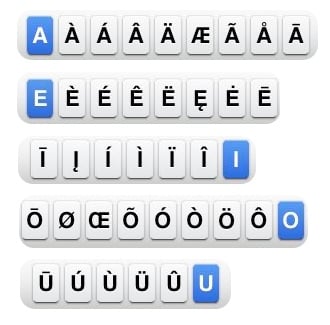
You can type many additional characters using the iPhone and iPad keyboard by holding down on a letter. I see that I haven’t posted a full list of those shortcuts since 2010, back when iPhone J.D. had far fewer readers, so I thought it might be useful to post the list again, which is largely still the same in iOS 8:
First, there are additional characters that you can access from the iPhone/iPad keyboard by holding your finger down on the vowels A, E, I, O and U:
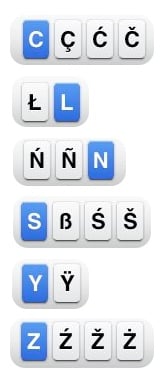
You can also hold your finger down on the consonants C, L, N, S, Y and Z:
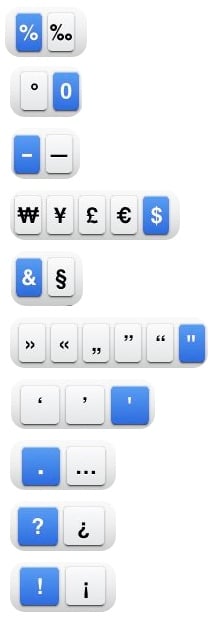
Here are the extra characters for the punctuation marks and symbols. (The blue characters are the one on which you hold down your finger to create the other symbols.)
One small addition since my 2010 post is that now when you hold down your finger on the dash, you have the option of creating an en dash, an em dash or a bullet. You can also create the bullet directly from the keyboard, but I suppose it makes sense to also put it behind the dash because folks often use either a dash or a bullet to create a list.
I see two other changes since 2010. First, you can hold down on / to get \. Second, you can now hold down on $ to get symbols for the Russian Ruble, Japanese Yen, Euro, Cent, British Pound and South Korean Won. (The Ruble and the Cent are new additions behind the $; the Ruble symbol is itself new, having been adopted by Russia in 2013.)
So as you can see from the above, if you want to create a § on the iPhone keyboard, you can access the & key by pressing the 123 button at the bottom left, and then hold down as you press the ampersand.
But what about that pesky pilcrow? As useful as the paragraph symbol is for lawyers, there is no way to create it using the built-in iOS keyboard. Instead, you need to find a way to copy the ¶ from someplace else so that you can then you can paste it into an email.
Back in 2009, I recommended a free web app called Glyphboard that let you copy a ¶ and paste it into an email. The web page is still there, but it doesn’t work the same way in iOS 8 so I don’t recommend it anymore.
One solution is to install a third party keyboard on your iPhone or iPad and store the ¶ there. For example, back in 2009 I interviewed Mike Schneider, an attorney who left the practice of law to write iPhone apps. He recently released a free keyboard called SnipsKey that lets you store bits of text that you might want to use again, and then access that text by simply tapping a button. SnipsKey is especially useful if you want to store a long string of text and save yourself the trouble of typing it over and over again, but you can also use it to store something that is one character long, like the ¶. In the following example, I simply selected the SnipsKey keyboard by tapping the globe icon at the bottom left, then tapped my Paragraph shortcut, which I chose to put at the top for easy access. (Tap Edit to rearrange your shortcuts.)
Click here for SnipKeys (free):
Another option is to use an app designed to let you create special characters. Although I haven’t tried it myself, I see that there is an older iPad app called Cymbol which lets you enter symbols, including a pilcrow.
Another option is to use an external bluetooth keyboard with your iPhone or iPad. You can create a ¶ by typing Option-7, and you can create a § by typing Option-6. (Those are the same shortcuts that work on an Mac.)
[UPDATE: As several folks have suggested in the Comments to this post, another option is to create a keyboard shortcut for the ¶. Great idea! See the comments for more details.]
And finally, you can always just find a webpage that has the ¶ symbol on it, go to that webpage, and copy the ¶ and then paste it into your email or document on your iPhone or iPad. Feel free to come back to this specific post as often as you want.
Sukolsak Sakshuwong is a computer science student at Stanford University, and he has come up with some interesting apps, including a sophisticated Japanese-English dictionary called Midori. Sakshuwong contacted me to tell me that he recently developed an iPhone/iPad app that contains the text of the U.S. Code. Sakshuwong isn’t a lawyer, but he enjoys working with large amounts of data, and he wanted to attack the challenge of creating lots of cross-reference links with a large data set, so the U.S. Code seemed like a natural project for him. The result is a $0.99 app called Codification. He sent me a code so that I could try out the app for free, and it works well.
A main advantage of an app like this is that it does not require an Internet connection to work, which can be useful if you are in court and have neither WiFi nor a stable cell connection. The app is also incredibly fast and responsive.
From the main screen of the app, you see a list of Titles. Tap a title to see the chapters. Tap a chapter to see a list of sections.
Tap a section to see the text of the U.S.C. provision.
[UPDATE: When I first wrote this post, I said that there is no way to jump to a specific section. There is a way, but it is just not obvious. If you tap the Search button and then type the Title, put a space, and then the Section (such as “28 1441") you can then jump right to that section. Click here for more information.]
If you think that you will want to view a statute again and you want to get back to it faster in the future, you can tap the bookmark icon to add a section to a list of bookmarks. Tapping the Bookmarks icon at the bottom right will show you your list of bookmarks. Tap the Edit button to delete bookmarks or organize them into folders.
You can also use the search function to search for U.S.C. provisions that contain a word. Tap two words separated by a space to search for sections that contain both words.
One nice aspect of the app is that it is full of hyperlinks. Thus, if you are looking at one provision and there is a citation to another provision, just tap to jump right to that second provision.
You can select text if you want to copy it, but there is no ability to highlight text in a section so that it will also be highlighted the next time that you use the app.
If you tap the Share button at the top of the screen (the box with the arrow pointing up), you see some options that you would expect to find there, including Email (to send someone the entire text of the selected statute) and Print. You’ll also see some commands that seem out of place in that location. Next and Previous will bring you to the next or previous section of the U.S. Code. Find will let you search for a word within the section that you are viewing.
This is a universal app, so it works on both the iPhone and the iPad. One noticeable difference in the iPad version is that there is a font selection button on every screen that you can tap to increase or decrease the font size. On the iPhone, you need to go to the main screen and tap the information button at the top right of the screen to change font size.
Codification doesn’t have a lot of bells and whistles. I recall that California lawyer Cliff Maier was selling apps similar to Codification that had far more features over five years ago — although those apps are no longer available. Nevertheless, I like this app. It is an easy to use, fast and effective app for accessing the text of the U.S. Code on your iPhone and iPad. If your law practice ever involves federal statutes, this app is easily work the $1 price to have easy access to the U.S. Code.
As we approach the holidays, I know that a lot of folks are a few weeks away from a new iPhone or iPad. What do you do with your old model after you upgrade? John Edwards of Law Technology News offers a few recommendations. In my family, my wife gets my old iPhone when I upgrade, and her old iPhones get loaded with age-appropriate apps and movies to keep my kids occupied on a plane or a long car ride. We take a similar approach with old iPads, with the oldest ones going to my kids for their occasional use. Nowadays, it seems that the old iPads are used 99% of the time to play Minecraft … which is actually sort of fun for me too, because after my son and daughter build some elaborate castle or other structure, they then invite me to launch Minecraft on my iPad and join their virtual world to get a tour of their creations. I used to do something similar when I was a kid with my parents, except that instead of using Minecraft on an iPad, I was using Legos, Lincoln Logs, etc. And now, the news of note from the past week:
California attorney David Sparks created a 2.5 hour video tutorial for OmniFocus — a sophisticated Mac / iPad / iPhone app for managing tasks — called the OmniFocus Video Field Guide. The video costs $9.99, and it is really good. If you are thinking of using OmniFocus, or if you use it and want to get better at it, I recommend that you get it. Sparks wrote an overview of the video here, and there is a 14 minute sample at the bottom of that post that gives you a sense of the high quality of the video.
I’ve talked in the past about the Apple in Law Offices survey conducted by Clio. The full results for the 2014 survey are not out yet, but this week Clio released some preliminary results. For example, their survey showed 79.8% of attorneys using iPhones.
Password security is so important for everyone, but especially for lawyers because of our duties to protect confidential information. Glenn Fleishman of Macworld wrote one of the best articles that I’ve read in a long time with recommendations for creating and managing passwords. It’s a great read.
Apple is currently appealing a decision in a case brought by the DOJ alleging price fixing on ebooks. Oral arguments are on December 15, and Roger Parloff of Fortune wrote an interesting article about the appeal, with quotes from Apple’s Eddy Cue.
Kara Swisher of re/code writes about the grief that she gets for using the iPhone 6 Plus because it is so large. To be honest, I just don’t get the iPhone 6 Plus either — to me it seems too big to hold and carry around, but too small to replace a tablet. But I know that some folks love it, so more power to them.
If you enjoy reading iPhone J.D., I’d really appreciate it if you voted on ABA Journal’s Blawg 100 page. One of the newcomers to the Legal Tech portion of the list, the Electronic Discovery Law blog published by K&L Gates, is currently in the lead with a ton of votes. I realize that K&L Gates is one of the largest law firms in the world, but if enough iPhone J.D. readers vote, perhaps we can get the totals closer. Thanks!
And finally, if you want to take your Christmas Tree lights (or other lights) to the next level this season, how about using lights that can be controlled from your iPhone via Bluetooth to change their colors? That’s what you get with Lumenplay App-Enabled Lights. The starter kit comes with 12 C9 bulbs (the large kind) for $79.99 (on Amazon) but you can add extenders ($44.99 on Amazon for another 12 lights) and control up to 500 lights with your iPhone. Here is a video that shows them off:
My American Express card is my primary credit card, and based on what I see other attorneys using, I know that I am certainly not alone. Thus, I love that since the first day that Apple Pay has been available, I’ve been able to charge to my Amex account whenever I use Apple Pay at supporting stores such as Walgreens, Subway, Whole Foods, etc. I was surprised that I could even use Apple Pay at the (in?)famous Flora-Bama bar at the beach on the Florida/Alabama border. This week, my American Express card has become even more valuable because one can now use Touch ID with the Amex Mobile for iPhone app instead of having to type a password.
There isn’t much to say about the feature. If you are using an iPhone 5s or an iPhone 6 / iPhone 6 Plus, the app gives you the option to turn on Touch ID support. Once you do so, it just works. Launch the app, put your finger on the Home Button, and almost instantly you are securely logged in to the app, without having to type anything at all.
This feature works great, and makes it a lot faster and easier to use the app to keep track of purchases, my balance, etc. Note that the feature currently only works with the iPhone version of the app, so even if you have an iPad Air 2 with Touch ID, you will still need to type a password for now.
Although this isn’t a new feature of the Amex app, I thought that I would also mention that if you turn on notifications for the Amex app, you get a notification every time that your Amex card is used to make a purchase, including the amount of the purchase. I generally keep notifications turned off for the apps on my iPhone, but this is one of the rare apps for which I allow notifications because the notification is a quick way to make sure that you were charged the right amount. And the notifications are incredibly fast. Give a credit card to your waiter, and you’ll get the notification on your iPhone long before the waiter returns with your card. If you don’t currently have notifications turned on for this app, give it a try and see what you think.
I only have a small number of apps on my iPhone that require a password when you launch the app. The perfect example is the 1Password app; it is one of the most useful apps on my iPhone, but given the confidential information contained in the app, you better believe that I have a secure password on it. But secure passwords are a pain to use, which is why I love Touch ID so much more, now that iOS 8 lets apps use Touch ID. You get the security of knowing that only you can access the app, without the inconvenience of typing a password. The Amex app was also a perfect candidate for this feature, and I hope to see all banks with iPhone apps adding the feature soon. (If you use a Discover card, I believe that its app is also Touch ID enabled.)
Click here to get Amex Mobile (for iPhone) (free):
Last week, Dropbox and Microsoft updated their iOS apps to work together, and the result is really nice. With the updated versions of the apps, it is easier than ever to take a file from Dropbox to Word and back again.
In the Dropbox app, you can now select any Word file in your Dropbox. Then tap the edit icon, which is four over at the bottom of the screen. In fact, when you open your first Word file after the app is updated, the Dropbox app will even give you a friendly reminder of the new feature, as shown in the picture below. After you tap the edit icon, the Dropbox app lets you select a helper app, and for now Microsoft Word is your only option.
This will cause the Microsoft Word app to launch, and once it launches your document will be opened in the Word app. Why would you want to do this? Two reasons. First, while the Dropbox app will show you a preview of your Word files, the document will virtually always look better in the Word app. The Microsoft Word app is the best way to read a Word document on an iPhone or iPad. Second, this is useful if you want to edit the document.
When you are done viewing or editing a document, tap the Back button — the one at the top left with an arrow inside of a circle:
This will close the document in Word. Next, if you made changes it will save the revised document back to Dropbox. Finally, it will return you to the Dropbox app where you started.
I have a few additional notes on the new feature. First, I focus in this post on Microsoft Word because it is the Office app that attorneys use the most often, but this same integration also works with Microsoft Excel and PowerPoint files in your Dropbox folder.
Second, note that you don’t need to use the Dropbox app to work with Word files in the Word app. As I explained last month in my review of the the Word app, you can also browse a list of files in your Dropbox folder from within the Word app itself. The update last week just makes it easier if you are starting from in the Dropbox app.
Third, I did encounter one hiccup during just one of the times that I was testing this feature — a time that I edited a document in Word and Word had trouble saving it back to my Dropbox. Fortunately, Word recognized the failure and gave me the chance to try to upload again, save a duplicate version of the document, or discard my latest edits. This error only occurred once, and every other time it saved the file correctly.
Fourth, if you use a Dropbox for Business account, I see that Lance Whitney of CNet reported that the integration only works if you are using an Office 365 account with your Microsoft Word app. But as I have noted in the past (1, 2), if you are using the Word app for commercial purposes then you should already have an Office 365 subscription.
This is a great update. It is nice to have apps work so well together that they can pass off documents and close themselves and open the other app — especially when the two apps in question are both already so useful. I wish that we saw even more apps working together this way.
I hope that you had a good Thanksgiving yesterday (or a good Thursday, if you are not in the U.S.). And that means that now we start the holiday buying season. If you are shopping today on Black Friday, hopefully you are getting some good deals. For example, I see that Apple is giving away gift cards with many Apple products if you purchase them today in a store or online, but that is just the tip of the iceberg. There are lots of great sales today. And now, the recent news of note:
If you still don’t have the TrialPad and TranscriptPad (my review) apps sold by Lit Software, you can now purchase them as a bundle for $159.99, a $20 savings. Better yet, that bundle is on sale on Monday and Tuesday for only $99.99. And even better yet, you can also use the bundle as a way to upgrade, at a discount, to both apps if you currently only have one. For example, if you have TranscriptPad and already paid $89.99 for it, on Monday and Tuesday you’ll be able to complete the bundle and get TrialPad for only an additional $10, an amazing bargain. Click here to get the bundle, but wait until Monday to do so:
With the Apple Watch coming out in a few months, I’m starting to think about the implications of wearable devices. Eleven judges recently gathered at my alma mater, Georgetown University Law Center, discuss some of the implications of this technology, and Mark Gerlach of Law Technology News wrote this report.
One of the speakers at Georgetown was Judge Dixon of the Superior Court of the District of Columbia. If you are looking for some year-end CLE credit, Judge Dixon and I are co-presenting an online CLE through ALI called iPad for Litigators on December 15th at 1:00 Eastern.
Suffolk University Law School Professor Andrew Perlman discusses a lawyer’s ethical duty to keep up with technology in an article for The Professional Lawyer. And if you don’t have time to read the full article, Loyola (of New Orleans) Law School Professor Dane Ciolino sums it up here.
Law Technology Today has a post on Finger Moves and Shortcuts on the iPad, which is adapted from Dallas attorney Tom Mighell’s book iPad in One Hour for Lawyers.
You know how the back of your iPhone, and so many other electronic items, has all of the small print? As reported by Julian Hattem of The Hill, this week, President Obama signed the E-Label Act, which means that the FCC information can now be available electronically instead of on the physical surface of the device. I presume that in the future it will just be part of the General information part of the Settings app. But that doesn’t mean that there will be nothing printed on the back of your iPhone; items available for sale in Europe still need (for now) the CE information. But at least that is one less item that Apple needs to put on the back of the phone.
And finally, if you love coffee as much as you love your iPhone, then you may want to check out the Mr. Coffee Smart Wifi-Enabled WeMo 10-Cup Optimal Brew Coffeemaker, a coffee maker that you can control with your iPhone. ($140 on Amazon) Steven Sande of TUAW reviewed it and gave it 3.5 out of 4 stars, saying that “this coffeemaker does a good job of letting you schedule and monitor brewing from your iPhone.”
The ABA Journal keeps track of over 4,000 law-related blogs in its comprehensive Blawg Directory, and for eight years now has compiled a list of 100 favorites at the end of the year. As we prepare for Thanksgiving, I’m thankful to iPhone J.D. readers who nominated this site for this year’s list, and I’m thankful to the editors of ABA Journal for including iPhone J.D. on the list for the sixth year in a row. I was especially honored to see that iPhone J.D. was one of 10 websites named to the 2014 Blawg 100 Hall of Fame.
I love looking at the Blawg 100 list every year because I always discover lots of great websites that are new to me. You can browse an alphabetical list, or you can see the sites organized into categories, making it easy to discover great blogs in whatever area is of interest to you: Criminal Justice, Tort/Consumer, Law Practice Management, Legal Research/Legal Writing, Litigation, Niche, Labor & Employment, For Fun, Profs, Intellectual Property, Careers/Law School, News/Courts and Legal Tech.
From now until December 19, you can cast votes for up to 13 of your favorite websites. You need to give the ABA Journal your email address to vote, but they just use this to make sure that you don’t vote more than once (or, more preceisely, more than 13 times).
You’ll find iPhone J.D. in the Legal Tech category. If you have enoyed reading iPhone J.D. this year, I would really appreciate it if this site received your vote. Just click the below picture to get started … and thanks in advance to everyone who votes!
Apple released iOS 8.1.1 this week. It includes some bug fixes, but I was surprised to see that it also takes up less space. Rene Ritchie of iMore reports that it typically gives iPad owners about a half of gigabyte of additional storage space after the update is installed. If you have been on the fence about upgrading to iOS 8 because you wanted to wait to see if there were any initial bugs to be fixed, I think it is definitely safe to go ahead and upgrade now. And now, the news of note from the past week:
Transporter, a current sponsor of iPhone J.D., recently came out with the Transporter Genesis, a device companies can use to create their own private cloud with with up to 24 TB of data. It’s just like the Transporter that you put on your desk, but it has a lot more capacity and is made for your entire office. California attorney David Sparks of MacSparky briefly discussed the Genesis this week.
I’ve been using my iPad Air 2 for about a month now, and it is a fabulous device. It is easier to hold than any other full-size iPad, it has a great screen, it is incredibly responsive, and I’ve been using the Touch ID a lot more than I thought I would. If you have an older iPad and you are still trying to decide on whether to get an iPad Air 2, this week Jason Snell of Six Colors wrote a very good review of the iPad Air 2.
John Brownlee of Cult of Mac relates a short but very interesting story by former Apple employee Amit Chaudhary that shows how Steve Jobs demanded the best when working on the original iPod.
If you want to see ApplePay on an iPhone 6 in action, Apple Vice President Eddy Cue shows off how it works in a video on this page of Los Angeles station KTLA.
iLounge released its Best of the Year Awards for 2014, with top picks in 25 categories such as speakers, cases, keyboards, games, etc.
If you are looking for an external battery to charge an iPad and iPhone, Liam McCabe of The Wirecutter says that the best battery to get is the Limefuel Blast L60X, which is $29.99 on Amazon. McCabe only looked at batteries that weigh less than 5 ounces, which McCabe thought was the most you can put in a pants pocket without being too uncomfortable. If you don’t mind a longer device that weighs more (8.35 oz.) I recommend the Lumsing Harmonica Style Power Bank which has much more battery capacity (10,400 mAh versus 6,000 mAh).
And finally, another way to avoid having a battery that weighs to much in your pants is to instead let the battery hold up your pants. The XOO Belt is a belt that includes a flexible, rechargeable battery so that you can use your belt to charge your iPhone. It is part of an IndiGogo campaign, and as of early this morning, they were at $34,510 of their $50,000 goal with 28 days to go. It seems strange to me that the video for this product talks about how good it looks but doesn’t really show what it looks like when someone wears it. Seems a tad bulky to me. I guess this is one belt that you definitely need to take off when you go through TSA.
iPhone J.D. turns six years old this week. Seems like it was just yesterday that I wrote the first post on iPhone J.D., explaining why I found the iPhone a valuable tool in a law practice. Back then, almost no attorneys used iPhones (about 5% according to a 2008 Am Law Tech Survey), but now the majority of attorneys in the U.S. use an iPhone (around 60% according to the ABA).
Over the past six years, I’ve written over 1,200 posts on iPhone J.D., including reviews of over 300 apps, reviews of every major iOS device released by Apple (from the iPhone 3GS to the new iPhone 6 and all models of the iPad) and reviews of over 100 accessories. I’ve also tried to provide lots of tips and tricks for getting the most out of your iPhone and iPad, and discussed all of the tech news that I think that you might want to know about if you use an iPhone or iPad.
Through the years, I’ve gotten tons of great feedback from iPhone J.D. readers, ranging from emails to over 2,500 comments on the site, and I’ve been honored to share guests posts by attorneys from around the world who use iPhones and iPads in their law practice. Site traffic has grown steadily every year, and in just a few days, one of you is going to load iPhone J.D. and it will be the 5 millionth page view since the site launched. [UPDATE: At 11:22 Central on Nov. 24th, smeone loaded the home page of iPhone J.D. and was the 5 millionth visitor. If you know who you are, consider yourself the lucky winner of a thumbs up from me!]
Popular posts this year. It’s a tradition on iPhone J.D.’s anniversary (1, 2, 3, 4, 5) to identify the most popular posts from the prior 12 months. Perhaps it reveals something about the topics that iPhone and iPad owners have been thinking about lately. Here are the ten most viewed posts published in the last year:
1. How to view unread emails. This post from December of 2013 was viewed over 30,000 times. Apparently, a lot of you were just as interested as I was in seeing a list of your emails that are still marked unread. I still use this feature all the time, and I suspect that many of you do, too.
2. Review: Adonit Jot Script. I know that a lot of you use a stylus to take notes on your iPad, and Adonit did something new when it created the first active stylus, one which has a small tip. I was very curious to try out this product, and apparently a lot of you were also interested. Having said that, if you are going to get an active stylus with a hard tip today, I think that the new Wacom Bamboo Stylus fineline, which I reviewed earlier this month, is better.
3. Review: GoodReader 4. GoodReader is one of the most useful apps on my iPad, and I hear lots of other attorneys say the same thing, so it is no surprise that so many of you were interested to read about the latest version of the app, especially because it was a new version that you had to pay for again. I see that the app is currently on sale for only $0.99 (until 12/5/2014), so if you don’t already have this app, you should seriously get it right now. Click here to get GoodReader 4 (on sale for $0.99):
4. Review: Microsoft Word. The most eagerly-anticipated iOS app of all time was released during ABA TECHSHOW in April of this year, and it seemed like everyone at TECHSHOW was talking about it. It is a fabulous app, and was recently updated to also run on the iPhone.
5. Review: Reader 7. I had no idea when I reviewed this app in February that Microsoft would release Word for the iPad only two months later. But for two months of 2014, this free app created by an attorney in Germany was the best way to view a Microsoft Word document. I still use the app when I want to use the full screen of my iPad to view a Word document, with no toolbars etc. taking up screen real estate.
6. Review: Cregle ink. This stylus tries to give you all of the advantages of an Adonit Jot Script without the noisy tip.
7. Review: Powerocks Super Magicstick. I still use this charger all the time. I love that it is so small and so easy to toss in a pocket. I even bought one to give my father as one of his birthday presents a few months ago, and he tells me that he likes it too, so I can now attest that there is at least one attorney and one architect who like it.
8. Review: iPin. I haven’t used this since I reviewed it in January of this year, but I still think it is awesome that you can add a laser to an iPhone. Is it necessary? Well that’s another story.
9. Apple improves security in iOS 7.1.2, iCloud.com. I’m surprised to see this post on the list since the security flaw fixed in iOS 7.1.2 was so minor. But as attorneys, I suppose that we all want to improve security when we can.
10. Review: Rechargeable Apex Fine Point Active Stylus. The top 10 list ends with yet another stylus review. This is a good one, too, My main gripe is that I cannot use my standard Micro-USB cords to charge the stylus because they don’t fit, so you have to use the smaller cord that comes with the stylus. That takes away some of the advantage of using a standard Micro-USB connector.
Visitors to iPhone J.D. It’s an annual tradition to use this opportunity to share some information on iPhone J.D. visitors, to the extent that I can figure it out using the tools at my disposal. About 37% of iPhone J.D. readers during the past year accessed this site using an iPhone. About 18% used an iPad. About 26% used Windows, and 13% used a Mac. Almost all of the other visitors (about 4%) used Android, which is higher than I would have expected given the nature of this website, although I suppose that some of the third party accessories that I have reviewed can also be used with an Android device. Or maybe those were Android users thinking about switching to the iPhone/iPad.
For those who have used an iPhone to visit iPhone J.D. since September 19, 2014, which is when the iPhone 6 and iPhone 6 Plus went on sale, 18.5% were using a either an iPhone 6 or an iPhone 6 Plus. This suggests that almost one-fifth of iPhone J.D. visitors are early adopters who got a new iPhone soon after it went on sale. Almost as many (17.3%) were using an iPhone 4s or earlier model, so about the same number of you are holding on to an old device. The vast majority of iPhone J.D. visitors, 64.2%, are using an iPhone 5 / iPhone 5s / iPhone 5c. For those of you who did opt for a new iPhone this year, which model did you get? iPhone J.D. visitors have strongly favored the iPhone 6 (as do I): 14.2% used an iPhone 6 versus only 4.3% used an iPhone 6 Plus. That’s a 3-to-1 preference for the iPhone 6 instead of the iPhone 6 Plus, which is consistent with numbers released yesterday by John Gruber of Daring Fireball (whose post inspired me to examine this same statistic for iPhone J.D. visitors).
Almost two-thirds of iPhone J.D. visitors are in the U.S., but the site also gets a huge number of visitors from the U.K., Canada and Australia. As for the top 10 cities for visitors of iPhone J.D., the top five are the exact same as last year, and numbers 5 through 10 are the same five cities as last year, but there was a slight reshuffling, including a higher percentage of folks from Toronto.
New York
London
Los Angeles
Chicago
Sydney
Toronto
Houston
Melbourne
San Francisco
Singapore
Thanks to all of you for reading iPhone J.D. As we enter the seventh year of this website — that’s a lucky number, right? – I hope that we see lots of great new iOS devices, apps and accessories that attorneys find valuable in their practice, and enjoyable when they are off-the-clock.
One of my all-time favorite apps for the iPad is TranscriptPad, an app I reviewed in 2012 and 2013. As a litigator, I frequently take depositions and have to review transcripts of depositions that I and others have taken. For example, I may want to assemble the best testimony to support a motion for summary judgment. In the old days, I highlighted and added Post-It Notes to a paper version of a depositions, but it was a pain to have to deal with large and heavy copies, the Post-It Notes would sometimes come off, and it wasn’t a very efficient way to find testimony that I had previously noted as important because you couldn’t easily see the key testimony on an issue all in one place. But with TranscriptPad, I can review transcripts on my iPad (which is much easier than dealing with all of that paper), I always have every transcript with me, and when I review a transcript I don’t just highlight all key testimony in yellow; instead, I assign issue codes as a I read. When I am done reviewing a deposition, TranscriptPad creates a report for me of each of my issues (e.g. comparative fault, damages, one of my affirmative defenses, etc.) with all of the questions and answers I coded for that issue listed underneath. And I can create a report either from a specific deposition or from all of the depositions in the case. This app greatly reduces the chance that I will miss key testimony that I can use to help win my case. TranscriptPad is one of those few apps that consistently helps me to be a better attorney.
Late last night, litigation consultant Ian O’Flaherty and his team at Lit Software released version 2.0 of TranscriptPad. The app has a new interface and new features, and is a free upgrade for owners of the 1.0 version of the app. I have been using a preview of the app for the last few days to prepare this review, and this is a great update. Here are the significant new features.
Improved Main Menu
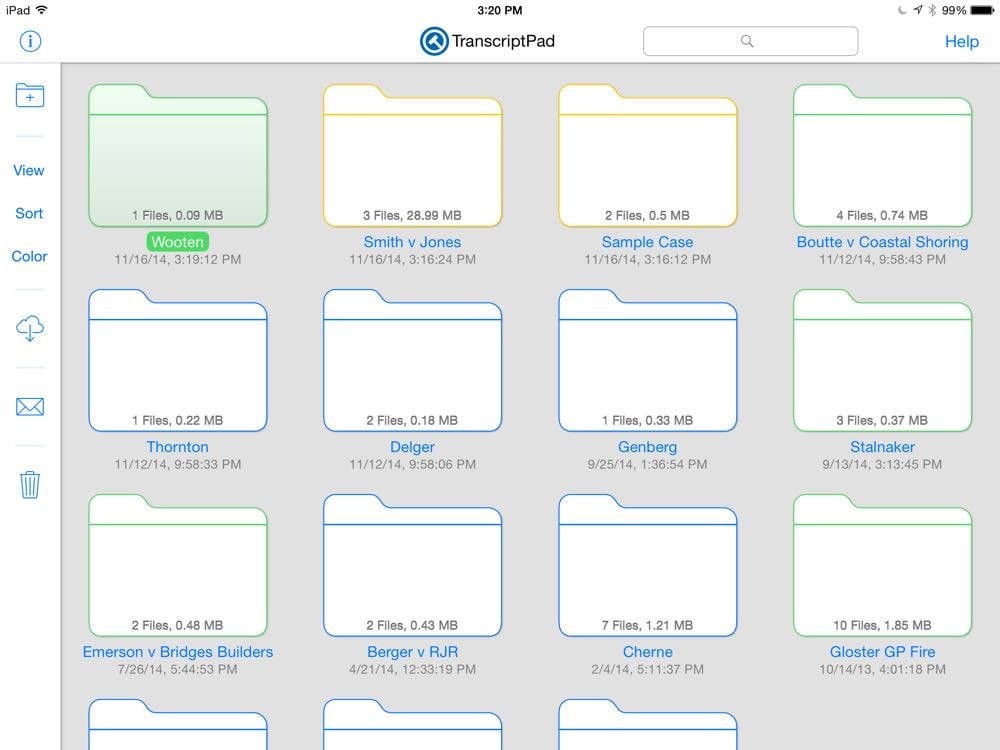
The app has a new interface that matches the look of iOS 7 and iOS 8. From the main screen of the app, if you choose a Grid view, you see folders for each of your cases, and a new feature is that you can color-code your folders. For example, you might want all folders for one client to be the same color. The color normally appears as an outline of the folder, but if you tap on a folder to select it, the folder itself also changes to the assigned color. This is a nice way to easily differentiate among your folders.
With a case selected, you can press the email button to send all of the transcripts, including your annotations, to another TranscriptPad user. (Exhibits that you saved in TranscriptPad are not included, which makes sense because, in virtually all cases, including exhibits would make the email too large to send.)
If you tap on a case and hold down your finger, a new popup menu gives you the option to open the case, rename the case, duplicate the case or delete the case. Or you can tap once to select a case and tap again to open it — in other words, a double-tap is a standard way to open a case in TranscriptPad 2.
Easier editing of issue codes
The most powerful feature of TranscriptPad is the ability to create your own case-specific issue codes. When you read a Q and A that is significant, you simply select the first and the last line and then assign an issue code that you create based upon the issues in your case — such as Damages or Comparative Fault or even Part 1RQ56 if a particularly important issue in your case is what each witness has to say about Part 1RQ56. It is now even easier to edit an issue code that you created because the app now puts Edit button at the end of each issue code on the left. Tap Edit and you can rename an issue code, select a new color or delete an issue code.
Improved navigation
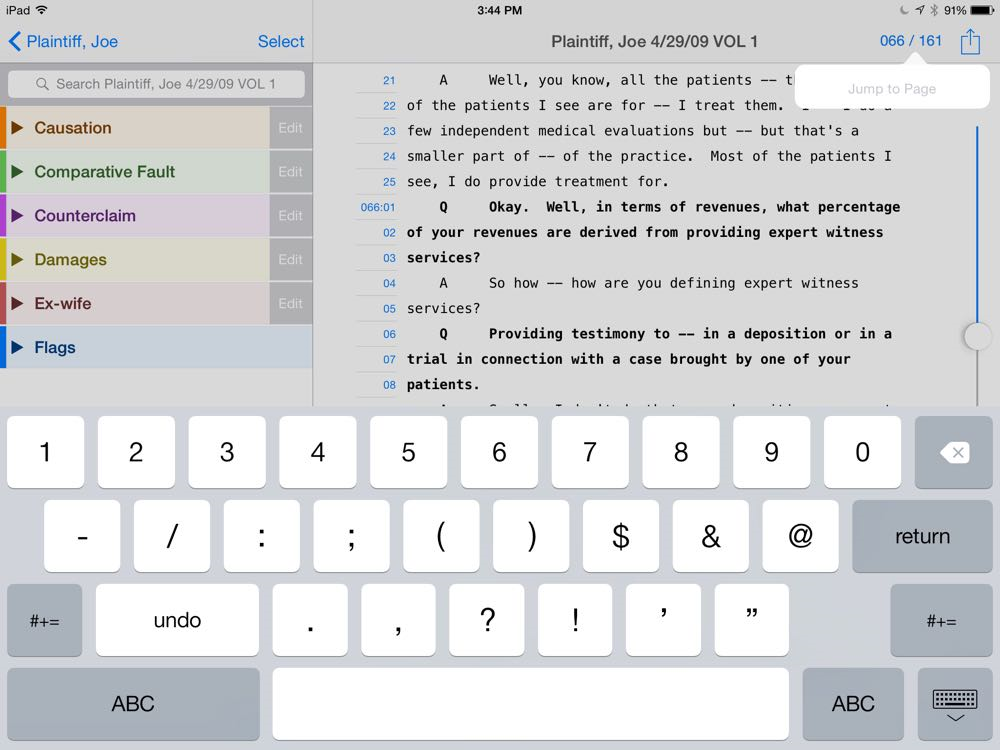
It is now easier to navigate within a particular deposition. In addition to the slider that lets you scroll up and down to find a page in the deposition, you can now tap on the Page X of Y indication at the top right of a transcript and enter a specific page number to jump right to that page.
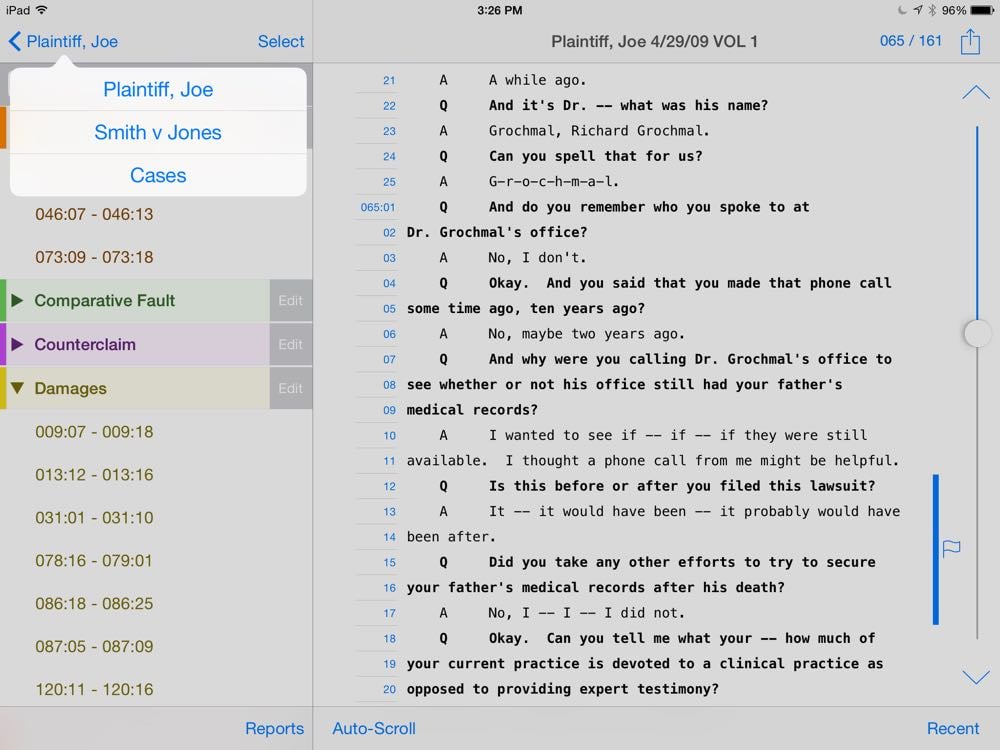
Another useful way to jump to important text is to select an issue code in the list on the left and then tap on a range of lines on the left to jump directly to those questions and answers on the right. In TranscriptPad 2, it is easier to have a sense of where you are because the range of lines on the left is bold when you are looking that range on the right. And as you manually browse through the transcript on the right by moving up or down, the list on the left updates with new lines becoming bold as you get to them.
Speaking of going through pages in a deposition, while I prefer to just flick my finger to scroll up and down, TranscriptPad 2 adds a Page Up and Page Down button. Every time you tap Page Up you are brought to the first line of a page. So tap it three times and you will go the first line of your current page, then the first line of the previous page, then the first line of the page before that. The Page Down button works the same way except that it bring you to the last line on the page.
And speaking of looking at a transcript, version 1 of TranscriptPad gave you a choice of four fonts for the text: Menlo, Courier New, Monaco and Andale Mono. Version 2 keeps those fonts and adds Noto Sans, Noto Serif and Open Sans — plus gives you a preview of what each font looks like by using the font for each font name.
When you are done reviewing a transcript, as before, you can tap the arrow in the top left to go back one level. Version 2 of this app adds a new shortcut. Hold down on the arrow and you see a pop-up menu showing the hierarchy, making it fast to jump up multiple levels or even navigate back the main Cases screen without having to tap back a whole bunch of times.
Better handling of flags
To be honest, I haven’t used the flag feature of TranscriptPad in the past except to test the feature. In my actual cases, when I have wanted to note that something is important, I have just assigned an issue code, or if I want added emphasis, I highlight in yellow or maybe underline. But I understand the advantage of using a flag; in addition to marking text as significant, you can (optionally) write notes on the flag, such as explaining why this testimony matters. If you share your TranscriptPad file data with another person, I can see that being helpful to share your thinking on a certain line of questioning.
In TranscriptPad 2.0, an open flag icon is placed next to text if you didn’t add a note, and a closed flag icon is used if you did add a note. Additionally, in the list on the left, there is a blue dot to indicate when you have a note associated with the flag.
Flags are also more sophisticated in version 2 because you can split them up. For example, if you place a Flag spanning lines 1-10, you can now go back and remove the flag from lines 2-4, which results in two (identical) flags, one for line 1 and another for lines 5-10.
Make your folders stand out
Within each case folder, the app creates different folders associated with different witnesses. You can also add your own folders. If you have a lot of witnesses in a case, it is nice to have a way to make some folders stand out, and now you can do that in TranscriptPad 2. Specifically, you can now add color to each folder (eight color choices) or you can add labels to each folder, including a π for the plaintiff and a ∆ for the defendant.
Support for Transporter and Box
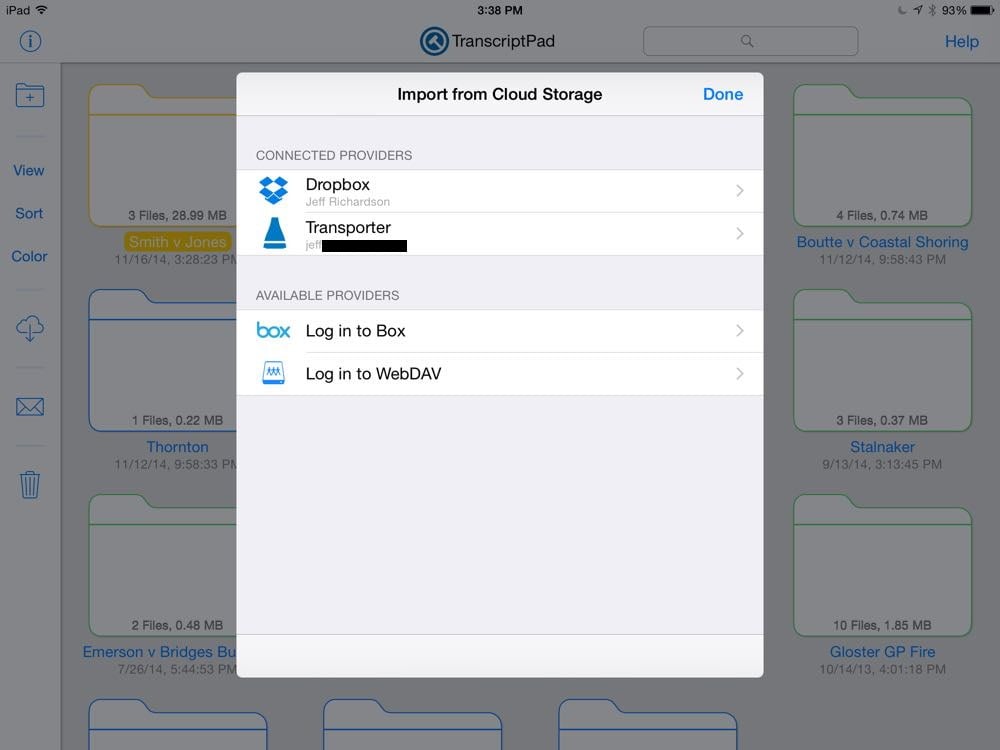
The main way that I get a transcript into TranscriptPad is to go to the email that a court reporter sent me with a plan text (ASCII) version of the transcript attached and open that file in TranscriptPad. Or sometimes I email the file to myself to do the same thing. TranscriptPad has long been able to open files from Dropbox, or add files by connecting your iPad to your computer and using iTunes. Version 2 adds the ability to open files that are stored on your Transporter. Unfortunately, I haven’t been able to try this feature yet because there is a small bug on the implementation in version 2.0. Ian tells me that the bug has already been fixed, and Transporter support will be working as soon as Apple approves version 2.0.1, which should be very soon.
Version 2 also adds support for Box (Box.net) and WebDAV. I don’t use either so I didn’t test this support.
I don’t mind using Dropbox to tranfer a bunch of transcripts to TranscriptPad because transcripts are (with rare exception) not confidential; I have no security concerns about storing plain text transcript files on Dropbox. Nevertheless, I am increasingly keeping all of my case file materials on my Transporter, and I know that others prefer to use Box. It is nice to have so many options for getting files into TranscriptPad.
Conclusion
Those are the big new changes, but there others as well, some of which are under-the-hood. And Ian tells me that he has a few more features close to being finished that weren’t ready to put in version 2.0, so I’m sure we will continue to see more TranscriptPad updates in the future. But just focusing the changes that I described above, version 2.0 itself is a big update, and it makes an already fantastic app even more powerful and easier to use and customize. If you own an iPad and you work with transcripts in your law practice, I strongly recommend that you get the TranscriptPad app. Unless you are representing someone on the other side of one of my cases, in which case I would prefer for you to use your old, inefficient, less effective tools like a highlighter and some Post-It Notes that are prone to fall off of your heavy, paper copies of the depositions.






 New York