Apple’s WWDC conference took place this week, and there were so many interesting announcements that this week we have a jam-packed episode of the In the News podcast. We start by discussing Apple Intelligence: what makes Apple’s AI effort different from what others are doing, and how will you use it? We then talk about numerous exciting changes coming to iOS, iPadOS, watchOS, the Apple Vision Pro, the Apple TV, and CarPlay.
In today’s Where Y’At? segment, we discuss using your AirPods, of all things, to track your stolen car.
In our In the Know segment, Brett and I pick some of our favorite new features that were announced by Apple this week.
WWDC was this week, and at the developer conference, Apple showed off an enormous number of new features coming to the iPhone, iPad, Apple Watch, Apple TV, Apple Vision Pro, Mac, HomePod, CarPlay, iPod … OK, maybe not the iPod, but the iPod did actually make an appearance during the first few minutes of the Keynote address. (And those first few minutes are fun, so if you didn’t watch the Keynote, I recommend you at least check out the beginning.) These new features will be beta-tested and improved over the next few months, and by this Fall, we will start to be able to use them on our devices in a shipping version of the operating systems. So in today’s post, let’s start to dig into the firehose of new announcements that are the news of note from the past week:
William Gallagher of AppleInsider says that the new Control Center in iOS 18 is faster to use and easier to customize. I can actually see this turning out to be one of the most useful features in iOS 18.
Here is something small and interesting in iOS 18. When you press a button on the side of the iPhone, the black portion of the display bezel goes in slightly, as if you are physically squeezing the side of the iPhone. Juli Clover of MacRumors shows off how this looks.
Ryan Christoffel of 9to5Mac notes that you can have collapsible sections in Notes in iOS 18. That looks very useful, especially on the smaller iPhone screen.
Earlier this week, when I wrote about the features in iPadOS 18 that look promising to me, one feature that I did not mention is Smart Script. The idea is that AI looks at your handwriting to understand your own personal style, and if something that you are writing using a stylus starts to get too messy, Smart Script will clean up your handwriting—not to look like the handwriting of someone else with great penmanship, but to look more like your handwriting on a good day. It is an interesting idea, but I’ve seen other companies try similar things in the past and I have never been impressed. Ed Hardy of Cult of Mac has tried out Smart Script in the beta version of iPadOS 18, and he found that sometimes it works but other times it does not. If Apple figures out how to make this work so that it works well and consistently, this might become a feature that interests me, but at this point, it isn’t something that I’m expecting to use much or at all.
Ryan Christoffel of 9to5Mac notes that in iPadOS 18, you can designate an iCloud folder so that it is always downloaded to your device, making the contents accessible even if you don’t have Internet access.
Here’s some Apple Watch news that we can all use: David Schloss of Apple Insider reports that you can monitor the heart rate of a lion by putting an Apple Watch around its tongue.
Macolm Owen of AppleInsider also describes new features in visionOS 2. He notes new support for trains in Travel Mode, which is interesting to me because I’ve used an Apple Vision Pro on a train and it works fine. You simply need to turn on Airplane Mode first so that your windows don’t get left behind as the train moves. I’m curious what the new train support in Travel Mode adds.
One interesting new feature in visionOS 2 discovered by Tim Hardwick of MacRumors: if multiple people are using Spatial Personas, you can touch fingers, high five, and fist bump with visual and audio feedback.
In an article for MacStories, Sigmund Judge explains what is new in tvOS 18. One feature I’m looking forward to is InSight, which gives you information about the actors on-screen and the soundtrack in a scene. It sounds similar to the X-Ray feature on Amazon Prime Video, but if you don’t want this info to cover up the screen you can also use InSight in the Remote app on your iPhone.
Will we get more Ted Lasso? Peter White of Deadline reports that this week at the Banff World Media Festival, Channing Dungey, chairman and CEO of Warner Bros Television Group, said that Apple definitely wants more Ted Lasso for Apple TV+, and that Jason Sudeikis and people at Warner have talked about a potential fourth season or a spin-off show, but nothing has been decided yet.
To use some features in HomeKit, you need a hub. An Apple TV can serve as a hub, and Felipe Espósito of 9to5Mac reports that in iOS 18, you can also designate a HomePod to serve as your home hub.
Taylor Ardrey and Nathan Hart of USA Today share the story, and stunning video, of an Apple Watch delivery being stolen from a front porch by a “porch pirate” so quickly that the FedEx driver was still on the porch.
There have been several recent stories of a person finding a stolen car that had an AirTag hidden in it. Harry Howard of WWL, the local CBS affiliate in New Orleans, shares the story of a man who tracked his stolen car because his AirPods were in the car. Unfortunately, he tried to confront the thieves on his own, without involving the police, and one of the suspects tried to shoot him.
And finally, here is a fun but also informative video from Apple that shows off 18 things announced by Apple during WWDC24:
Yesterday, Apple held a Keynote address to kick off its WWDC24 developer conference. There were tons of announcements, including major new updates to the operating systems of virtually every device sold by Apple, all of which will be coming later this year. Apple also decided to put the “A” in “AI” by announcing Apple Intelligence, a system that will use the information on your device to help you find items on your device and express yourself in new ways. Here are the highlights of iOS 18 and iPadOS 18 that I think will appeal the most to lawyers and other professionals who use the iPhone and iPad to get work done—although I’ve also included some new features below just because they seem fun.
Improved Control Center
You can currently swipe down from the to right on a modern iPhone to bring up the Control Center and access some commonly used features, such as a Wi-Fi toggle, the flashlight, Shazam, screen sharing, etc. In iOS 18, there are many more controls, and app developers can even add their own controls so that you can toggle an in-app function without having to actually open the app.
If you have lots of control center icons, you can even add some of them to a second or third screen.
The Control Panel functions can also be used on the Home Screen, replacing the camera and flashlight buttons that have been there for a long time. Or you can assign them to the Action button.
Lock an app
If you sometimes give your iPhone or iPad to another person and you want to restrict what they can do, you can now lock any app with Face ID / Touch ID. So if you want to let a child watch a video while you are in a restaurant and you don’t want your child to read or delete emails, change time entries in your billing app, etc., you now have an easy way to restrict access to any app.
Mail improvements
Using on-device AI, you can optionally have the Mail app analyze your messages and automatically sort them into Transactions (such as receipts), Updates (social media, newsletters), and Promotions. That way, while you are trying to get work done, you can focus on your main emails, and then later when you take a break you can deal with the emails in those three categories.
Also, a digest view will display multiple emails from a specific business together, such as all of your emails with a specific airline.
I will be curious to see if this works with all mail services, including those of us who sync with Microsoft Exchange. If it does, I guess I will see all of my emails in Outlook on my work PC but my iPhone and iPad will show just the subsets of my emails? I’ll be curious to see how this all works in practice.
You can use AI writing tools to proofread your email, rewrite the email in a different style, summarize the text in an email, convert text into a table, and much more.
It will be very interesting to see how useful these AI tools are in practice. Microsoft has similar writing tools in its new Copilot service
Math Notes
Let’s set aside the jokes about why it has taken Apple 14 years to finally include a calculator app with the iPad. One is coming with iOS 18. But what jumps out at me is not the calculator itself but instead a feature called Math Notes. If you are taking handwritten notes using a stylus on the iPad, you can write out math equations and have the iPad solve them. It even works with incredibly complicated equations, which I’m sure will be useful for engineers and students taking an advanced math class. But what interests me is if I am just writing a list of numbers in some notes, I can have the iPad add the numbers for me. Sure, I could have done the same thing by opening a spreadsheet app such as Excel or Notes, typing in all of the numbers, and adding the correct equations in a cell. But it seems much faster to just jot things down using the Apple Pencil. And it looks like you can easily change a number and have the answer update as well.
When Math Notes writes the answer, Apple says that it tries to imitate the style of your own handwriting so that it will look like you wrote it.
You don’t have to use the stylus for this. You can also use the Math Notes feature with text, such as in the Notes app.
For the simple math that I do as a lawyer, such as thinking about settlement figures during a mediation or adding up a few numbers to calculate a damages claim, this looks like it would be perfect.
Photos improvements
There are tons of changes and improvements to the Photos app on the iPhone and iPad. First, there is a new interface that shows both photos in a grid and sets of photos all on the same page.
I’m not quite sure if this change is an improvement. But it is certainly different.
Second, there is what looks to be a fantastic new search feature. Thanks to AI, you can use natural language to describe what you are looking for in your Photos collection and the app should find the photos. One example shown by Apple yesterday is to type “Katie with stickers on her face.” The app knows who Katie is because Photos can already identify people, and it will look for pictures that seem to have stickers on her face.
You can even use this search feature in videos that are stored in your Photos app, with the app able to find a particular moment in a video and then show you just that relevant segment. The example shown by Apple yesterday was “Maria cartwheeling on the grass,” which immediately showed that part of a video.
You can also use AI to create a memory movie such as “everything we ate in Japan.” Photos will pick out the best pictures and videos, put them in an order that makes sense, and select appropriate background music.
There are also new edit tools that use AI, such as the ability to remove an unwanted person from the background of a photo. We’ve seen this before in other apps, but it will nice to have this in the built-in Photos app.
Accept or reject calls with your head
If a call comes to an iPhone tucked away in a pocket while you are wearing AirPods, Siri will already ask if you want to answer the phone. You can currently say (out loud) yes or no, or if you are wearing an Apple Watch, you tap to take or reject the call. iOS 18 adds another way: you can nod yes to take the call or no to reject the call, all without saying a word. Apparently, AirPods Pro can detect the motion of your head using a gyroscope.
I’m not sure how useful this feature will be if you want to accept a call. Sure, you can skip saying “yes” to Siri, but won’t you immediately need to tell the caller “Hello” so you need to speak anyway? But I can see this being useful as a quick way to reject a call.
When you eventually do take the call, Apple also said that AirPods will get improved voice isolation so that even if you are in a lot of wind or in a place with loud background noises, your voice will still sound good to the person on the other end.
Passwords
My hope is that most people reading this already use a password manager and have done so for a long time. Using a password manager is the only practical way to use complex and unique passwords for every service. iOS 18 will feature a built-in Passwords app, so for those who have not yet started using 1Password or another third-party app, there is no longer any excuse for not using something. To my surprise, the app is cross-platform, not just working on the Mac. iPhone, and iPad but even on Windows.
For power users, a third-party app like 1Password will offer much more, such as sharing passwords with family members, a place to store other types of confidential information, etc. But password security is such a critical topic that I’ll be thrilled to be able to tell every iPhone and iPad user who isn’t yet using a password manager that there is no longer a reason to wait.
Messages improvements
There are lots of improvements to the Messages app. Instead of being limited to six Tapback reactions, you will be able to use any emoji as a Tapback on a specific message. You can schedule a text to be sent later. You can format text with bold, italic, underline, and strikthrough. In addition to the prior full-screen effects that you can use to deliver a message, iOS 18 adds text effects for specific words in your message to make them stand out more (or just to be funny).
And if you are in the middle of nowhere, with no Wi-Fi and no cellular service, you will still be able to send and receive text messages via satellite. Other companies charge for this feature, and I haven’t yet seen if this is free or if there is a charge for doing this.
You can also use generative AI to create images that you send in a text message. You can even make a figure in the image look like the person to whom you are sending the text message, or make the figure look like yourself.
Image Playground
A popular generative AI feature is the ability to create images. Apple’s AI in iOS 18 will have this feature, and it can be used within many apps (such as creating an image in Messages to send to someone) or you can use a new stand-alone app called Image Playground to create images. At first, it supports three styles of images: animation, illustration, and sketch. Pick a style, tell the app what you want in the image with as much detail as you want, and then the app creates an image along with alternative versions.
It seems obvious that Apple is starting with a limited set of styles to try to avoid some of the problems that have been associated with generative AI, such as photorealistic images that people may think are real images.
I could see this being a useful feature if you want to quickly add an image to a PowerPoint or a Keynote slide. It could also potentially be useful for demonstrative exhibits at trial. You can already do something similar with current AI products, but you get better privacy by doing this all on-device.
Phone call transcripts
Different jurisdictions have different rules on when you can record a phone call, and sometimes the restrictions are even more severe on lawyers than others. But with the full consent of all participants, I suspect that recording calls is allowed everywhere, and there are certain circumstances when it could be useful. A new feature in iOS 18 will let you create a transcript of a phone call.
When you turn on the feature, all call participants are notified that the call is being recorded. Then, the iPhone gives you a transcript of your call. You can even use AI to summarize the call when it is finished.
The Notes app will have a similar feature for recording audio. I suppose this means that a student could record a lecture as they are taking notes, which is a feature that has been available in many dedicated notes apps for many years.
…and the rest
Of course, that is just the tip of the iceberg. There are lots of other new features that don’t really jump out at me so much but will certainly appeal to many others. This includes the ability to customize the position of apps on the home screen (leaving some of the app icon areas blank so that you can see through to the wallpaper underneath) and changing the tint of app icons.
The Maps app adds topographic maps so that you can create hiking routes. Reminders can be integrated with the Calendar app so that your to-do items appear in your calendar. When you are screen-sharing with someone else to explain to them how to do something on their device, you can remotely draw on their screen to circle something and request remote access to control their screen. And much more.
Conclusion
The updates to iOS 18 and iPadOS 18 would have been impressive even without Apple introducing its new integration of AI throughout the operating system. But with all of the AI improvements, I almost feel like we had two WWDCs worth of updates this year. I very much look forward to this Fall when new features are officially released for the iPhone and iPad.
Apple’s WWDC conference starts on Monday, so Brett and I begin this week’s episode of the podcast discussing what Apple might announce. We expect AI to be a big topic, and shortly after we stoped recording this episode, I saw reports that Apple may refer to its spin on AI as “Apple Intelligence.” We’ll see. We also talk about a settings change for the Notes app that you might want to make, soft app pillows, and much more.
In our Where Y’at? segment, we share tales of people tracking down lost luggage, stolen power tools, and missing laptops.
In our In the Know segment, Brett and I celebrate the 10th anniversary of Microsoft Word on the iPad by sharing some tips for that app. Brett discusses the Mobile View feature, and I discuss the new paste format feature.
On Monday, June 10, at 10 Pacific / 1 Eastern, Apple will stream a Keynote address as a part of its developer conference, WWDC24. Every year, Apple takes this opportunity to preview the next versions of its major operating systems, so on Monday we will learn about new features in iOS 18, iPad OS 18, and other operating systems that Apple will release in a few months, probably September 2024. This year will be a little different. For prior WWDC keynotes, certain specific features were the big news, such as the StandBy feature announced at WWDC in 2023. But this year, I expect a theme to be the big news: AI. Apple has been hinting for months that AI will be the big theme of WWDC, and that doesn’t come as a big surprise because many other technology companies have been making major AI announcements lately. And that has resulted in articles such as this one: How Apple Fell Behind in the AI Arms Race by Aaron Tilley of the Wall Street Journal. Articles with that angle strike me as unfair. First, Apple has been incorporating AI for many years, even adding a special neural engine to its chips to handle the processing power. Just to pick one example, the Memories feature of Photos always surprises and delights me with the pictures it selects from my collection, and it uses AI to select pictures that I might like. Second, the companies that have been on the bleeding edge of AI have also had lots of embarrassing incidents, often because of the hallucinations in AI. One of my favorite recent examples was when Google’s AI recommended that people eat rocks every day, and the source of that advice was discovered to be this article from The Onion. (In case you don’t know, perhaps because you have been living under one of those rocks, The Onion is a news parody site, and a very good one.) Can Apple meet the challenge of coming up with a take on AI that seems substantial enough to satisfy users while also somehow avoiding the significant problems that seem inherent in so much of the cutting-edge AI nowadays? I myself have no idea how they will thread that needle, and it is the main reason that I am looking forward to Monday’s announcements. And now, as we look forward to WWDC next week, here is the news of note from the past week:
I enjoyed the recent interview of Tara Cheever of Lit Software by Steve Embry of the FED Speaks podcast from the Federation of Defense & Corporate Counsel. Tara discusses her company’s great apps such as TrialPad and TranscriptPad and explains why the new iPad Air is a particularly good device to use with those apps because it has most of the features that used to be associated with the iPad Pro but at a more attractive price.
Tara isn’t the only one with that thought. Juli Clover of MacRumors has been using the new iPad Air for the last few weeks and Clover similarly concludes: “The M2 iPad Air is essentially an M2 iPad Pro without the higher-quality display, and it’s a good middle tier option if you want solid performance for futureproofing but also don’t want to spend $1,000+ on a tablet.”
Jennifer Pattison Tuohy of The Verge reports that Apple’s newest iPads, MacBooks, and iMacs all contain Thread radios even though Apple hasn’t announced that they are there. I continue to hold out hope that Apple will soon announce some type of major improvements in the smart home category, and perhaps these not-yet-announced Thread radios will be a part of that story.
One of the predictions for iOS 18 is that Apple will unveil a standalone Passwords app, something similar to 1Password. John Gruber of Daring Fireball points out that this wouldn’t really be a “new” item because Apple has been slowly improving the Password panel in the Settings app for a long time. Add a few more improvements and put it in a standalone app so that it is easier for users to find and you will end up with a great app. Of course, for almost every good iPhone or iPad app made by Apple, there is an even better third-party app for people who want more features. I suspect that I will stick with 1Password even if Apple releases a fantastic Passwords app simply because I will appreciate features like cross-platform support (I doubt that Apple’s product will work on Windows) and multiuser support (so that I can easily share passwords with my family). But because having strong and unique passwords is so important, and because a password manager is essential for having good password hygiene, I think it would be incredibly great news for Apple to announce a Passwords app on Monday that will have widespread appeal.
Tesla gets lots of attention for making electronic cars, but there are other great options available. I recently had a chance to check out a friend’s Rivian electric truck, and I was incredibly impressed with all of the features and how nice the ride was. Juli Clover of MacRumors reports that the second-generation versions of Rivian’s vehicles (it makes a pickup and an SUV) will support Apple’s Car Keys feature so that your iPhone or Apple Watch could work as your car key. Rivian vehicles don’t support CarPlay, but they do support Apple Music.
If you love an iPhone app so much that you just want to curl up to it, Juli Clover of MacRumors reports that Thowboy has a new range of pillows that look like app icons: Notes, Messages, Apple Music, and Mail. Plus a Finder icon, so perhaps these are supposed to be Mac icons and not iPhone icons, but you can certainly think of them as iPhone icons if that helps you sleep better.
Lowe’s has an Apple Vision Pro app called Lowe’s Style Studio that you can use to customize a kitchen. Juli Clover of MacRumors reports that you will be able to try out an Apple Vision Pro with that app at select Lowe’s locations in North Carolina, California, and New Jersey this month. I suspect that if this proves popular, Lowe’s will try this at additional store locations.
There have been lots of examples of people finding luggage that an airline claimed was lost thanks to an AirTag attached to the luggage. William Gallagher of AppleInsider shares the tale of a woman in Florida who didn’t have an AirTag but she did have a MacBook Pro in her lost luggage. The day after her flight, her Apple Watch alerted her that her computer was at a location, and when she went to that location, she found a house with suitcases littered around it. The police arrested the person who lived at the house, a man who worked at the airport, and reminded the victim that it is always best to call the police before approaching a house that you think contains stolen items.
Paul Duggan of the Washington Post shares the story (gift link) of a carpenter who was fed up with his tools being stolen so he hid some AirTgs in his larger tools. Sure enough, one of them was stolen, and he alerted the police to the location. They got a search warrant and ultimately discovered 15,000 stolen power tools. Wow.
John Guber of Daring Fireball comments on a new report that Apple is in talks with China Mobile to bring Apple TV+ to viewers in China, which would be the first U.S. streaming service in China. I share Gruber’s concern that if this happens, it may have an impact on the content of shows on Apple TV+ in an effort to comply with China’s strict restrictions on many types of content.
For a few months now, Apple TV+ has been making a selection of older movies available for a limited time. I’ve enjoyed that feature quite a bit. For example, I’ve watched some good 3D movies on my Apple Vision Pro. Ryan Christoffel of 9to5Mac lists the movies that are available this month. (Unfortunately, I don’t think that any are available in 3D this month.)
Christoffel also reports that Season 2 of the fantastic Apple TV+ show Silo may be coming out this year, and Seasons 3 and 4 may be filmed back-to-back. That sounds great to me; it is a wonderful show.
Christoffel also came up with a selection of products that will let your iPhone or Apple Watch mimic classic Apple designs.
I see that a number of Anker products are currently on sale on Amazon for a limited time. I am writing about two of them because I reviewed them recently and I use them every day.
First, the Eufy SmartTrack Card (Eufy is an Anker company) is like a flat AirTag made to fit in a wallet. Here is my full review. In short, if you ever lose your wallet, you can use the Find My app on your iPhone to locate your wallet. This product works great, and the list price is $40, but the price sometimes dips down to about $17, which is how much I paid for mine. The price is there again ($16.98 as I type this), so this is a great product to get now, either for yourself or as a gift.
Second, the Anker 3-in-1 Cube with MagSafe is what I use at my desk every day. I reviewed it at the end of this post about the StandBy feature. In short, it charges and holds an iPhone so that you can use StandBy mode, plus it can charge your AirPods and an Apple Watch. It is also so small that I take it with me whenever I travel. I paid $150 for it, but you can get it now for $112.46.
I use affiliate codes when I link to Amazon, so by using those links to make a purchase, a tiny portion of your sale price goes to help pay the costs associated with keeping the lights on here at iPhone J.D. But more importantly, you’ll get great deals on two products that I use extensively and that I recommend to people even when they are not on sale.
The first topic in this week’s episode of the In the News podcast is a deep dive into the new Apple Pencil Pro. Next, we talk about top lists from Apple: Apple’s list of the Top 100 albums of all time, and Apple’s list of finalists for the Apple Design Awards. We also talk about the new Marvel app for the Apple Vision Pro, three new ads for the Apple credit card, some potentially great programming coming to Apple TV+ this summer, and more.
In our In the Know segment, Brett recommends an app that you can use to put a card into the Apple Wallet app even if the card/service doesn’t natively support that app. And I share a tip for getting ALL of your text messages on a new iPad or other Apple device after you upgrade.
The team behind Apple Music and a select group of artists, songwriters, producers, and industry professionals picked the 100 best albums ever made, and Apple published the results this week. Any ranking like this is necessarily subjective and thus likely to lead to debate. For example, there are no country albums on this list, which may cause some to cry foul. But it is still a list of some fantastic albums and may give you some ideas for what to listen to next on your iPhone. Scroll down the website to see the album covers fly by. The top 10 on the list are: (1) The Miseducation of Lauryn Hill (1998), Lauryn Hill; (2) Thriller (1982), Michael Jackson; (3) Abbey Road (1969), The Beatles; (4) Purple Rain (1984), Prince & The Revolution; (5) Blonde (2016), Frank Ocean; (6) Songs in the Key of Life (1976), Stevie Wonder; (7) good kid, m.A.A.d city (2012), Kendrick Lamar; (8) Back to Black (2006), Amy Winehouse; (9) Nevermind (1991), Nirvana; and (10) Lemonade (2016), Beyoncé. You can learn more about why those ten made the list in this article from Apple. And now, the rest of the news of note from the past week:
Speaking of winners, Apple announced the finalists for this year’s Apple’s Design Awards, and John Voorhees of MacStories shares the list. As is true every year, there are some apps on the list that make me say “oh, of course,” and others that I haven’t heard about that I now want to check out.
Brent Dirks of App Advice reviews a new app called Kino, made by the team behind Halide Camera, which can be used to improve videos that you take with an iPhone. For example, you can use the Instant Grade feature to apply professional color presets that provide a film-like look.
Malcolm Owen of AppleInsider compares the former Apple Magic Keyboard for iPad with the new model that works with the iPad Pro G4.
Samantha Wiley of iLounge reports that the Apple Vision Pro was recognized as the recipient of the Black Pencil design award.
Yesterday, Marvel launched a new, free app for the Apple Vision Pro called “What If…? An Immersive Story” (click here to download) which tells an interactive story in an immersive environment. Jason Snell of Six Colors liked it, noting that it is “a single app that demonstrates all the features of the Vision Pro at its best.”
I tried the “What if…?” app last night, and I liked it. The interactive portions of it didn’t always work for me as well as it seemed they should, but the story proceeds even if you don’t make every hand gesture necessary to cast every spell. The one-hour presentation itself was beautiful, a 3D cartoon in which I seemed to be a participant, which was a new experience for me. This is yet another example of how immersive content on the Vision Pro is something special, and I love it.
David Sparks of MacSparky discusses the new immersive content for the Vision Pro such as Apple’s new Parkour video and this new Marvel app, noting that “it is simultaneously promising and overdue.” Don’t get me wrong, I’m thrilled to see this new content and would love to see more, but the Vision Pro is such an early adopter device with, I presume, a relatively small number of current users, that it doesn’t really surprise me that it takes time for everyone to ramp up. Indeed, the system is so new that it wouldn’t surprise me to see some major software updates announced at WWDC next month.
Someone who goes by the handle LegoTruman thinks it would be a good idea for Lego to sell an Apple Store, so he came up with a model to show what it would look like and posted it on the Lego Ideas site. He did a great job with this one!
And finally, Apple shot a video of an actress moving around against a green screen and then gave the video to three different artists who used the Procreate app on an iPad Pro M4 to create a different video. The end result is interesting as you see three completely different ideas even though they start from the same video:
The Apple Pencil, first introduced on September 9, 2015, is different from every other Apple product. There is no screen, no buttons, and no ports. The words “top” and “bottom” don’t really mean anything for this product. With the exception of the tip that I’m sure most people never change or even pay much attention to, there are no replaceable parts and no seams. It works as if it were a solid item carved out of a single material. And yet it can do many different things, especially with the new features added in the latest and greatest version, the Apple Pencil Pro. Of course, it is useful for artists, but it is also a great way to take handwritten notes, and it can be a nice tool for simply navigating the interface of the iPad, offering advantages over using your finger.
Since you are reading this review, I presume that you have already used an Apple Pencil or other stylus with an iPad. They have been available since the first iPad was released in 2010. For many years, there were so many options available that I used to routinely review styluses on iPhone J.D. There is an entire section of the Index of this website devoted to those reviews. But when the first generation Apple Pencil was introduced in 2015, it was so much better than third-party styluses that much of the third-party market disappeared. Companies like Adonit still make some interesting products, some of which have the advantage of being less expensive than the Apple Pencil and some of which have unique features, such as this model that can also act as a microphone and store up to nine hours of voice recordings. But for most folks, the best choice is the one made by Apple.
If you have used an Apple Pencil before, your first reaction to the Apple Pencil Pro may be that nothing seems to have changed. A second-generation Apple Pencil and an Apple Pencil Pro are virtually indistinguishable from each other except that one says “Pro” on the side:
But of course, there are some significant differences in what the new Pro version can do.
Haptic feedback
The addition of haptic feedback to the Apple Pencil Pro may be my favorite new feature. I have long been a fan of double-tapping the side of an Apple Pencil to switch between two tools, such as between a pen and an eraser, and with the addition of haptic feedback, you get instant verification that the tools have changed.
With the new squeeze gesture, discussed below, the haptic feedback convincingly creates the illusion that the Pencil is physically responding to you pinching your two fingers together, even though no actual movement is taking place. Apple has used haptic feedback to create similar illusions of motion in the past, such as when pushing in on an iPhone or Apple Watch screen or when squeezing the post on an Apple AirPod Pro, so Apple has had the chance to perfect this.
The haptic feedback works in lots of other situations too, such as when interacting with certain menus. Tiny little clicks make it clear that you are moving from one item to the next one. It’s very nice.
Apple interface designer Steve Lemay told Nicolas Lellouche of the French website Numerama that fitting this haptic engine—the smallest one ever used by Apple—into the Pencil Pro was one of the most difficult parts of creating this new version of the Pencil because they had to rethink the entire architecture to maintain the same recognizable design on the outside. [For a cute story on why Steve Jobs once referred to Lemay as “Margaret,” read the last six paragraphs of this 2014 New York Times article by Brian X. Chen.]
The new haptic feedback is a wonderful new feature and makes the Pro a big step forward.
Squeeze
The most interesting new feature in the Apple Pencil Pro is Squeeze. Simply squeeze your fingers on the front of the Pencil to trigger an action.
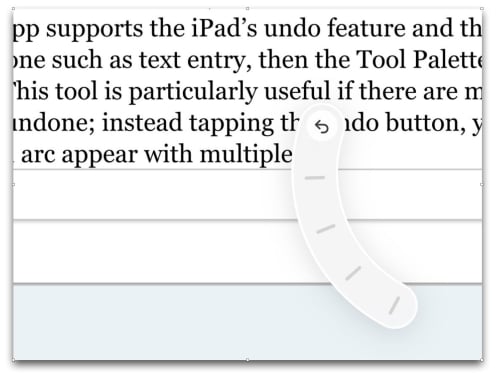
The default action is to show the Tool Palette, and what that means depends upon what app you are in. If an app supports the iPad’s undo feature and there is something that can be undone such as text entry, then the Tool Palette will show an undo and a redo tool. This tool is particularly useful if there are multiple different steps that can be undone; instead of tapping the undo button, you can hold down for a second to see an arc appear with multiple notches.
You can slide the undo icon up and down the notches to select how many of the prior actions you want to undo, with a live preview of what will be undone as you slide up and down. It’s an incredibly useful and nicely implemented feature.
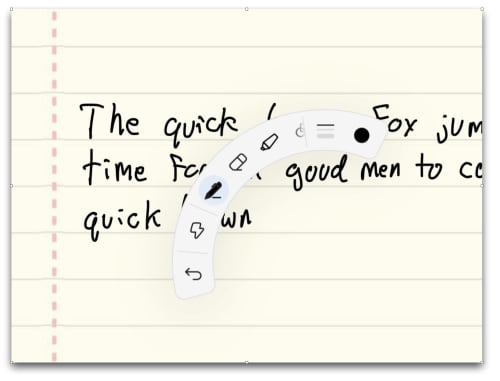
This undo/redo feature is so nice that I wish it were available in all apps. However, app developers can create their own custom Tool Palettes that work in their app, which means that they get to decide whether to include Apple’s new undo/redo feature. Overall, having developer-created custom Tool Palettes is a great idea because they can pick the tools for which it will be most helpful to have easy access in that particular app. And if a developer wants to provide access to more tools than there is space for in the Tool Palette’s arc, that is not a problem because you can use the Pencil to slide the tools on the arc to make new ones appear. For example, in the GoodNotes app that I use almost every day to take handwritten notes, all of the tools that you might frequently use are on the Tool Palette: pen, eraser, highlighter, shape tool, lasso tool, insert picture tool, etc.
For some tools, selecting the tool on the Tool Palette brings up additional choices. For example, selecting the eraser tool in GoodNotes places three different eraser sizes at the end of the Tool Palette so you can quickly change to a larger or smaller size depending upon what you are about to erase.
Of course, you can perform all of these same functions in GoodNotes by using the toolbar at the top of the screen. But the advantage of the Tool Palette is that it is right there next to the Pencil’s tip. Thus, it is much faster to change tools using the Tool Palette than by moving your hand up to the top of the screen and then back to where you were writing.
Although the Tool Palette in GoodNotes has an undo tool, all that you can do is tap it once to undo the last action. And there is no redo tool. I would prefer it if GoodNotes would replace this button when the system-wide undo/redo feature written by Apple, and hopefully this is a change that the developer of GoodNotes will implement in the future.
When I first started using the Apple Pencil Pro, I noticed that I would frequently trigger the Squeeze gesture by accident, and that would slow me down. I subsequently learned that if the Tool Palette comes up by mistake I should simply ignore it and keep writing. Now that I have learned that, I still find myself squeezing by mistake, but the Tool Palette no longer interrupts my flow.
The Tool Palette is neat, but it is not the only action that can be triggered by Squeeze. In the Settings app on the iPad, if you select Apple Pencil and then tap Squeeze under “Actions,” you can assign other actions to Squeeze. For example, you can switch back and forth between tools, the same action that I have long had assigned to the Double Tap gesture.
You can also assign the Squeeze gesture to a Shortcut, which opens up virtually unlimited possibilities. For example, if you are writing notes in one app based upon something that you are reading on a website in Safari, you could create a simple Shortcut that launches Safari and assign that to Squeeze. That way, you could write in your writing app and then squeeze the Apple Pencil to jump back to Safari.
I hope that people come up with interesting and useful Shortcuts that make sense with a Pencil and then share those on the Internet. By connecting the Squeeze gesture to the vast world of Shortcuts, there are lots of interesting possibilities.
Hover
Hover is not a new feature—it was one of the handful of new features that was added to the 2022 version of the iPad Pro—but I’ve heard many people say that their first opportunity to use the Hover feature has been with the Apple Pencil Pro and the 2024 version of the iPad Pro. That is certainly true for me.
The way that the feature works is that you hold the tip of the Pencil close to the iPad’s screen without quite touching the screen. The iPad will sense that you are hovering, and what happens next depends upon what app you are using.
If you are about to write or sketch, an app can show you where you are about to start writing for greater precision. If you are using the Scribble feature, text fields automatically expand when the Pencil gets near the screen, and handwriting converts to text even faster. If you are in a painting app, the hover feature can show a preview on the screen of what brush you are using and how the paint will be applied so that you can get it just right before you start painting.
The hover feature is also useful even if you are just navigating your iPad because it can work the same as hovering a cursor, even if you are not using a mouse or a trackpad. This is useful on many websites. For example, here on iPhone J.D., there are words across the top of the website that jump to different parts of the website: Main, Index to Prior Posts, Monthly Archives, Podcast, and About Me. If you hover a Pencil Pro above one of those words, a line will appear under the word as a visual indicator without selecting the word. It is the same thing that happens when a cursor hovers over that part of the website, and it is something that you cannot see at all on an iPad without the cursor or the Pencil. I use some websites on which useful information such as statistics appear as I hover over a part of the screen, and since I don’t use a mouse or trackpad with my iPad very often, I was typically unable to use that function of the website. But with my Apple Pencil Pro always right there attached to the top of my iPad Pro, I can now get that information quickly and easily.
Find My
When Apple introduced the second generation of the Apple Pencil in 2018, it added a fantastic new feature: the ability to attach the Pencil to the top of the iPad using magnets, and to charge the Pencil in that position. It provides a perfect place to put the Pencil when you are not using it, and it means that the Pencil is virtually always fully charged.
But sometimes I leave an Apple Pencil on a table, and the next thing you know it is lost under a piece of paper, and then next thing you know you are in a different location and you no longer know where the Apple Pencil is located. With Find My added to the Apple Pencil, your iPhone or iPad can now help you locate a lost Pencil.
First, the Find My App can display a map and give the last known location. If you left your Pencil in the office and don’t think about it until after you get home, this feature is helpful so you know to stop searching your briefcase.
Second, if you are in the same house as the Pencil, the Find My app can help you locate the Pencil within the house. It doesn’t display arrows pointing in the right direction the way that some Find My devices work, so instead you have to move around while your device tells you if you are getting close. As you do so, you will be alerted that you are far, nearby, or within reach.
I had some difficulty getting this feature to start working on my Apple Pencil Pro. I eventually had to go to the Find My app on my iPad, tap on the + to add a new device, and add my Apple Pencil Pro manually. I think it had something to do with the fact that I connected the Apple Pencil Pro to my new iPad Pro while it was still transferring information from my former iPad. If you get a new iPad Pro and a new Apple Pencil Pro, I recommend that you completely finish getting the new iPad Pro set up before you pair the Apple Pencil Pro by attaching it magnetically for the first time.
Find My is one of those features that you hope you will never need, but whenever you do need it, you are glad to have it. I’m glad that this support is built-in to the new Apple Pencil Pro.
Barrel Roll
The Apple Pencil Pro contains a tiny gyroscope so that it can sense as you rotate the Apple Pencil. When your Apple Pencil is simulating a pen or brush that has a shape, such as a paintbrush that is longer when oriented one way or shorter when oriented another way, you can spin the Pencil in your hand to adjust the brush.
I virtually always use just a simple pen tool with a round dot for the point, so spinning the Pencil may not have much utility to me. But if you use your Pencil for more artistic endeavors, this gives you even more power.
Also, app developers can assign the Barrel Roll to some other function. For example, in the app Procreate Dreams, you can use the Apple Pencil Pro to change an object’s orientation.
Shadow
I don’t know if this counts as a feature, an Easter Egg, or just Apple showing off, but one interesting change with the Apple Pencil Pro is that the Pencil casts a (fake) shadow on the page. It doesn’t work (yet?) in certain apps like GoodNotes, but you can try it out in the built-in Notes app.
Create a new Note and then start writing on the note using the Pencil. Squeeze the Pencil to bring up the Tool Palette. Scroll through the palette to see the different types of pen tips. Select the fountain pen. Now put the Pencil close to the screen so that Hover mode is enabled. As you spin the pen (the Barrel Roll feature) not only will you change the shape of the small line (the Hover feature previewing what you will draw) but you will also see a change in the shape shadow of the fountain pen.
Steve Lemay of Apple told French website Numerama that the new shadow can help you to remember which tool you selected. I suppose that could occur, but the shadow is fairly subtle and many pen tip shadows are similar. But even if this was primarily added for pure whimsy, it is still fun to see.
And the rest…
Other great Pencil features from the past are still there. It still has a flat side, which helps to guard against rolling around on a desk, and which allows you to magnetically attach it to the top of the iPad for charging and pairing. It still has pressure sensitivity, tilt sensitivity, palm rejection, and ultra low latency so that it mimics a real pen or pencil. It is still white. It is still weighted well so that it feels good in your hand. And as shown above, it looks the same.
Cost
The Apple Pencil Pro costs $129 on Amazon and in other stores. That price is a pleasant surprise because it is the same price as the second-generation Apple Pencil. You can instead get the Apple Pencil USB-C for only $79 (only $69 on Amazon), which is a nice stylus if you only want the basics, but you get a lot more with the Apple Pencil Pro. Still, it is nice to have the choice.
Note that the new Apple Pencil Pro only works with the new iPads released in 2024: both sizes of the iPad Pro and both sizes of the iPad Air.
Conclusion
I’ve been looking forward to the next generation of the Apple Pencil for a while now, and this new version does not disappoint. It keeps everything that I loved about the second-generation Apple Pencil and adds new features that are useful and fun but that don’t get in the way of what was already great.
We start this week’s episode of the In the News podcast by turning back the clock to the day when the iPhone was first named. And to really to do that, you need to turn back the clock all the way to the 1990s when the decision was made to use the word “iMac” for Apple’s first self-contained computer aimed at getting on the Internet. We then turn the clock forward to the future to analyze whether people will pay more for an ultra-premium iPhone that Apple is rumored to be working on. Perhaps it makes sense considering that the current iPad Pro is really just an ultra-premium iPad. We also discuss new immersive content for the Apple Vision Pro, updates to Shazam!, the past and future of Atari and Intellivision, and much more.
In our In the Know segment, Brett and I each pick one of the great tips in a recent Wirecutter article on top iPhone tips. Brett discusses using the Files app to remove a background from a photo, and I share a tip for taking photos in Burst mode that had been right there in the Camera app for who knows how long but I never saw it.