In an article for Above the Law, New York attorney Nicole Black describes how using an Apple Watch can reduce your reliance on your iPhone. I agree. For example, every day I use my Apple Watch to quickly glance at new emails and see if there is anything important, and also to quickly delete the junk. If I need to act on the emails, I’ll usually use the iPhone (unless only a quick response is required, which I can easily do on the watch), but it is typically far more efficient to see what is there just using the watch. And now, the news of note from the past week:
Debra Cassens Weiss of ABA Journal shares the news of Connecticut police charging a man with the murder of his wife, in part based upon data from her Fitbit fitness tracker regarding the time of day when she was moving around (which was inconsistent with the husband’s story). I could see the same type of thing occurring with an Apple Watch.
California attorney David Sparks reminds us that free is never free, and if you use a service that you don’t have to pay for, keep in mind that the the provider of that service may making money off of you in ways that you are not thinking about. For this very reason, I have a bias in favor of apps that cost money; I want to support developers so that they continue to make good apps, and I don’t want the developer to be tempted to resort to unscrupulous tactics to make a living.
Legal tech consultant Brett Burney reviews iThoughts, a mind mapping app. The video accompanying his review is both informative and entertaining.
Cameron Summerson of How-To-Geek compares the unlimited plans being offered by all of the major U.S. cellphone companies. As I noted last month, I recently switched to the AT&T Unlimited Plan, and so far I’ve been very happy with it. The knowledge that I have unlimited data has encouraged me to do much more with my iPhone, such as streaming more audio and video and using LTE when I don’t get a good WiFi signal, and it has made my iPhone much more enjoyable to use. My personal plan used to be 4 GB/month, and as I type this I see that I have already used 12.55 GB this month, and I still have five days left in my billing cycle.
John Gruber of Daring Fireball explains that while Apple Watch sales may pale in comparison to iPhone sales, the Apple Watch has still be very successful for Apple.
Nick Guy of The Wirecutter describes the best Apple Watch chargers and stands. His favorite is the Spigen stand which I reviewed in 2015. I really like that stand too, and it is the one that my wife uses. He also likes the Material Dock by Studio Neat which I reviewed in 2016. I’m still using the Material Dock every night, and it is nice to have a convenient location next to my bed to charge both my iPhone and my Apple Watch.
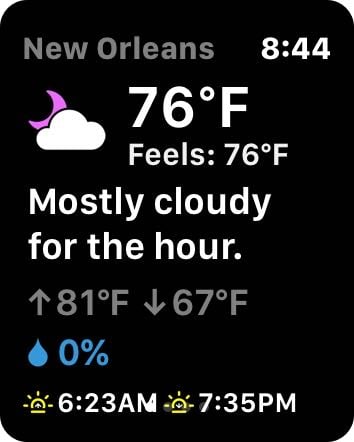
There are lots of different weather apps for the iPhone, and the competition has encouraged many developers to create unique approaches to the user interface. Forecast Bar is a great weather app that lets you customize most aspects of the user interface. Better yet, the app brings this customization to the Apple Watch, which I love because there are currently only limited ways to modify the interface of an Apple Watch.
iPhone
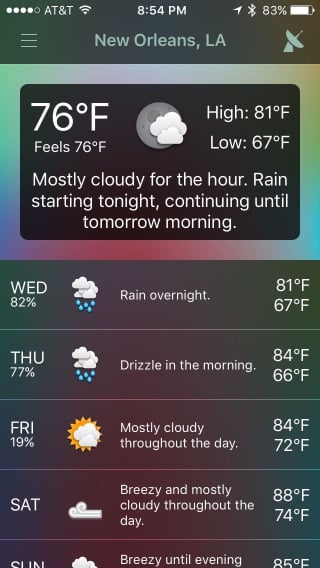
The main screen of the iPhone shows you the city at the top, then has a rectangle with a summary, and then has information on upcoming days. The weather data comes from Dark Sky, a reliable source of weather information including accurate forecasts for the next hour in your current location.
By default, the app uses a dark theme at night and a light theme during the day, but you can change that in the settings.
In fact, that is just the tip of the iceberg of what you can change in the settings.
For example, you can control what appears in the the summary rectangle. Do you want the summary to tell you about the next hour? The next two days? The next week? Do you want icons included in the summary? Do you want to real temperature or the fells like temperature? Pressure? Tomorrow’s Forecast? Wind? Do you want information to appear on one line or on separate lines? Etc. etc.
On bottom part of the main screen, there are rows with the forecast for upcoming days. Tap any row to get more information. And again, you can control what you see. Do you want lines on a graph showing you temperature changes and precipitation? Do you want hour-by-hour forecasts? You get to decide what appears.
You can even change the style of the icons in the app. I count 27 different icon styles that you can choose from.
If you have ever used another weather app for the iPhone and thought to yourself that you wish that you could just see X and Y information, without having to also look at Z, there is a good chance that Forecast Bar will give you exactly that.
Apple Watch
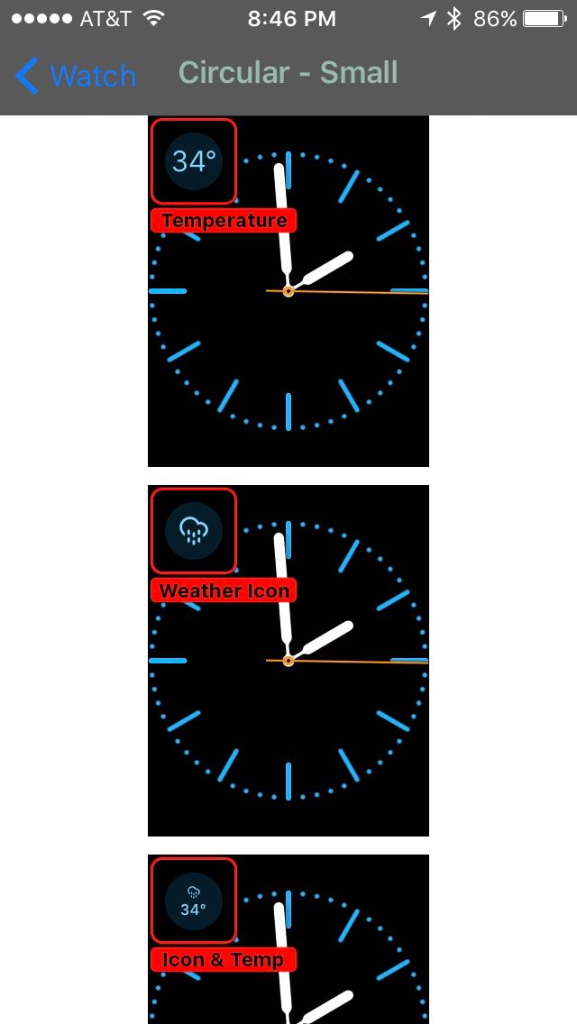
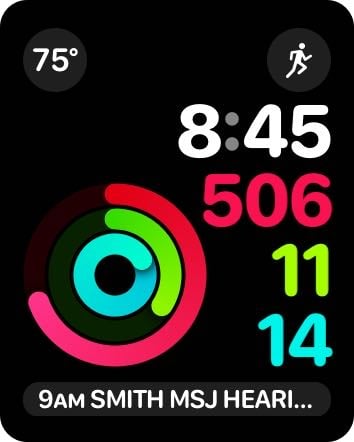
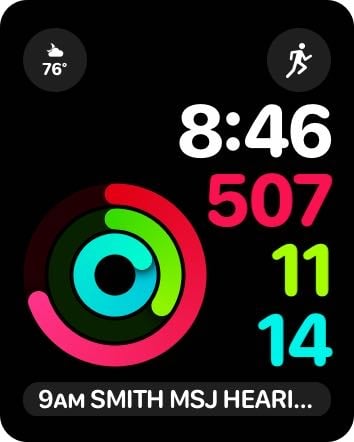
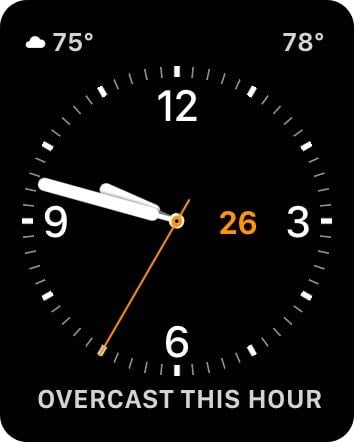
The iPhone app is nice, but what attracted me to Forecast Bar is its Apple Watch app, especially the complications. Using the iPhone app, you can customize what appears in each of the different Apple Watch complications which appear in different watch faces. For example, in the smallest version of the Apple Watch complication — which appears on circular watch faces or the Activity watch face — you can decide whether to show the temperature, a weather icon, both the icon and the temperature, the chance of precipitation, or the UV index. I thought it might be nice to show both the icon and the temperature, but number is a little small to read for my eyes.
If you use the Utility face, there is a place for an even wider complication at the top left, plus a place for a line of information at the bottom. With the extra space, I think it is reasonable to use both the icon and the number together. And you have lots of control over what appears in the text strip below the watch, such as temperature-high-low or a summary forecast.
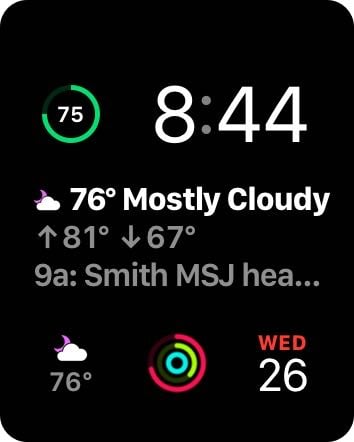
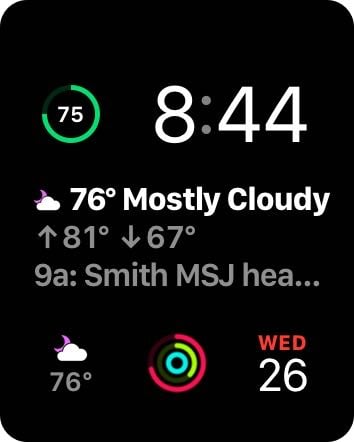
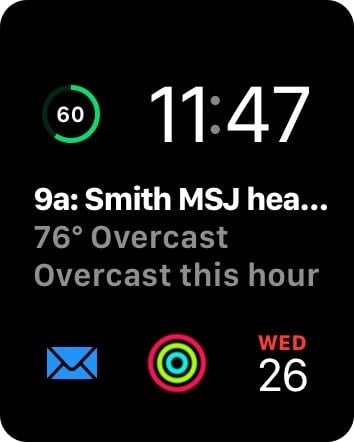
The modular clock face includes a large area with three lines of text in the middle. Forecast Bar lets you control each one of those lines individually.
I am still trying to determine which combination of information I like best. One nice feature is that you can have one of the lines display your next appointment (or next to do item). Before I started using Forecast Bar, I would use either the Calendar or Fantastical complication in that middle area. With Forecast Bar, I can get the same information about my next appointment (in a more abbreviated fashion) while also getting detailed information about the weather.
I’m far from done with playing with all of the different configurations that are possible with Forecast Bar, and who knows which configure I will ultimately decide to use.
In addition to customizing the face, you can also control how often the Apple Watch gets updated weather information from Forecast Bar on your iPhone. The normal mode is about once every 45 minutes, but you can also change this to 30 minutes or one hour. Faster updates just use up a little more of your battery life. If you lift your Apple Watch to look at the watch face, it typically forces an update at that time too, but of course it is better if the current information is already there. So far, I’ve kept mine set to Faster updates, and I seem to have more than enough battery to handle that every day.
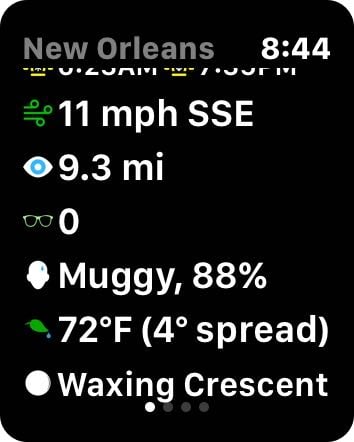
Whenever you tap on the Forecast Bar complication, you launch the app on your watch, which has a lot of detailed information about the current weather and the forecast.
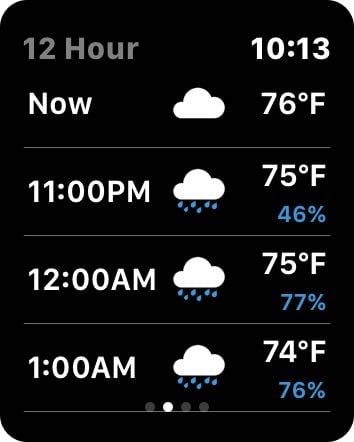
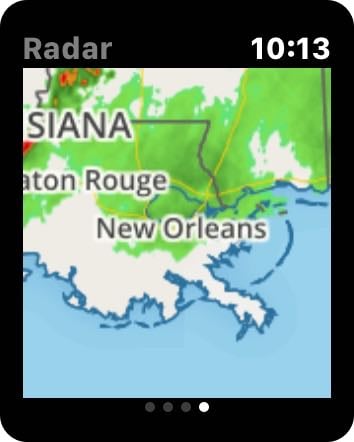
Swipe to the right to see a 12 hour forecast, then a five day forecast, then a radar image.
I am really amazed at the degree of customization for the Apple Watch. I’ve never seen any other app — weather app or otherwise — that gives you so much control over the specific information in every type of complications on the watch face.
iPad
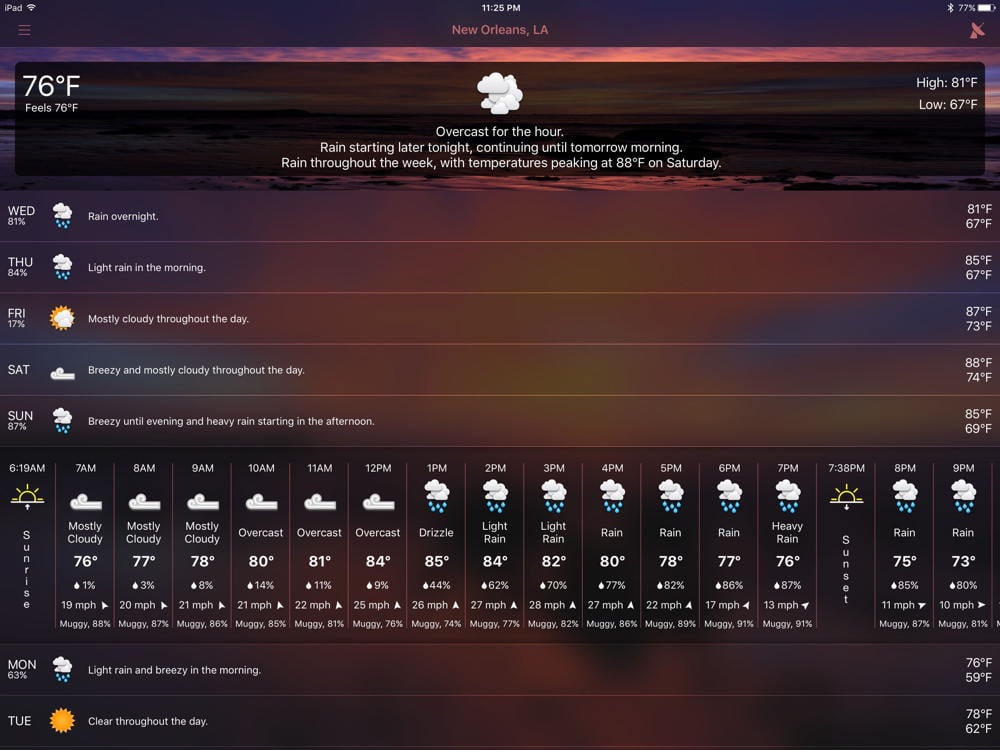
Forecast Bar also works on the iPad, using a layout similar to the iPhone, but the wide screen makes it easier to see detailed hourly forecasts.
I see that the weather should be nice for Jazz Fest this Saturday, but it looks like a rainy Sunday — which is not good news for all of us looking forward to the performances by Dr. John and Tom Petty that day. Hopefully the Sunday forecast will change over the next few days!
But that’s not all
The app also includes a widget for the iPhone and iPad. You can configure alerts if you want to use those. If you also use Forecast Bar for the Mac, and if your Mac is running, you can even configure the app so that when the Mac learns that it is about to start raining in the place where your iPhone is located, the Mac send a notification to your iPhone. (I haven’t tried this feature yet.)
The app also features what it calls a Time Machine feature, which lets you check the historical weather up to 70 years in the past, or you can see what the weather is predicted to be up to 70 years in the future. I’m not sure how much faith to put in the fortune telling aspect of Time Machine, but I asked the app about April 30, 2016 in New Orleans, a day which saw the heaviest rain that I have ever seen at Jazz Fest, and sure enough the app reports that there was heavy rain in the afternoon.
Conclusion
Forecast Bar is a very nice iPhone weather app, and is an excellent Apple Watch weather app. I hope that this app inspires other developers to do more with their own Apple Watch apps. You can download Forecast Bar and use it for free for a week, but to maintain all of the features you then need to pay $2.99 a year for the iPhone version, or $4.99 a year for the iPhone + Apple Watch version. (It uses the subscription model, so it automatically renews every year, but you can cancel at any time.) It took me less than 24 hours to realize that I wanted to subscribe to the iPhone + Apple Watch version of this app, and I have really enjoyed using this app.
I’ve been traveling this week, and one of my trusty companions is my set of AirPods. I love being able to listen to music and podcasts, often using both AirPods, but when I want to listen to audio while also being able to hear the outside world, I just wear one of them. I just got the audiobook version of Daniel Suarez’s latest book Change Agent, and I look forward to using my AirPods to listen to that this weekend. Even though AirPods have now been out for many months, they are still very hard to buy, as noted by John Gruber of Daring Fireball. But if you think that they might appeal to you, I encourage you to buy a pair. Jason Snell of Six Colors explains his thoughts after using AirPods for four months, and I agree with most of what he says, except that in my experience, my ability to use AirPods on a plane depends upon what I am doing. For music and many podcasts, AirPods are loud enough even with the background noise of a plane. But for some movies and TV shows, I agree with Jason that the volume isn’t quite loud enough to overcome the background noise, so I instead use a wired set of headphones that fit more snugly in my ears and thus block out some external noise. And now, the news of note from the past two weeks:
Legal technology expert Brett Burney recently gave a presentation called Top 10 Apps for Lawyers for MyCase. You can watch the presentation and learn about all of the apps that he recommends in this post on the MyCase Blog.
Also on the MyCase blog, New York attorney Nicole Black writes about a presentation at ABA TECHSHOW regarding iPad Tips for Lawyers.
California attorney David Sparks discusses whether it is necessary to take a laptop when traveling, or whether the iPad is enough. Except for the times that I have gone to trial, I have not travelled with a laptop since 2010, instead relying upon my iPad. I’m out of town as I type this post, using my iPad Pro in split screen mode.
In an article for Macworld, Jason Snell says that using ApplePay still feels like living in the future, even though it has been out for two years now. I agree; every time I have the opportunity to pay for something with my watch, it still makes me smile.
And finally, Apple’s new Apple Park campus is nearing completion. Here is a cool drone video showing the state of the construction, both during the day and at night. It looks very neat:
Keynote is one of my favorite apps for the iPad. It is a both easy to use and incredibly powerful, and it lets you create fantastic slides for presentations. Best of all, it doesn’t take much work in Keynote to create slides that are much better looking the standard PowerPoint slides that most other attorneys use, so when you use Keynote, your slides are more likely to grab the attention of your audience. Moreover, it is very easy to give a presentation using Keynote and an iPad. All you need is a small dongle sold by Apple to connect your iPad to either a VGA or HDMI cord that connects to a projector.
Since September of 2013, Apple has made its iWork apps (Keynote, Numbers, Pages) and other apps such as iMovie free for anyone who purchased a new iPhone or iPad. I suspect that includes most of you, but as of yesterday, it now includes all of you. As reported by Juli Clover of MacRumors, Apple has now made its Keynote, Numbers, Pages, iMovie and GarageBand iOS apps free for everyone.
If you want some help getting started with Keynote, three years ago I reviewed a e-book by California attorney David Sparks called Presentations. That book has lots of timeless general advice on giving presentations, but also includeds a fantastic guide to making the most of the Keynote app. New features were added to Keynote since David wrote that book, but I skimmed through the book again last night and most of the advice is just as useful with the current version of Keynote for the iPad.
As for the other apps that Apple made free along with Keynote, I don’t think that Pages would be of interest to most lawyers — Microsoft Word is the word processing app that you want for your iPad. But Numbers is a nice app for creating simple spreadsheets, and you can also quickly create some nice looking charts with the app. I use Numbers for every chart that I use on iPhone J.D., and also for the charts that I use in my Keynote presentations. iMovie and GarageBand are nice apps if you want to create a movie or music, and I’ve enjoyed using both of them just for fun, but I haven’t had a reason to use either in my law practice.
For lawyers, Keynote is the gem in the bunch that Apple made free yesterday. Whether you are teaching a CLE, giving a presentation to a client, or preparing a closing argument, Keynote for iPad is a fantastic app for creating and presenting interesting slides. Now that the app is free for all, you should definitely check it out.
At its developer conference in June of 2013, Apple revealed that it was developing a way to display information from an iPhone on a screen in a car. In March of 2014, Apple announced that this technology would be called CarPlay. The first car to use CarPlay was the Ferrari FF released in September of 2014. However, automobile manufacturers were slow to add CarPlay support. By January of 2016, there were 100 models from 21 brands that either already had CarPlay or which had CarPlay support coming later in 2016. Today, there are just over 250 models from 41 brands supporting CarPlay. Toyota and some other brands still don’t support CarPlay at all, some brands only support it in one or a few models, and you often have to get a higher-priced version of a car model to get CarPlay support. Add to this the fact that most folks go many years between buying a new car, and the net result is that the vast majority of people are not driving cars with CarPlay support. I hadn’t even talked to anyone using CarPlay in their own car until I started shopping for a new car earlier this year and I heard car salesman describe how they were using this technology. A few weeks ago, I bought a new car with CarPlay — a 2017 Honda Accord (Touring) — so I have finally had the chance to try out CarPlay myself. I absolutely love it, and I recommend that you look for CarPlay support the next time that you buy a new car. You will want to have this.
How it works
CarPlay may be an option that you need to select on a new car, but the car itself has relatively little to do with CarPlay. The car just provides some basic hardware — a color touchscreen, a button to control Siri, and traditional buttons to support audio playback. In virtually all car models, CarPlay uses a USB port, and you plug your iPhone into that port using a USB-to-Lightning cable.
The cable means that your car can charge your iPhone’s battery while you drive, which is nice. But more importantly, the cord lets your iPhone control what is showing on the CarPlay screen. You see, the brains of CarPlay comes from your iPhone, not your car. It is fair to think of CarPlay as just an external monitor for your iPhone, albeit one with touch controls. It was smart for Apple to design CarPlay this way. It means that Apple has complete control on the CarPlay interface. It also means that every time that Apple updates iOS, it can improve CarPlay. Thus, with CarPlay, your car becomes just an accessory for your iPhone. A really expensive accessory. If you own an Apple Watch and you use it to control your iPhone – such as using the Now Playing app on an Apple Watch to play/pause/FF/RW music coming from your iPhone — CarPlay is the same idea.
Here is what the CarPlay screen looks like in my 2017 Honda Accord when connected to my iPhone 7 via a USB-to-Lightning cord:
Note that on the far left of the screen, there is a strip of buttons that says “Home” at the top, then some volume controls, and a “Back” button at the bottom. That is not CarPlay; those are Honda-specific touchscreen buttons right next to the CarPlay screen. Everything else in that center screen is CarPlay.
My Honda Accord also features some buttons on the left side of the steering wheel that can be used to control certain CarPlay functions: a RW and FW button, volume up and down buttons, and a button that you hold down to activate Siri:
Some cars also have a physical knob that can be used to scroll through a list on a CarPlay screen, but my car doesn’t have that feature.
Apple also makes a wireless version of CarPlay that uses Bluetooth and Wi-Fi so that your iPhone can control the CarPlay screen and receive input from the car without a USB-to-Lightning cable. I believe that the BMW 2017 5-Series is the only shipping vehicle that currently supports this feature. I can see how this might sometimes be useful, such as for a very short trip when you don’t want to bother with a cord, but I don’t consider it a problem to plug in my iPhone to make CarPlay work. In fact, I prefer plugging in so that I can charge my iPhone. I’ve been using Bluetooth to play audio in my car since 2010, and while I could use Bluetooth audio without plugging in my phone, I virtually always plugged in my phone anyway just to charge while I was driving. Thus, while I expect that it will be a while before we see more widespread adoption of the wireless version of CarPlay, I think that most folks would, like me, be perfectly satisfied with the wired version of CarPlay currently in use.
It is also possible to add CarPlay to an older car by purchasing and installing a video screen that works with CarPlay. Note that some older and less expensive CarPlay screens use a resistive touchscreen, which means that you need to push and apply pressure to select an option on the screen. Newer screens use a capacitive touchscreen which works when your finger makes contact with the screen without having to push down. The 2017 Honda Accord has a capacitive touchscreen.
Using CarPlay
Starting CarPlay is incredibly easy. Just start your car and attach your iPhone to the USB cable, and CarPlay starts on the screen. If you were previously playing a song, podcast, etc., CarPlay will sometimes resume playback, but not always; I haven’t yet figured out what makes that happen automatically. If the audio didn’t start right away, just tap the play button (the arrow) in the middle of the CarPlay screen.
It is my intention today to discuss CarPlay, not the Honda Accord-specific implementation of CarPlay. Nevertheless, I will mention one minor gripe that may not exist on some other cars. When I start my car, I first have to wait for Honda’s built-in entertainment system to start, and then after that is done CarPlay can start. As a result, it takes a good 20-30 seconds after starting the car for CarPlay to be fully operational. No, that’s not a very long time and certainly isn’t a deal-breaker, but I’d be happier if CarPlay started far more quickly. I’ve seen complaints about CarPlay starting slowly on other cars too so I know that this isn’t unique to the 2017 Honda Accord.
CarPlay has a main app screen that you can access by tapping the home button at the bottom left of any screen. From here, you see a list of apps on your iPhone that support CarPlay. Swipe left or right on the CarPlay screen to switch between screens, just like you would do on an iPhone or iPad.
You can change the order of these apps by opening the Settings app on your iPhone and going to General -> CarPlay.
These apps are not actually living inside of that CarPlay screen; they are just projections from apps on your iPhone. Thus, if you are using one app in CarPlay and you pick up your iPhone to switch to another CarPlay-compatible app, CarPlay will switch as well. If you switch to an app that doesn’t work with CarPlay, the CarPlay screen will stay on the home screen while you use that app on your iPhone. Tap an app on the CarPlay screen and it will exit the app you had been using on your iPhone and will launch the corresponding app on your iPhone. Thus, you cannot use one app on your iPhone while simultaneously seeing a different app on the CarPlay screen.
Whether you are on the home screen or using an app, there is always a thin bar in the left side of the screen. The bottom shows you the time, Wi-FI or Cellular signal strength, and the home button. The top of the screen has three buttons which correspond to the most recent audio, map and phone app that you have used. There are many different CarPlay audio apps right now, but currently CarPlay only supports Apple’s Maps app and Apple’s Phone app. Thus, those top three buttons will always show the Maps and Phone icons; only the third icon changes to show your most recently-used audio app. The order of those three apps is based on how recently you used each app. These three icons give you a way to quickly launch those apps without having to first go to the Home Screen.
Audio
Perhaps the best part of CarPlay is the interface that it provides for listening to audio in your car, using a CarPlay-compatible audio app on your iPhone. For example, if you are playing music from the iPhone’s built-in Music app, that app projects a corresponding Music app onto CarPlay.
Every audio app supports a Now Playing screen. Here is what it looks like when playing a song from the Music app:
The background displays (very faintly) the album art. The on-screen controls are fairly self-explanatory. If you are playing songs from a playlist, the top left shows you the name of the playlist; otherwise, it just says “Playlists” and tapping it will bring you to the list of playlists. There are traditional buttons to play/pause/FF/RW. Instead of those on-screen buttons, you can also use whatever hardware buttons are available. In my car, there are buttons on the left side of the steering wheel. It is nice to shuffle all of the songs on my iPhone and have the ability to quickly skip any song that I am not in the mood to hear by just pressing the FF button on my steering wheel.
Tapping the three dots at the bottom gives you the option to love or dislike a song and the option to create a custom radio station based upon that song:
Third-party audio apps can also take advantage of CarPlay. I use Overcast to play podcasts on my iPhone, and there is a corresponding CarPlay version of the app. Here is what the Now Playing screen looks like in the Overcast app:
I can see information on the podcast currently playing including how much time is left, podcast artwork is displayed in the background, and the FF and RW buttons can be used to jump forward or backward in a podcast. Overcast lets you set how much; I have the FF button set to 30 seconds forward to help me quickly skip through commercials that I don’t want to hear, and I have RW set to 15 seconds so that I can go back when I jumped forward too far. The ability to FF and RW through a podcast using the hardware buttons built-in to the steering wheel is incredibly useful.
The Now Playing screen is the most important part of any audio app. For that reason, there is actually a special CarPlay app called Now Playing that will quickly show you the Now Playing screen of your most recent audio app. But audio apps can support other screens as well. For example, in the Music app, you can also see a list of artists, playlists, etc. and select something new from there, and there is an Up Next screen so you can preview songs about to be played.
In the Overcast app, there are screens to let you select a different podcast, a different playlist, or a specific episode.
Apple has an Audiobooks app, and Amazon makes an Audible app, either of which can be used to play audio books. It won’t surprise you to learn that using CarPlay to listen to an audio book works much, much better than the books on tape that I listened to back when I was in college.
I have always enjoyed listening to audio from my iPhone in my car. With CarPlay, the experience is so much better because the big screen makes it easy to see and control what I am listening to.
Maps
As noted above, CarPlay currently only works with Apple’s Maps app. I cannot think of any technical reason that Google Maps, Waze, and others wouldn’t work with CarPlay, but considering that Google makes the competing Android platform, perhaps Google just doesn’t want to do anything to improve CarPlay.
Fortunately, Apple’s Maps app has improved substantially over the last few years, and it works well on CarPlay. You can use Siri, your iPhone, or the CarPlay interface to choose a destination. Then you get turn-by-turn directions, along with Siri voice prompts.
You cannot pinch to zoom in or out on the CarPlay screen. Instead, you can double-tap to zoom in, and there are also plus and minus buttons on the bottom right to zoom.
While you are driving, Maps switches to a 3D view.
Much like the Maps app on the iPhone itself, Maps on CarPlay can even suggest certain nearby establishments such as gas stations, restaurants, or grocery stores. There is also a button to show recent destinations.
At night, Maps automatically switches to a darker interface.
The experience of using Maps in CarPlay is similar to the experience of using Maps on an iPhone when you have an iPhone in a prominent position using a car mount. But with CarPlay, the screen is bigger and built-in to your car, and buttons are bigger and easier to tap. Thus, it is a nicer experience.
Phone
Although CarPlay supports the Phone app, I haven’t found it much more useful than just using the older Siri Eyes Free technology with Bluetooth. To place a call in my old car, I could activate Siri, tell it to call my wife at home, and the iPhone would do so. With CarPlay, the experience is very similar, except that now I can use the CarPlay screen to see what is going on.
CarPlay is more helpful when you are receiving a call because you can see the name of who is calling you on the screen. I wish that CarPlay also showed the caller’s picture. When CarPlay was first announced in 2013 (back when it was still called iOS in the Car), Apple showed a demo of the technology in which a photo of the caller appeared on the screen:
I’m not sure why Apple didn’t yet implement that feature. CarPlay does have access to the photo portion of a contact; if you use the Phone app in CarPlay to browse your list of contacts, you see the person’s picture in that part of the app (assuming that you assigned a picture to a specific contact).
Messages
My experience with Messages is similar to my experience with Phone: the CarPlay screen adds a nice improvement over Siri Eyes Free, but it is not a fundamentally better experience.
When I first saw the Messages app on the CarPlay screen, I thought that it might display the words of a text message on the screen. But of course, that would be incredibly distracting for a driver, could lead to accidents, and would be illegal in many states. Instead, the Messages app provides a way for CarPlay to read your message out loud, and a way for you to dictate messages.
There is not a CarPlay version of the Mail app. You can still use the traditional Siri Eyes Free commands to work with your emails, such as asking Siri to read you your newest email, but nothing will display on the CarPlay screen.
Conclusion
The menus on built-in entertainment systems in cars are notoriously horrible. Perhaps the best feature of CarPlay is that you get the good taste of Apple’s approach to design on the screen of your car. In my new car, there are lots of things that I could do on the built-in screen (listen to traditional radio, play a CD, listen to SiriusXM, etc.), but I suspect that over 99% of my use of that screen will be devoted to CarPlay.
For me, the ability to use audio apps — especially Overcast and Apple’s Music apps — is by far my favorite part of CarPlay. But the CarPlay screen is also very useful for Maps, and is somewhat nicer for other functions too. And because CarPlay is controlled by the iPhone, I love that the technology can improve as Apple releases new versions of iOS and new versions of the iPhone. After just a few weeks of using CarPlay, I would never want to use a car that didn’t have it. CarPlay works well, is very useful, and makes it much more enjoyable to drive your car.
Yesterday, Apple released its new Clips app for the iPhone. This fun, free app lets you create short videos to share with others via Messages, email or a social network. Click here to download it from the App Store. Joanna Stern of the Wall Street Journal explained how to use the app, but even more useful is the short video that accompanies her article showing you how to use the app. Rene Ritchie of iMore also has useful tips for using Clips. And now, the news of note from the past week:
You may be thinking that the new Clips app is only useful for people who are into Selfies. That is certainly how Apple promotes the app, and I’m sure many folks will use it that way, to share videos of themselves talking about things on camera. But you can also use the Clips app to send a message without using a photo or video of yourself, as I demonstrate in this short video:
Florida attorney Katie Floyd has tips for using iPhone apps and accessories to manage packages that are coming your way. One of the apps that she discusses is Deliveries, and I use that one all the time.
Rene Ritchie of iMore reviews the new Fifth Generation iPad. As he notes, that iPad lacks many of the features of the iPad Pro, but the low cost will make it worth it for many folks.
In light of the recent decision by Republicans in Congress, in a party-line vote, to remove privacy protections, your Internet Service Provider can now sell or otherwise disclose your Internet browsing history, app usage, and other information that you might want to keep private. Brian Fung of the Washington Post explains the vote. You can potentially restore some of your privacy by using a VPN, so Mark Smirnitois recently updated his post on The Wirecutter explaining the best VPN options.
Joe Caiati of The Sweet Setup says that if you want to use your Apple Watch to track your sleep patterns, AutoSleep is the best app.
And finally, Apple debuted a new Apple Watch commercial this week called Live Bright. The use of color in the commercial is really interesting. Here is the video, which I’m fairly certain was not created using the new Clips app:
At some point in the future, I suspect that Apple will sell an Apple Watch with a built-in cellular connection so that it can connect to the Internet even when it is not within Bluetooth range of an iPhone, and thus be more of an independent device. Even now, there are certain things that you can do without an iPhone nearby, although you run into limits. An Apple Watch can track your workout (and track your progress if you have a Series 2 with GPS), and you can even listen to music using just the Apple Watch and Bluetooth earphones (such as AirPods) if you first transfer songs to the Apple Watch. But if you want to listen to a podcast, there is no built-in way to do that without having an iPhone nearby. Of course, the absence of a feature is often a great opportunity for a third party developer, and Peter Knapp, a software developer in Germany, created Watch Player so that you can transfer podcast episodes to an Apple Watch and then play them on the Apple Watch even without an iPhone. The app works well, and it is free to use (although in-app tips are accepted).
The iPhone version of the app has one main screen with four buttons across the top. Use the button at the top right to select a podcast. You can either search for a podcast by name, or if you have a specific RSS feed you can add that URL.
Tap on any podcast name to select specific episodes to download to your iPhone, which should happen very quickly on a Wi-Fi connection.
The main screen of the Watch Player app on the iPhone shows all of the episodes which have been downloaded and are thus available to transfer to your Apple Watch. A green button indicates that an episode has already been synced; a red button indicates that it has not yet been synced.
To sync episodes, open the Watch Player app on your Apple Watch and then press the sync button at the top left of the iPhone app. Episodes will then transfer. It takes a little while to do so. For example, a 2 hour and 21 minute episode of The Talk Show (97 MB) took me about six minutes to transfer.
While the file is transferring, if you look at your Apple Watch screen you can see the progress as a percentage at the top of the screen. The same percentage also shows at the bottom of the iPhone app during transfer. The percentage is only updated when your watch screen is on, so if the screen turns off during the transfer, just tap once on the Apple Watch screen to wake the watch and update the progress indication.
Note that in the current version, you will see some bizarre numbers at the top of the screen at the very end of the transfer, due to the way that the app calculates the percentage. Just ignore that and it will go away.
Once episodes are transferred, the main screen of the Apple Watch app will show you the available episodes.
Tap on an episode to see a screen where you can start to play the episode. On this screen, you can also select to start the podcast at any particular point, useful if you have already listened to part of a podcast on your iPhone and just want to resume listening starting where you left off.
Once you press play, the podcast will begin. If you have Bluetooth speakers attached to your Apple Watch, such as a pair of AirPods, then the podcast will play through that source. Otherwise, you will just hear the podcast using the built-in speaker on the Apple Watch. There is a large play/pause button in the middle, plus smaller buttons to jump forward or backwards five seconds at a time. You can also adjust the volume.
Alternatively, if you are using Bluetooth speakers, you can use the standard Now Playing app on the Apple Watch to play/pause or control volume. However, the FF and RW buttons in the Now Playing app don’t appear to do anything when the Watch Player app is playing a podcast.
Tap the Watch Player icon at the top left of the Now Playing screen to jump to the Watch Player app.
I mentioned using this app while you are walking or jogging and you leave your iPhone at home, but it is also useful if you are listening to a podcast while you are just doing errands around the house and your iPhone is not in your pocket. You can listen to a podcast using earphones connected via Bluetooth to the Apple Watch without having to stay in the same room as the iPhone so that the earphones are close enough to the iPhone to maintain a Bluetooth connection.
I also used this app when using a treadmill inside of my house. Everything worked fine, but I didn’t see any advantage to using Watch Player when it is easy for my iPhone to be nearby.
When you are finished with an episode, you can delete it from the watch one of two ways. First, you can swipe across an episode title in the iPhone app to delete that episode, and then sync to the watch to remove it from the watch. Second, in the Watch Player app on the Apple Watch, go to the screen for a particular episode (the one with the big Play button at the bottom) and force-press on the screen. This will show the option to delete an episode.
Other options
My iPhone podcast player of choice is Overcast, and it has the option to speed up podcast playback by playing at a faster speed (I typically use 1.5x) and by removing longer pauses between words. Watch Player lacks those features, and I miss them. When you are used to hearing a person’s voice at 1.5x speed, the voice—sounds—really—slow—at—normal—speed. There is an Overcast app for the Apple Watch, but it is just a remote control for the iPhone. That’s a useful feature, but I wish that the Apple Watch app also let you download particular episodes to the Apple Watch. Maybe that feature will be added to Overcast in the future, and if it is, I strongly suspect that I would switch from Watch Player to Overcast.
[UPDATE 5/8/17: Shortly after I wrote this review, Overcast added the ability to send a podcast to the Apple Watch. I’m still testing the product, but I can already say that it has some advantages (such as syncing your spot in a podcast between the watch and the iPhone, and the ability to play podcasts at the same speed as your iPhone setting) and some disadvantages (no progress indicator for how long you have left to transfer a podcast to the watch).]
Just a few weeks ago, another app was released that does something similar to Watch Player. It is called Watchcast, and it aims to be both an iPhone app for listening to podcasts and an Apple Watch app, meaning that you can sync your play position between both devices. It has some features that I prefer over Watch Player. First, the artwork for a podcast syncs to the Apple Watch, which I like to see. Second, Apple Watch app lets you jump forward 30 seconds or jump back 15 seconds, better than the 5 seconds offered by Watch Player.
However, the current version of Watchcast has a major drawback — no progress indicator for when you are transferring a podcast to the Apple Watch. Transferring audio to an Apple Watch is very slow no matter how you are doing it; this is true even when you are transferring songs using Apple’s own music app. Thus, I consider seeing how much longer you have to wait pretty essential. Otherwise, you wonder if it is doing anything at all and feel tempted to shut down the app and start over. (Another, less important, issue is that Watchcast doesn’t work with the Now Playing app.) If Watchcast is ever updated to add a progress indicator, such as a percentage like Watch Player uses or even just a progress bar, then I’ll take a closer look at Watchcast, but this omission makes the current version less appealing to me than Watch Player.
Conclusion
For now, Watch Player is a perfect solution to the problem of playing podcasts on your Apple Watch without having to also carry around your iPhone. This past weekend, I went jogging on historic St. Charles Avenue in New Orleans, watching the streetcars pass and looking at the beautiful live oak trees overhead. My Apple Watch was on my wrist and my AirPods were in my ears, but I didn’t have any other electronics with me. Not carrying my iPhone meant that I was cut off from electronic communication with the world — no phone calls, text messages, emails, etc. — but that isn’t necessarily a bad thing when you are exercising. Thanks to the Watch Player app, I was able to listen to a brand new podcast as I looked at interesting houses on St. Charles Avenue built in the 1800s.
Brett Burney makes his living helping lawyers make the most of technology in their law practices. He is also a former chair of ABA TECHSHOW, very smart, and an all-around nice guy. He recently launched a new podcast called the Apps in Law Podcast in which he interviews lawyers and other legal professionals about one of their favorite apps. Each episode is short, focused, and full of great information. For any iPhone J.D. reader who enjoys listening to podcasts, this is a good one and I encourage you to subscribe.
I mention his new podcast today because I was a guest on Episode 4. It was hard to pick a single app to discuss — there are so many that I love! — but I selected 1Password because it is incredibly useful, a delight to use, and with all of the security issues that we read about in the news every day it is incredible important. (My review.) You can listen to Episode 4 in your web browser by clicking here. But I recommend that you instead subscribe to the podcast using your podcast player of choice. That way, you can hear all of the future episodes, and the three great episodes that have already aired:
Episode 1: Ohio attorney Chad Burton discusses the Mail app.
Episode 2: Maryland attorney Neil Tyra discusses Daylite.
Episode 3: Illinois attorney Nerino Petro discusses Trello.
By the way, if you are trying to select a great podcast app for the iPhone, I recommend Overcast. And if you want to learn more about Overcast, Brett just posted an entertaining video review of Overcast on his Apps in Law website. Not only does that video show you the great features of Overcast, it also provides a brief history of podcasts. So if any of you don’t yet listen to podcasts, I recommend that you watch that video just to see what all of the buzz is about.
Thanks, Brett, for creating this podcast and for providing attorneys with such a valuable resource for learning about how to make the most of their iPhones.
Click here to subscribe to the Apps in Law podcast using Apple’s podcast app:
I love using my AirPods with my iPhone. They weigh nothing, you don’t have any cords to worry about, and it is nice to wear just one of them if you are half-listening to music or a podcast while you also want to hear what is going on in the outside world. But some people prefer a soft rubber tip versus the hard tip of each AirPod, and even I will admit that I miss having buttons on a cord to play/pause, FF, RW, etc. If those issues are more important to you than the advantages of AirPods, I’ve heard great things about Apple’s BeatsX headphones. Just this week, a friend was raving about them to me. If you are in the market for Bluetooth headphones and you are looking at the AirPods, you should also consider whether BeatsX is a better choice for you. To help you make that decision, this week Susie Ochs of Macworld reviews Apple’s BeatsX headphones, and she really likes them compared to the AirPods. And now, the news of note from the past week:
FlightTrack Pro used to be one of my favorite travel apps. It would tell me when my airport gate had changed before anyone else knew about it, and was a great source of information on flights. Alas, the app is no more, but David Pogue of Yahoo discusses other apps that do something similar, and found some good options.
Bryan Wolfe of AppAdvice reviews the Griffin iTrip Clip, a device that turns any traditional headphones into Bluetooth headphones.
Jason Snell describes 25 cool things that you can do with Workflow, an automation app that Apple recently acquired. There are some neat tips in here, many of which I use frequently.
Snell also discusses the new iPad, and what it might tell us about other future Apple products, in an article for Macworld.
Chance Miller of 9to5Mac reports on what at first sounds like good news — President Trump is no longer tweeting from his Android phone. But that’s only because he switched to an iPhone.
And finally, Apple released three new iPad Pro ads this week, more in its line of finding real tweets on Twitter and turning them into an ad (using an actor instead of the original tweeter). The new ones are Light and Powerful, the almost-but-not-quite-racy All Your School Stuff, and All Day Battery. Here is the All Day Battery one:
As a litigator, I frequently need to calculate dates. I often just ask Siri to do the calculation — “Hey Siri, what is 65 days after April 4?” — but it is nice to see all of this worked out on a calendar, especially if you need to adjust dates. Time Jump is a date calculator app that has a slight learning curve when you first start using it, but the app lets you do some pretty sophisticated date calculations. The developer of the app sent me a free code to try out this $2.99 app. I’m impressed, and I recommend the app for attorneys.
Basic features
You use Time Jump in landscape mode because the app mostly consists of a single screen with a calendar on each side of the screen. When you start the app, both calendars are set to today. If you tap a date in the future on the right side, the app calculates the difference between the days. If you tap a date in the past on the left side, the app does the same thing. (The calendar on the left always has to have a date on or before the calendar on the right.) Change a month either by swiping up/down or left/right.
The main calculation done is the difference between the two dates. If I tap March 30, 2017 on the left and April 25, 2017 on the right, Time Jump tells me that those two dates are 26 days apart.
Time Jump also tells me that those two days are 17 business days apart. Business days are calculated by excluding weekends and, if you have any holiday calendars selected, by excluding holidays. You can adjust all of this in the app settings, accessed by tapping the gear at the bottom of the screen. For example, if your business week runs Tuesday to Saturday, you can tell the app to exclude Sundays and Mondays when calculating business days.
Date Calc
For me, the most useful function of any date calculator is the ability to count days in the future, which this app calls “Date Calc.” For example, let’s assume that today I received a favorable decision from a state appellate court, and I want to know when the 30 days will run for my opponent to file a writ with the Louisiana Supreme Court. Yes, I can manually count 30 days in my head (after reciting the “30 days has September” rhyme), but it is better to see it clearly shown and calculated on an iPhone screen.
On the left side, I select March 30, 2017. That’s easy to do by just tapping on that date on the calendar, but you can also double-tap on the large number above the left calendar to bring up a date wheel to quickly jump to a specific date.
To select the number of days forward that you want to count, tap the top middle of the app, and a screen comes up to select 30 days. (The default is to count by Days, but you can also count by Business Days, Weeks, Months, or Years.).
Even before you tap done, you can already see the 30th day in the top right. To see this day on a full calendar, tap done. Here, I see on the calendar on the right that the 30th day is April 29, which is on a Saturday. Thus, I know that the real filing deadline would be Monday, May 1.
Holidays on a calendar are marked with a blue dot under the day, so if for example I were to see that the 30th day was on a day with a blue dot, I would know that the actual deadline is the following day.
If you tap on a day in either calendar, the date is shown in a large number above that calendar. Tap on that large number to see more information on that day, including an explanation of why it is a holiday (if applicable), the day of the year, the week of and the month of the year.
Holidays
Holidays can be complicated to account for in any date calculator, but they are handled very well in this app. First, there are lots of built-in lists of holidays to choose from. The Federal (standard) list includes all of the major holidays. Tap the words “Federal (standard) to see the specific dates on that list, and you can manually turn on or off any of those holidays if they do not apply to you.
The Federal (optional) list includes holidays they are typically not work holidays, such as Flag Day and Halloween.
There is also a full set of U.S. State holidays that you can optionally enable. Here in New Orleans, for example, Mardi Gras is a work holiday for virtually everyone, and the Louisiana list includes Mardi Gras and Good Friday. If you need to select a day as a holiday which is not on any of the app’s lists, you can designate any other day using the Personal Day Off feature, which is fully described on the Time Jump website.
As a test, I decided to configure Time Jump to correspond to the court holidays of the Civil District Court for the Parish of Orleans (New Orleans, LA). There is a complicated Louisiana statute which governs holidays, La. R.S. § 1:55(E), but it is easier to just look at the page of the CDC website that lists the holidays. To accomplish this, I turned on the Federal (standard) list which gave me most of the holidays (except that I needed to turn off Columbus Day which is not a holiday here). Then I turned on the Louisiana list, which added Mardi Gras day and Good Friday as holidays. Finally, I needed to manually add holidays for All Saints Day, the day after Thanksgiving, and the day after Christmas.
Your own calendar
In the Settings portion of this app, you can choose to show events from your own Calendar. Doing so is a two-step process. First, turn on the switch next to Show Events From iPhone Calendars. Next, tap the words “Show Events Form iPhone Calendars” to select which of your calendars to show in Time Jump.
You will now see green dots on days on which you have events on your own calendar. If you are like me, you’ll have a green dot on just about every day. But this is still useful because, for example, if you do a date calculation and determine a filing date, you can look at your calendar and see that you are already scheduled to be in a deposition all day long, and thus you can plan accordingly.
Conclusion
The interface of this app seems a little clunky at times. For example, it took me a while to figure out that, in the app settings, you often need to tap on the words in the title of a setting to get more options. That wasn’t intuitive to me. But I’m willing to live with the problems with the form of this app because the function is quite useful. This app lets you perform pretty sophisticated date calculations, and the dual-calendar layout and indications of holidays makes it easy to figure out what is going on. Time Jump is now my go-to app for date calculations on the iPhone.