

The 2026 edition of the iPhone is the iPhone 18 Pro and iPhone 18 Pro Max. Yes, there is also the new iPhone Duo, coming out next month, but it’s a different kind of device: not quite an iPhone, not quite an iPad. For the latest generation of the type of iPhone that we all know and love, this is it.
For the fourth year in a row, I’ve purchased the iPhone Pro with a larger screen: the Max version. Many years ago, it took me a little while to get used to a larger iPhone in my hand. Now, I prefer the bigger screen, partly because my eyesight is far from 20/20 and it is nice to have everything just a little bit bigger on my screen. Of course, some folks prefer the Max version because it lets you see more at once.
I received my iPhone 18 Pro Max this past Friday morning, and I’ve been using it extensively since then. In this post, I’m calling this new iPhone the “iPhone 18 Pro” for ease of reference; I’ll use “iPhone 18 Pro Max” only when pointing out differences between the two models with different sizes.
The upgrade process
When you upgrade to a new iPhone, you can restore from an iCloud backup or transfer data directly from another device. The iCloud backup route lets you use your new iPhone immediately, but it takes longer to move everything over. This year, I opted for the direct transfer method. At first, I thought I’d made the wrong choice when I was warned it would take almost seven hours. But instead, it took just a little more than two hours. When the process was done, just about everything was ready to go. All that remained was letting my iPhone download third-party apps from the App Store, which took about 20 minutes, and then configuring my new device to work with my law firm’s VPN. I’m glad that I went this route.
Variable aperture
The iPhone 18 Pro looks virtually identical to the iPhone 17 Pro. Other than the new colors available this year, the only visible exterior change is that the main camera has a variable aperture. In other words, the iPhone can adjust the size of the hole in the lens through which light passes into the camera. The variable aperture is hard to see, but if you look very closely (and perhaps shine a flashlight on the camera), you can see it.
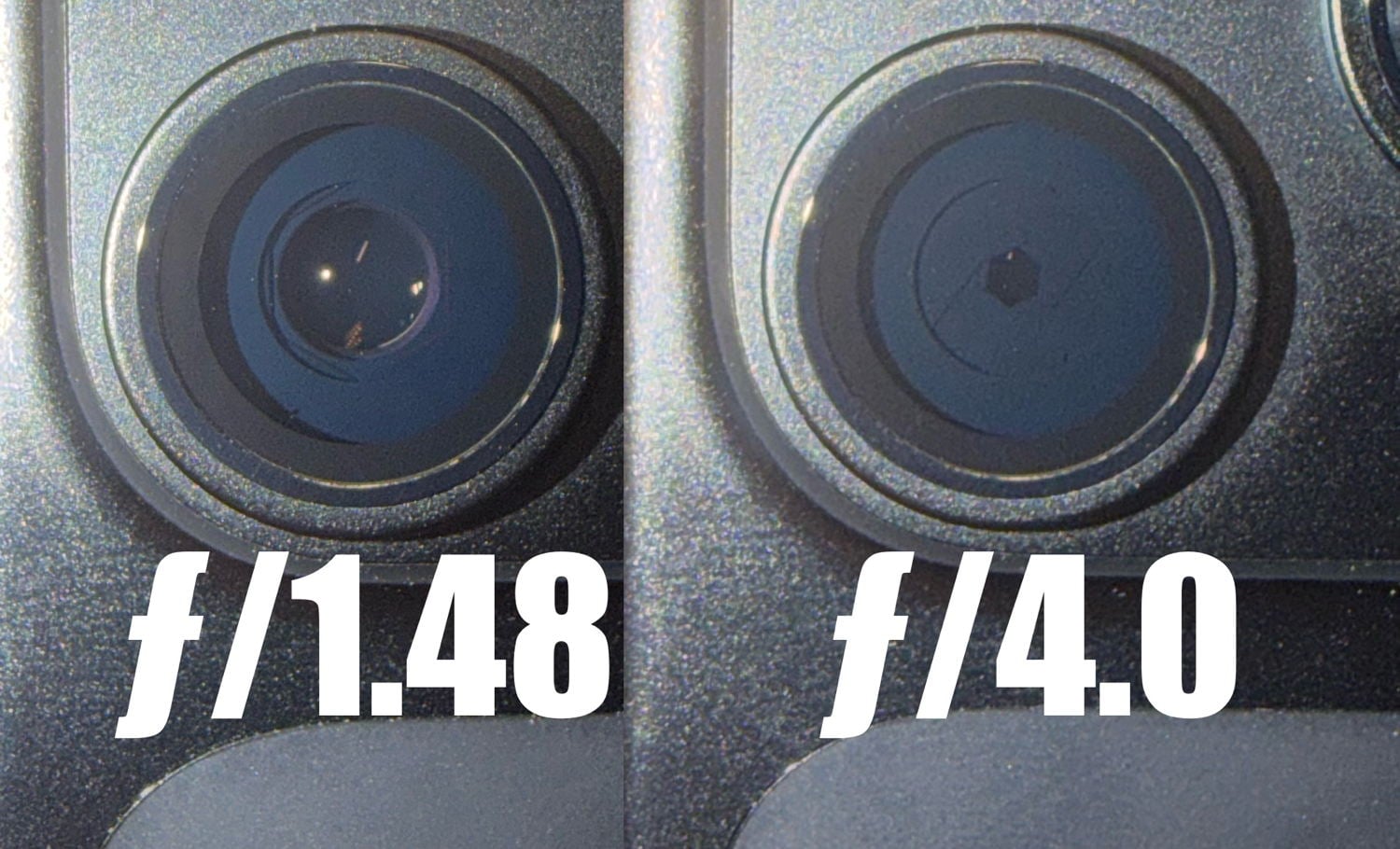
The iPhone’s Photos app automatically selects the aperture it deems best for the photo you are taking. However, a new iOS 27 feature lets you choose which photo controls appear at the top of the app, if you want to adjust the aperture yourself.
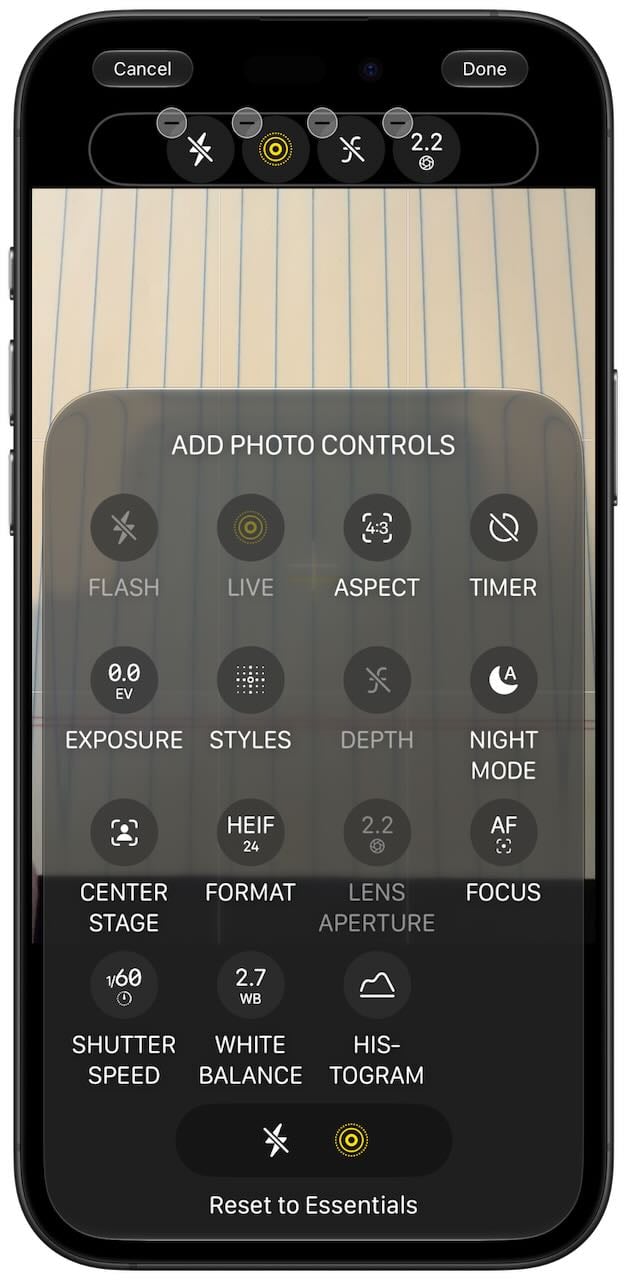
If you select the Lens Aperture control, you can tap that icon when taking a picture to manually choose between focal lengths of ƒ/1.48, ƒ/1.8, ƒ/2.8, and ƒ/4.0.
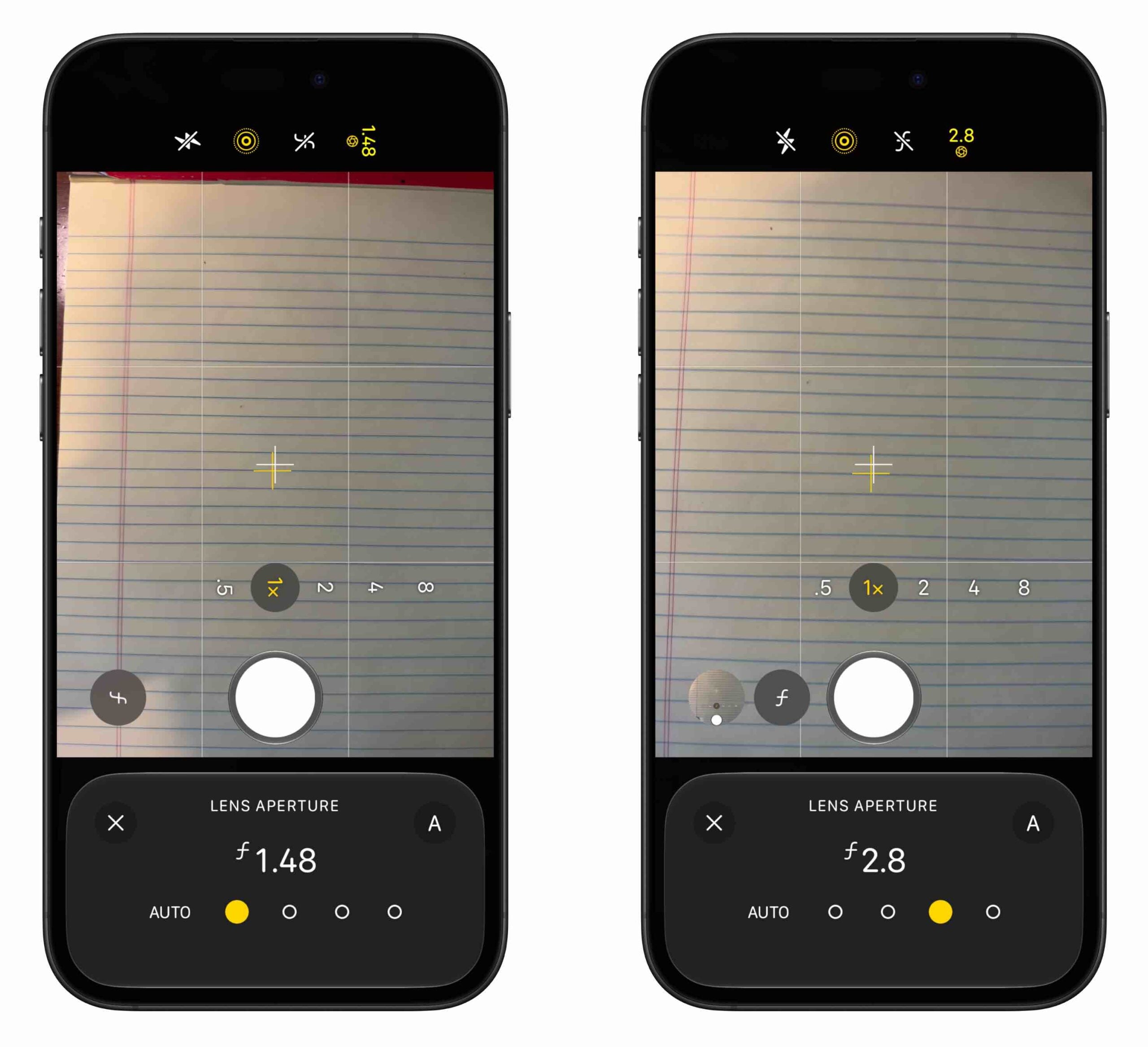
Apple says third-party apps can select any range between ƒ/1.48 and ƒ/4.0. A smaller F-stop number means the lens opens wider to let in more light. Think of it as the difference between the “2" in 1/2 and the “4" in 1/4. One-half of an apple is twice as much as one-fourth of an apple; similarly, ƒ/1.48 lets in more light than ƒ/4, so ƒ/1.48 is a larger aperture than ƒ/4. With a larger aperture, the camera can take a picture more quickly; with a smaller aperture, it takes longer.
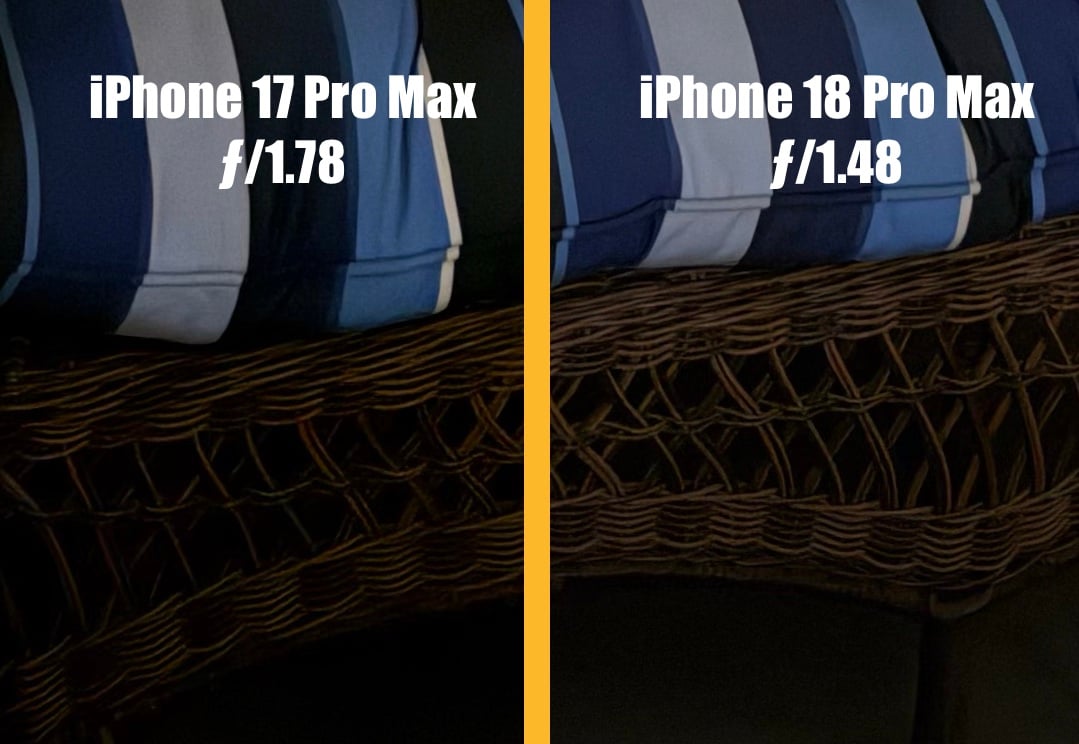
Variable aperture is nice for three reasons. First, you can take better-quality photos in low light. The iPhone 14 Pro through iPhone 17 Pro use a fixed aperture of ƒ/1.78. This year’s iPhone 18 Pro can use an aperture of ƒ/1.48 to let in even more light when you take a photo in a dark setting. For example, I took a picture of a wicker outdoor couch on my back porch at night when there was very little light. My iPhone 18 Pro with ƒ/1.48 captured more detail of the wicker than my iPhone 17 Pro with ƒ/1.78 by letting in more light. In the comparison below, I cropped in on the two images to show what I mean. (You can click on any of these photos to look at larger versions.)
On the other hand, when there is plenty of light, a larger aperture is also nice because the camera takes the picture more quickly. You can use it to freeze fast motion in sports. It can also help you to have a sharper picture.
A second advantage of variable aperture is that you can adjust the depth of field to achieve a different look in your photograph. This effect is called bokeh, and it keeps one part of the picture in focus (typically something in the foreground) while other parts are blurrier. It makes a picture look more interesting, and professional photographers have used it for decades.
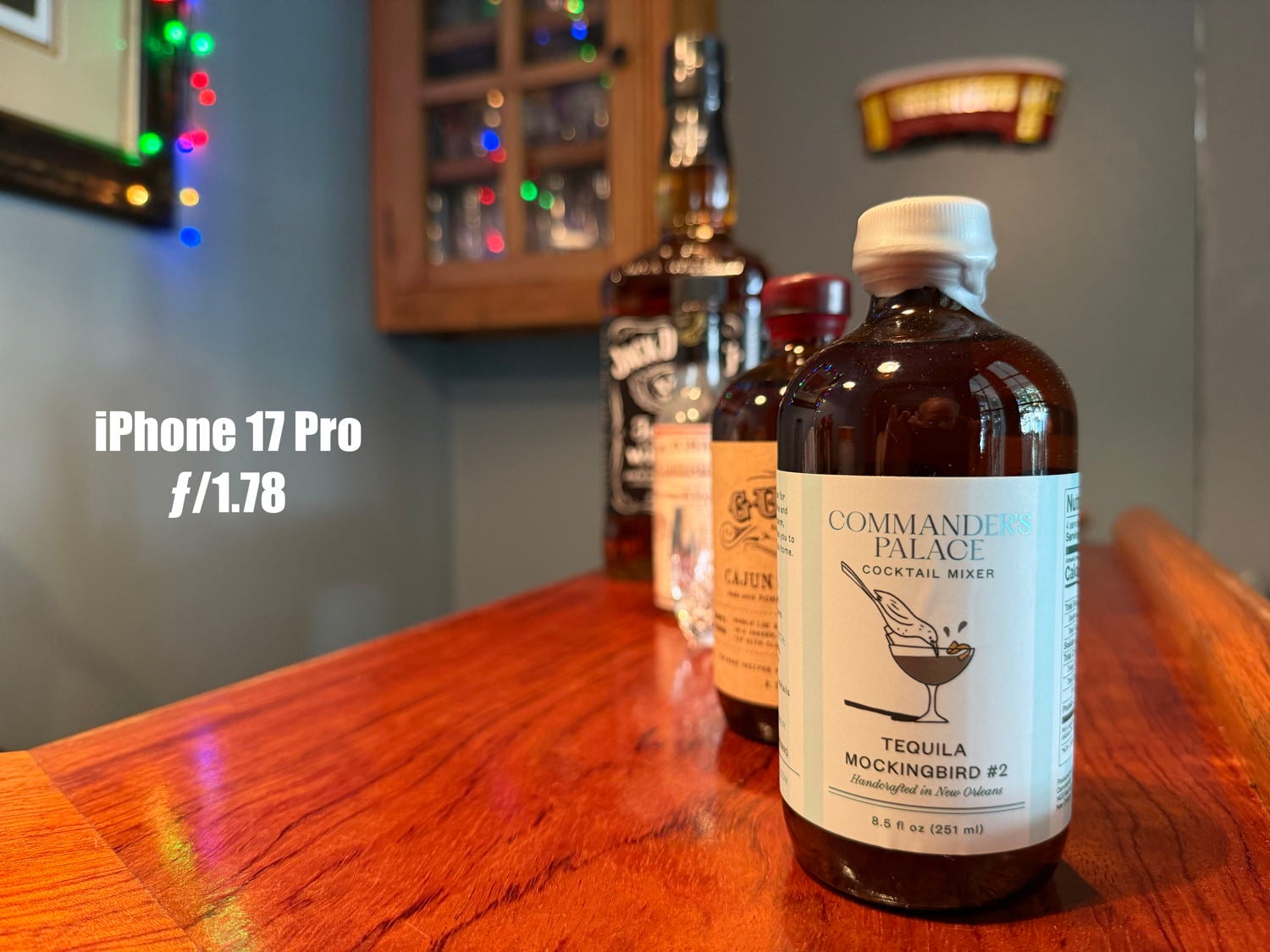
For example, here is a picture I took of items on the bar in my house using an iPhone 17 Pro’s ƒ/1.78 aperture. It automatically does a nice job of creating bokeh, blurring the bottles that are farther back and other items in the background.
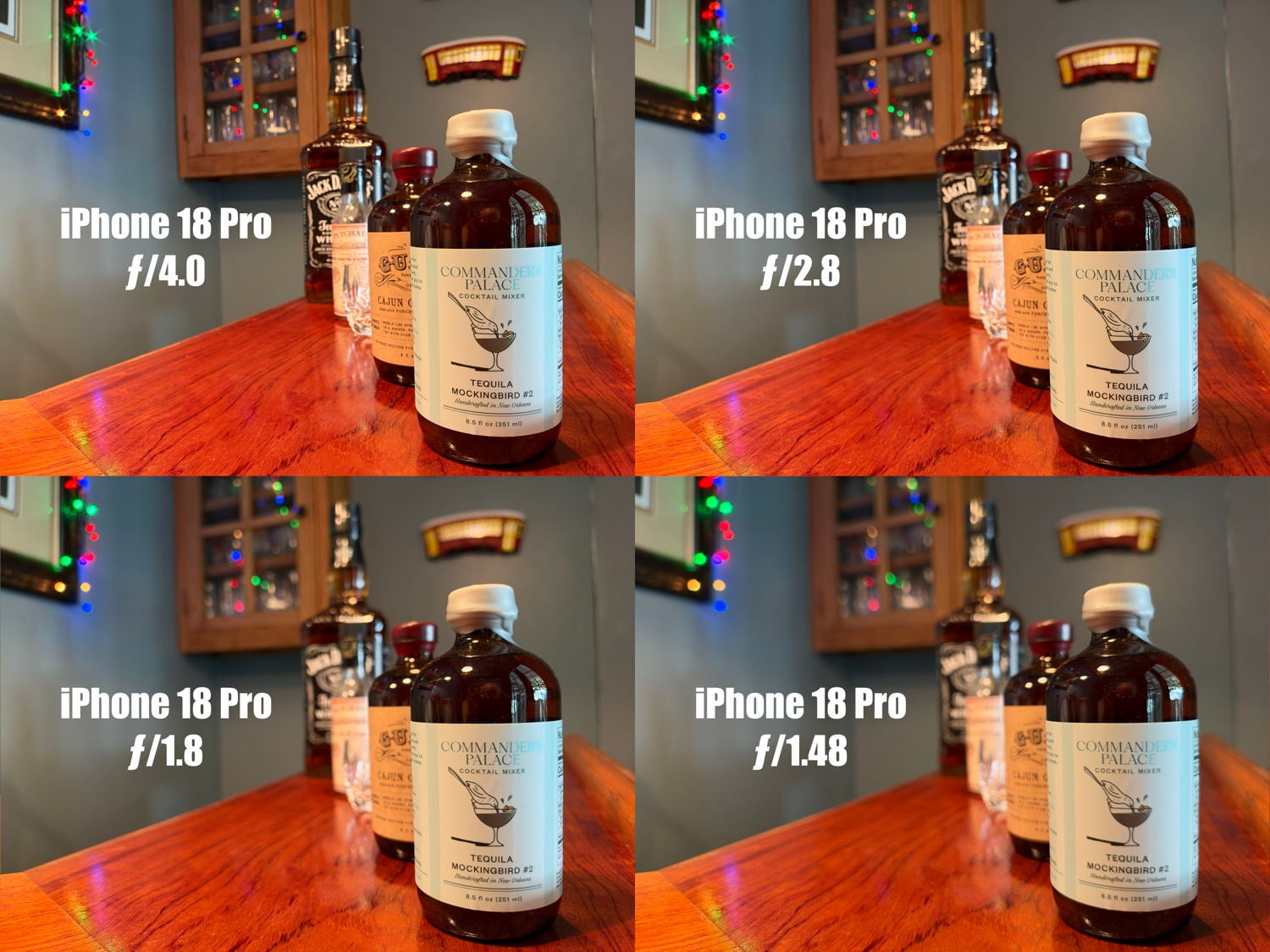
Here is a similar picture taken with the four different apertures on the iPhone 18 Pro. At ƒ/4.0, much more of the picture is in focus, including items in the background. Older iPhones cannot do this, and sometimes it is nice to have a picture where everything is as sharp as possible. On the other extreme, the iPhone 18 Pro lets you create more of a dreamy effect, with items in the background even more out of focus.
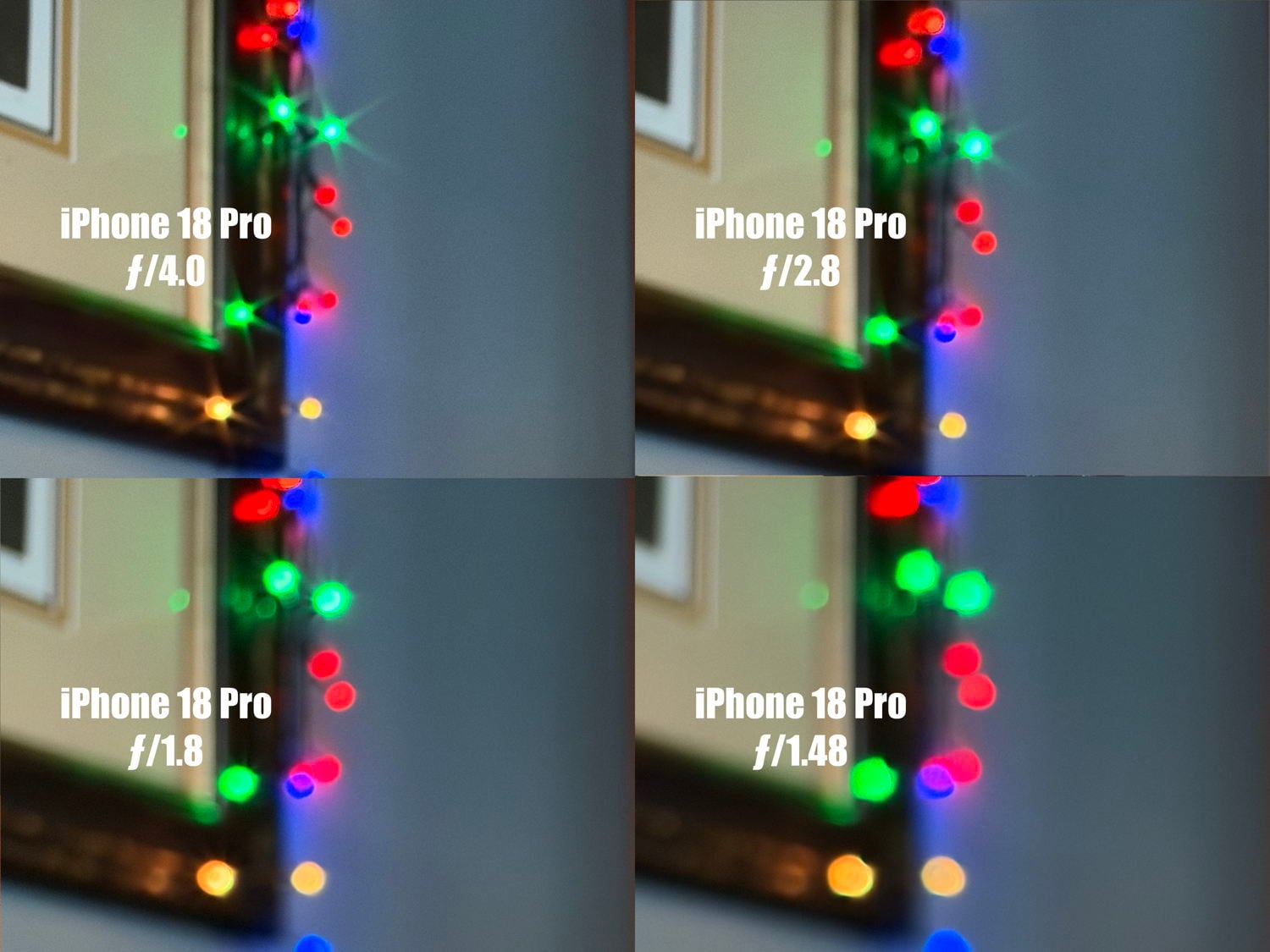
A third advantage of variable aperture is that a smaller aperture creates a starburst effect on lights, creating some drama and making the photograph more interesting. In this next example, I have cropped the pictures to show the twinkle lights in the top left corner of the above photographs. At the smallest ƒ/4.0 aperture, the LED lights show a starburst effect. This effect occurs because light diffracts around the edges of the aperture blades as the light squeezes through a smaller opening.
Jeremy Gray of PetaPixel interviewed Matt Waldon, Senior Director of Camera & Depth Hardware at Apple, to discuss the variable aperture feature. Waldon said that Apple experimented with different options and decided that six blades—each of which is thinner than a human hair—provided the best effect:
So six blades was really a combination of things. One is just the physical dimensions of it. The more blades you add, given the size constraints, it becomes difficult to fit them all in, frankly. So there’s, there’s a physical constraint. … Obviously we want enough blades to give sort of a nice, smooth aperture at every setting. So we did a lot of optimization around the shape of the blades and at every aperture setting. … You sort of see how the blades have a big impact on how bokeh and out of focus areas look. It impacts how the starburst looks. So for this particular design, six was really the sweet spot.
Apple says ƒ/1.8 is the best setting for most pictures, so the iPhone 18 Pro typically uses it. But it can adjust the aperture when appropriate, and the only thing that you will notice is that your pictures are even better—unless you decide to manually adjust the aperture to achieve a different look.
The iPhone 18 Pro also updates the camera app’s Photographic Styles feature. Unlike prior iPhones, which use Photographic Styles version 2, the iPhone 18 Pro supports version 3, which adds texture and grain controls, letting you take an iPhone picture that looks like it was shot on film. If that matters to you, then that’s an advantage. I’m not sure that it is a feature I will ever use.
There is also a new feature called smart focus tracking. You can lock focus on a single moving object, and the iPhone will stay focused on it even if it goes out of the frame and then comes back. If you are taking video of an active child, this could be nice. I haven’t tested it yet.
I’ve always been a fan of my iPhone camera. As it has improved over the years, I virtually never use my Nikon SLR. For normal photos in good light, the iPhone 18 Pro is similar to last year’s iPhone 17 Pro, except it can do a better job keeping both the subject and the background sharp. But in low light, and when you want to take advantage of the options available with a variable aperture, the iPhone 18 Pro’s camera is better than ever.
Processor and cooling improvements
The iPhone 18 Pro features Apple’s new A20 Pro chip. I covered what is new in this chip in a previous post. Apple also improved the iPhone’s vapor chamber, which means the chip can do more without overheating and slowing down.
How much will you notice these changes? It depends on the iPhone model you are upgrading from. Kimberly Gedeon of PC Mag says the most widely used iPhone model in 2026 is the iPhone 13, introduced five years ago, and notes that the iPhone 18 Pro is three times faster than the iPhone 13. That is a huge speed difference that will be easily noticeable for pretty much everything that you do on the iPhone.
How does it compare to last year’s iPhone 17 Pro? Tom Pritchard ran a bunch of benchmark tests. You can read his post to see all of the details, but his conclusion is that “Apple has made serious gains compared to the iPhone 17 Pro and Pro Max.” Similarly, Chance Miller of 9to5Mac ran tests and reported: “The iPhone 18 Pro’s A20 Pro CPU consistently came in between 22 and 27% faster than the [iPhone 17 Pro’s] A19 Pro, while the GPU landed between 40 and 45% faster.” That’s good to hear.
The iPhone 17 Pro was still pretty darn fast, and in my use over the last few days, there was not a specific moment when the iPhone 18 Pro was noticeably faster. Even so, with the substantial AI improvements to Siri in iOS 27, I know that I’ll be asking my iPhone 18 Pro to do a lot more than ever before. It is nice to know that this new device will provide the best possible experience.
Dynamic Island
I love the Dynamic Island on the iPhone. It is a handy spot to check on apps running in the background.
In the past, you could see either one or two apps in the Dynamic Island. The iPhone 18 Pro moves one of the cameras hidden in the black part of the Dynamic Island (the infrared Face ID sensor) to the top-left corner behind the screen. You don’t notice this as you are using the iPhone, but with more space available, the Dynamic Island can do more.
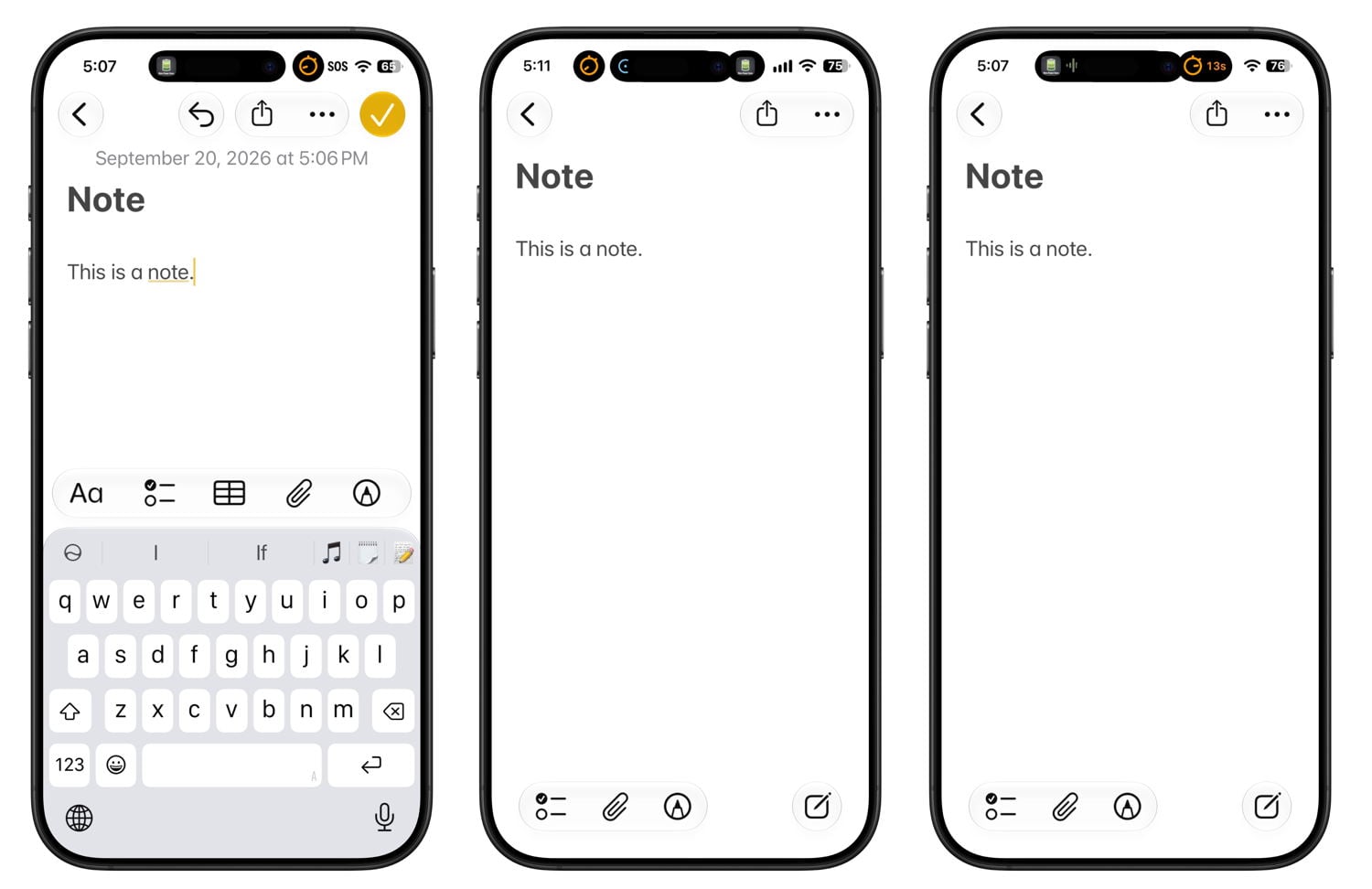
First, when you don’t have any apps in the Dynamic Island, it is a little smaller, letting you see a bit more of the screen. This change isn’t really that noticeable. Second, when you are running two apps in the background, you can see more information about both of those apps in the Dynamic Island. Third, when you are running three apps in the background, you can see information from three different apps in the Dynamic Island—a first on an iPhone.
For example, in the picture below, the first screenshot shows last year’s model as I am listening to a podcast and also running a timer. A small circular image shows me the timer is running, but that is all it tells me. The second screenshot is from the iPhone 18 Pro, and it shows three apps running: the timer, directions in the Maps app, and my podcast. The third screenshot shows two apps running in the background on the iPhone 18 Pro. Unlike prior iPhones, the timer app’s indicator is larger, so I can now see the seconds counting down. This is a huge improvement. Just seeing that an app is running in the background is only mildly useful. Seeing key information from that background app—such as the seconds on the timer—tells me everything I need to know without switching apps.
The improved Dynamic Island has already been very nice, and I’ve only just started to appreciate it. This will be a nice improvement as I use this new iPhone over the next year.
Apple Reference Image
The iPhone’s camera app supports modes such as Portrait, Spatial, and Pano. The iPhone 18 Pro adds a new option: Reference. To use it, first turn on Apple Reference Image mode in Settings. After that mode is enabled, when you take a picture in Reference mode, Apple captures the original data from the iPhone’s Main camera and then cryptographically signs that original image, creating a digital negative. You can edit the picture, but if you or anyone else running iOS 27 wants to see the true original image, you can tap the Reference Image indicator at the top of the image to view it. You can tap the screen to switch back and forth between the current image and the reference image to look for changes.
In the following example, I took a picture of a legal pad, and then I rotated the image, making the lines diagonal. Thus, I altered the original image. If I shared the image, another person could compare it with the original and see that I had made a modification.
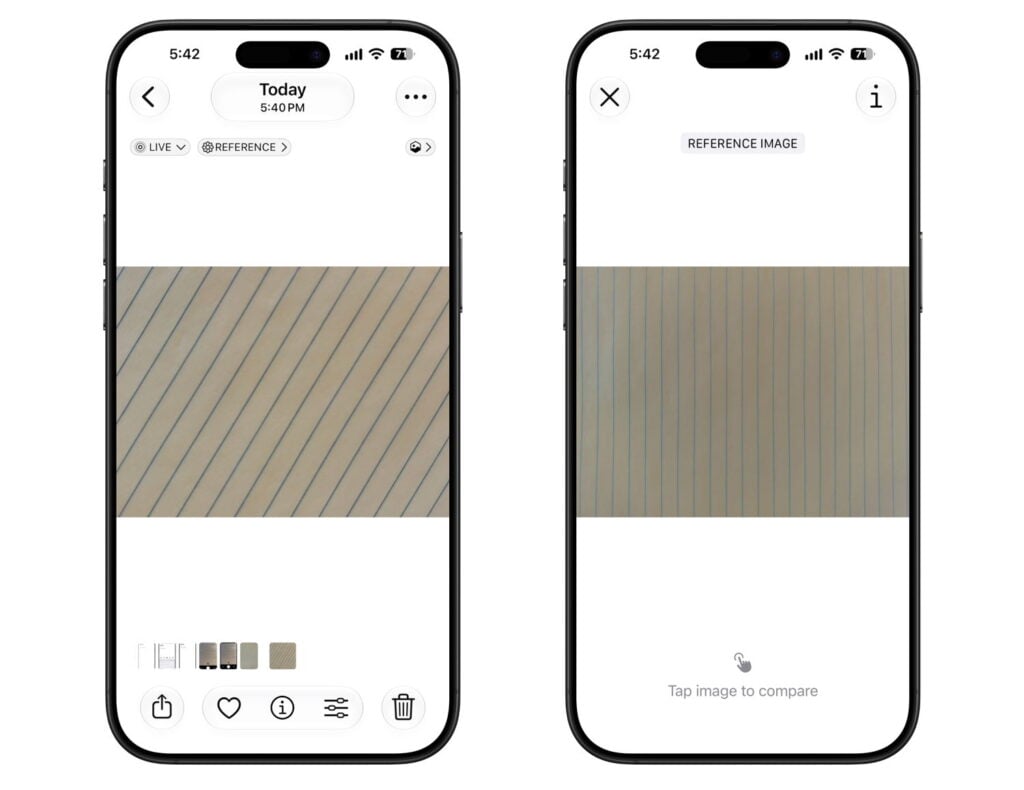
On the other hand, if the image has not been changed, a person can see that it looks the same and that AI or other techniques were not used to alter the photo.
In my tests, the Reference Image always seems darker, even if I haven’t edited the photo. I assume this is because HDR mode isn’t being saved, or something like that.
There is some complexity associated with this mode. For example, if you take a picture in this mode, you can choose whether to share the Apple Reference Image version of the photo with another person. In other words, you can decide whether the other person can see the digital negative for the photo or only the current (potentially edited) version.
For people taking photos with an iPhone that will be used in court, for people in the news industry who want the ability to prove that a photo is real, and for others for whom authenticity matters, this seems like a fantastic new feature. But to be honest, this is all very new, and I will need more time to learn how this feature works. I’m glad it is there, and I want to learn more.
Etc.
The battery life is better than ever with the iPhone 18 Pro. Apple says that the iPhone 17 Pro Max can play video for up to 39 hours, while the iPhone 18 Pro Max can play video for up to 45 hours. However, after only a few days of use, I haven’t noticed it yet. When it is time to recharge an iPhone, the right 60W power adapter can charge it to 50% in just 15 minutes. (Fast-charging on an iPhone 17 Pro takes 20 minutes.)
I like being able to choose a black iPhone—an option that wasn’t available last year. When I was in the Apple Store this past Friday to pick up my device, I saw the other colors: Burgundy, Glacier, and Silver. Glacier is a lighter blue than I had anticipated. Burgundy has more of a metallic look than I anticipated. Colors often look different in real life than they do in a marketing photo on the Apple website, so if colors matter to you and you have the ability to see the colors in person before you choose one, that is always best.
The Max version that I purchased is the only new iPhone that still uses a modem made by Qualcomm. Other new iPhone models use Apple’s own C2 modem, which is more efficient and uses less battery life. John Gruber and others have speculated that Apple was contractually required to use the Qualcomm modem in one of the new models this year, even though Apple would have preferred to shift all models to Apple’s own C2 modem, so Apple used the Qualcomm modem in the U.S. version (only) of the Max model because it has more than enough battery life to spare. It’s an interesting theory. I wonder if this will be the last iPhone model to use a modem that isn’t made by Apple.
If you put an iPhone in a place where it can stay still for a long time, you can create time-lapse videos. In the past, they were limited to 1080p. The iPhone 18 Pro can create 4K Dolby Vision HDR time-lapse videos—the same resolution as the high-quality video that you can take with an iPhone. You can also enable an Adaptive time-lapse feature, which slows the time-lapse when it detects motion.
Conclusion
The iPhone 18 Pro is a fantastic iPhone. If you are upgrading from an iPhone 17 Pro, only a few things are new. But most folks will be upgrading from older models, which means that you also get the features introduced with the iPhone 17 Pro (more durable design, improved telephoto camera, improved Ultra Wide camera), the features introduced with the iPhone 16 Pro (larger screen, Camera Control button), etc. Plus, the battery and speed improvements will be more noticeable.