One of the reason that I encourage folks to consider taking handwritten notes with an Apple Pencil and an iPad Pro instead of typing notes on a computer is that studies show that it is better to take handwritten notes because you understand and remember more. James Doubek of NPR reports on one of the latest such studies involving college students. If this study convinces you and you are ready to take the plunge, which app should you use? Serenity Caldwell of iMore considered that question and selected the best apps for handwriting with the Apple Pencil. She describes my favorite, GoodNotes, as the “high-powered sports car” of handwriting apps. And now, the rest of the news of note from the past week:
California attorney David Sparks discusses typing on the 12.9" iPad Pro’s glass screen. His conclusion is similar to mine — typing on glass is not ideal, but it works much better on that device because of the large screen with a full-size keyboard.
Tison Rhine of the State Bar of Wisconsin discusses iPhone mail apps.
Apple’s General Counsel, Bruce Sewell, testified before Congress this week. Chance Miller of 9to5Mac describes the testimony and links to a video of it.
I previously reviewed Cloak, a VPN service that works really well and that I still use myself. Russell Brandom of The Verge reports that the company is currently facing a ransom demand and a potential DDoS attack. iPhone J.D. and other sites that use TypePad went through a similar attack two years ago, and it isn’t fun. But I think Cloak is taking the right approach to this criminal attack, being open and honest about it with customers.
Serenity Caldwell of iMore lost her iPad Pro in the middle of the night at a rest stop (oh no!) but she recovered it (yea!) and lived to tell the tale.
Apple has struck gold! Well, almost. Kif Leswing of Business Insider UK reports that as a result of Apple’s iPhone recycling efforts, the company recovered 2,204 pounds of gold — over a ton, about $40 million work.
And finally, Tesla has been in the news this week because of its newly announced Model 3 sedan, which already has almost 400,000 pre-orders. That reminded me of this video, in which someone uses an Apple Watch to to instruct their Tesla Model S to get out of the garage automatically:
The Microsoft Word app is one of the most useful apps for attorneys looking to get work done on their iOS devices. Since Word was first introduced two years ago, the app has received frequent updates making it even more useful. Today I want to focus on two great features added this year — the Draw tab for the iPad, and contextual commands for the iPhone. I’m focusing on Microsoft Word because that is the Microsoft app that I use almost every day, but these new features also work in the Excel and PowerPoint iOS apps.
Word on the iPad — the Draw tab and the Apple Pencil
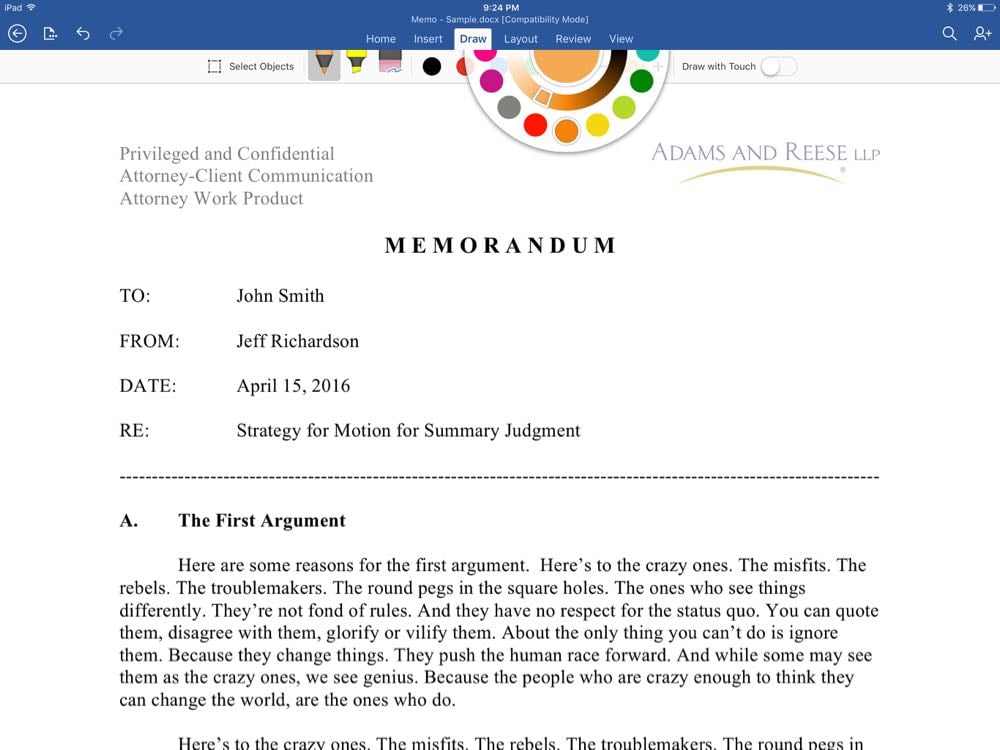
In late January of 2016, Microsoft added drawing tools to the iPad version of Microsoft Word. One way to access the drawing tools is to tap the Draw tab.
There is an even better way to start drawing if you are using an iPad Pro (either a 12.9" or the new 9.7" version) and if you have an Office 365 account: just start drawing. Thanks to the new instant ink feature, you can just start drawing on a document using an Apple Pencil and the Word app instantly starts applying digital ink to your document and switches to the Draw tab. So if you are reading a document and you want to make a note in the margin, just make the note with the Pencil. The app will be ready for you.
Using the Draw tab, you can switch between a pen, a highlighter and an eraser. You can tap a plus or minus sign to make the pen or highlighter thicker or thinner.
You can change the color of the pen ink or the highlighter, either by picking one of the four default colors, or by tapping the fifth color circle which brings up a color wheel. Spin the outer wheel to choose the basic color, then spin the inner wheel to select how light or dark the color should be. The result is shown in the middle.
The eraser tool doesn’t work like a traditional eraser. Instead, when the tool is enabled, any drawing that you tap just disappears. Thus, it is fast and easy to remove drawings.
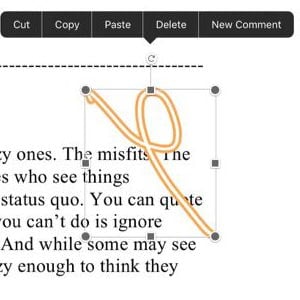
If you are not using an Apple Pencil, then you need to flip on the switch labeled Draw with Touch. This lets you use a finger or other stylus to draw. Then you flip off the Draw with Touch switch to use your finger to scroll up and down the page or select a specific drawing to move it around, or use the pop-up menu to cut, copy, or paste whatever you selected. This all works best if you use an Apple Pencil because then you can just keep Draw with Touch always turned off; you draw whenever the Pencil touches the screen, and you scroll or select a drawing by using your finger.
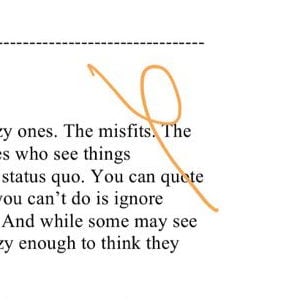
One tool that ought to be better is the highlighter tool. When you use it, it adds a yellow color (or whatever color you select) on top of text, making the text itself harder to read. A proper highlight tool keeps the underlying text the same dark black and adds yellow around it — which is exactly the result that you get using Word’s normal highlight tool. In the following example, compare the difference between the highlighting that I did with the Draw tool and the Apple Pencil at the start of the paragraph with the highlighting I did with Home tab and the highlighting tool at the end of the paragraph.
What makes highlighting even more curious to me is that if I view this same Word document on my PC, the highlighting that I drew with the Pencil looks correct, with the text staying dark. It is just on the iPad and iPhone (and Mac) that the Apple Pencil highlighting doesn’t look correct. This indicates to me that it is a problem that Microsoft could fix, and hopefully they will in a future update.
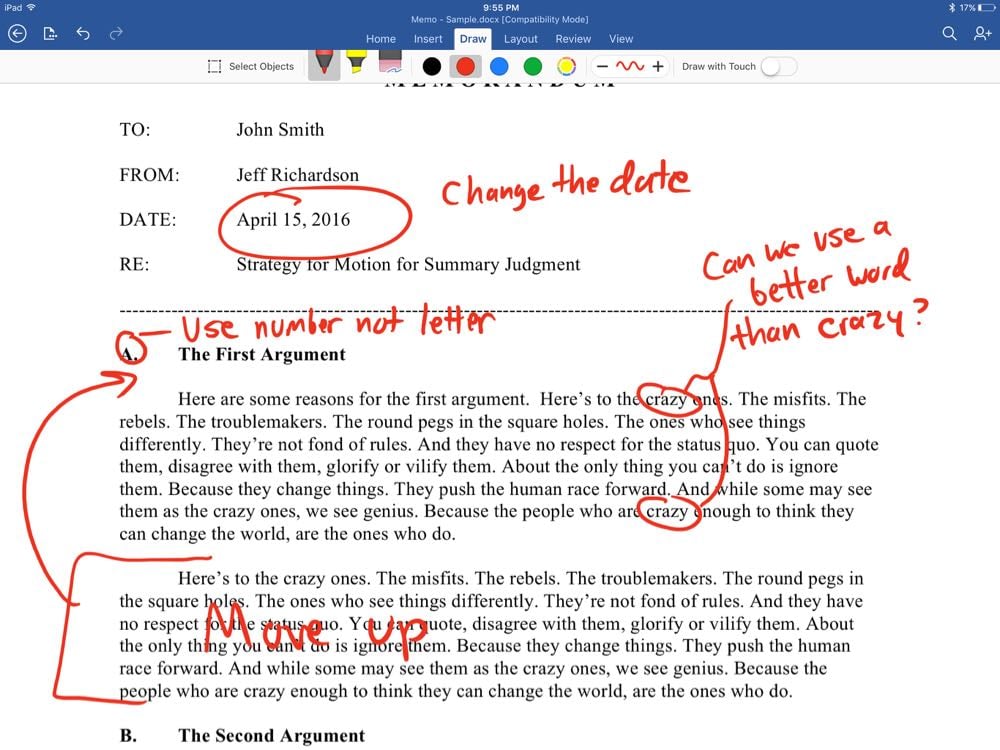
Before this update to the iPad app, if I wanted to use handwriting to annotate a Word document, I would first have to convert the file to PDF and then use a PDF editor to add the annotations. Now, I can just add the annotations directly in Word. If I am in a meeting and someone emails me the agenda in Word format, I can take notes during the meeting just by writing in the margins of the agenda. If someone sends me a file to review and I don’t want to make more formal and precise edits using the Track Changes feature, I can just add my thoughts using handwriting, circling words or sections and writing handwritten notes.
If you send someone a Word file with your handwritten notes, they will be able to see all of the notes on a Mac or PC (or iOS device). The notes themselves are like pictures on top of the document. As a result, when that other person goes to edit the document to implement your suggested changes, they will usually not want to use the Word file that you sent them — because they will have to take the time to manually remove each drawn annotation — but instead they would likely want to go back to a clean version of the document. Thus, handwritten edits can be less useful than edits that you make using the Track Changes feature, where the other person can just review the edits and accept or reject each redline. But sometimes I don’t want to take the time to actually make the full edit, and instead I just want to convey an idea, and for that, handwritten edits, circling words and paragraphs, adding arrows, etc. are better than redline edits.
The Draw tab is a nice feature for lawyers or anyone else who has the need to markup a document. The basic feature works on all iPads, but it really shines when you are using an Apple Pencil on an iPad Pro.
Word on the iPhone — contextual commands
You cannot use the Draw tab on an iPhone, nor do I think that you would want to do so on that small screen, but that doesn’t mean that Microsoft has forgotten about the iPhone. Just this month, Microsoft added a new feature to the iPhone version of Word: contextual commands.
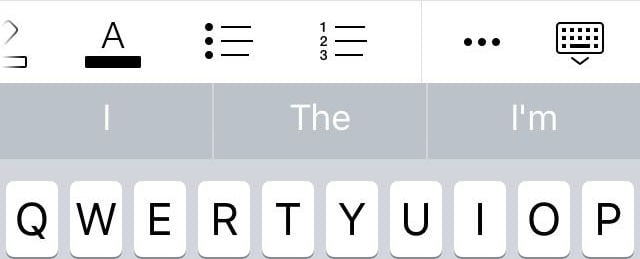
When you edit a document in Word, just above the keyboard area, there is now a new bar that gives you quick access to the commands that you are most likely to want to use. You can see about four options on the main portion of the bar, followed by three dots that you can tap to bring up the different tabs, followed by a keyboard icon that you can tap to make the keyboard disappear.
Although you can only see about four icons in the main part of the contextual commands bar, there are more; you just need to swipe to the left to bring them up. So in addition to bold, italics, underline and highlight, you can also quickly access other commands such as bullets, comments, insert table, and undo.
What you see in the contextual commands bar changes based on what you are doing. For example, if your cursor is in a table you will also see icons to add or delete rows and columns.
Conclusion
I find both of these new features to be very useful when I am working with Word documents on my iPad or iPhone. If you have your device configured to update apps automatically, you might not have even noticed that these new features were added. I encourage you to try them out.
Moreover, if you are still on the fence about whether it is time to update from an older iPad to the 9.7" or 12.9" iPad Pro, now you have one more reason to do so. The Word app on the iPad Pro and the Apple Pencil are a powerful combination for getting work done.
Yesterday, while waiting for a flight in the Atlanta airport, I tried out a free app called Tunity. It’s a neat service that plays on your iPhone the sound from a television that is tuned to certain channels — the idea being that even if the TV is muted or too low for you to hear, you can still watch the TV and listen to the audio using headphones on your iPhone. I used it in an airport, but the website for the app suggests that you can also use it in other places such as a bar, gym, waiting area, etc.
Using the app is simple. Just point your iPhone at the screen and tap a button for Tunity to scan the TV. It works best if you are pretty close to the screen, but as you can see from the below photos, I got the app to work even when I was pretty far away from the TV (although sometimes I had to scan more than once from this distance for it to work).
If Tunity is unable to figure out what you are watching, you will get an error message. I found that the app sometimes wouldn’t work when a commercial was playing, but worked well during the regular broadcast.
Once Tunity detects what is on the TV, you wait a few seconds, and then the audio starts to stream. Often you will find that the audio is not in perfect sync with the TV, but you can press the fast forward and rewind buttons to skip the streamed audio ahead or behind so that it matches the video.
When I was in the airport yesterday, the TV audio was being played on a speaker in the airport. It was sometimes hard to hear over the background noise in the airport, but I was able to take out one of my earphones to listen to the sound in the airport in one ear and the sound from my iPhone in the other ear to quickly figure out how to sync the audio. (The stream from Tunity was usually a little ahead of what I was hearing at the airport.) But if you are in an environment where the TV is muted, it might be a little more difficult to guess whether you need to skip the audio slightly ahead or slightly behind to match the lips of the person speaking. Having said that, even if the audio is slightly out of sync, I suspect that for many programs, it will be OK if the audio is slightly out of sync with the video.
I found that after listening to the audio for a few minutes, the audio would sometimes get slightly out of sync again, even if I started by getting them perfectly in sync. I’m not sure why the Tunity stream played just slightly faster than the actual TV, but any time that I noticed it, it was easy enough to tap the rewind button once to get it back in sync.
Tunity works with lots of national stations, but not every station. You can tap a button in the app to see all of the compatible stations, which include the New York feeds of the major network stations including ABC, CBS, NBC, FOX (and in Atlanta I was also able to see the Atlanta major networks, so perhaps there are other major city networks that work), plus lots of popular cable stations including AMC, CNN, CNBC, Comedy Central, Discovery Channel, Food Network, TBS, TNT, USA, etc. And lots of sports networks work too, such as Big Ten Network, ESPN, ESPN2, ESPNews, ESPNU, Fox Sports 1, Golf Channel, MLB Network, NBA TV, NFL Network, NHL Network, SEC Network, etc.
The app only works with live content from supported channels. Thus, if you are watching a TV that is showing a movie from a DVD, or a local station that isn’t included in the app, it won’t work.
I’ve been in sports bars that had lots of different TVs tuned to different channels showing different games. I can imagine using Tunity to listen to the audio of the game that interests me on one TV, even if audio from another TV is being played at the bar.
The app is free to download and you can try it out without an account for a while, but then it eventually asks you to create a (free) account to continue using the app.
Tunity is a neat idea that works well. I’m not sure when I will next use this app, but this is exactly the sort of app that I like to have on my iPhone so that it is there whenever I need it.
In light of the ongoing litigation in multiple cases between Apple and the FBI regarding iPhone security, many folks are wondering about the most secure way to communicate with clients and others, via text or a telephone, on the iPhone. Currently, two good options are the iPhone’s built-in Facetime and Messages technology and the third party WhatsApp app. Glenn Fleishman of Macworld explains why you might get slightly more security with WhatsApp right now because of a few features that Apple might soon adopt but which are currently limited to WhatsApp. Having said that, using either technology, you will get much more security than normal SMS text messaging and traditional telephone conversations. And now, the news of note from the past week:
Back when I used a PalmPilot in the early 2000s, I used a stylus to enter text in my mobile device. California attorney David Sparks shows off MyScript Stylus, a keyboard replacement for the iPad that lets you convert handwriting to text instead of typing on a keyboard.
Jesse Hollington of iLounge reviews Lutron’s Caséta wireless devices, including the in-wall dimmer and plug-in lamp dimmer units, and concludes that it is “the system to go with at this point.” I use a number of Lutron devices in my home, including three dimmers and a plug-in unit, and they work really well for me. (My review is here.) If you are thinking of taking advantage of Apple’s HomeKit technology to turn your home into a smart home, you’ll want to take a look at the Lutron units.
Christian Zibreg of iDownloadBlog reports that Siri is getting excited for the new season of Game of Thrones. You can ask Siri questions such as “Is Jon Snow dead?” and “Is Winter coming?”
I enjoy using my Apple Watch and iPhone for fitness purposes, but for those who really want to take it to the next level, Dennis Sellers of Apple World Today discusses the upcoming Naked 3D Scanning Mirror, a scale from Naked Labs that spins you around in front of a full-length mirror and uses an app to take a 3D scan of your naked body, used to compute body measurements, fat percentage and weight, and to monitor changes in your body over time.
And finally, if you watched TV this week, you may have seen some of Apple’s new 15 second Apple Watch commercials. I think that they are all pretty good. Abdel Ibrahim of WatchAware has a post where you can watch all of them, but my favorite is the one featuring Jon Batiste of the Late Show with Stephen Colbert — and I’m not just saying that because Batiste is from New Orleans and I’ve enjoyed seeing him live many times. (He is incredibly talented on the piano.) Here is the Jon Batiste video in the new Apple campaign:
Thank you to Westlaw for sponsoring iPhone J.D. this month. There is some good news for iPhone J.D. readers who use Westlaw: the app now works on iPhone. Westlaw has long worked well with the iPad. The iPad was first introduced in the Spring of 2010, and just a few months later, WestlawNext for iPad was introduced. That app was useful when it was introduced, and has improved substantially over the years, adding new features and improving the interface. Last month, just before ABA TECHSHOW, Thomson Reuters updated the Westlaw app so that it now runs on both the iPad and iPhone.
Even though this is a universal app, when run on the iPhone you see something fairly different than what you see on an iPad. On an iPad, the Westlaw app is a full featured research tool, one that you can use to do virtually all of the same type of research that you might to on a computer. Indeed, when I am at my desk, I will often have Word open on my computer as I am drafting a Memorandum but I will use Westlaw on my iPad to do legal research. I like the clean look of the iPad app, and it is nice to be able to lean back in my chair and do research on my iPad.
The iPhone screen is pretty small to do full legal research (although of course you could do it in a pinch). So instead, the iPhone version of the app focuses on just a few things.
Of course, there is a search feature. You can enter a case citation, or search terms, and quickly see results. So if you are talking to another attorney about a reported decision and you want to look at the language of the opinion, you can just take your iPhone from your pocket and quickly pull up the case and then scroll down to the relevant language. Even better, if you want to re-run a search that you previously did on your computer or on the iPad, your most recent searches are listed so that you can just tap to run them again.
Looking at an opinion on the iPhone is different from the iPad. For one thing, the headnotes are not displayed at first, which makes it faster to scroll down to the text of the opinion. But if you want to see the headnotes, you can just tap the “Related Content” link to see them.
If you tap the three dots at the top right corner, you can email an opinion (in MS Word, PDF, Word Perfect or RTF format), or you can print. (A tip for iPhone 6s owners: tap Prepare to Print, then use 3D touch to push down on the preview of the opinion, and you will see a PDF version of the opinion that you can easily email or open in another app.)
If you use the folders feature of Westlaw, you can see all of your folders on the iPhone app, including all of the items you saved there on your computer or iPad, and you can add a case to a folder.
Searching for opinions and statutes is the most useful part of this app for me, but the app also lets you stay up-to-date with Westlaw alerts, docket updates, and gives you the ability to track companies and follow practice area developments.
One feature I would love to see on the iPhone app is a History button so you can quickly pull up the most recent documents that you viewed on an iPad or computer. A West representative told me that the company is considering adding some limited History functionality such as easier access to recent documents in a future update.
Note that if you want more features, you can still just access Westlaw using the Safari browser on an iPhone, which gives you access to most of the full Westlaw features — including history. The interface of Westlaw in Safari is actually pretty good, but for the functions that are available in the iPhone app, you get an even better experience in the native app.
The iPhone version of Westlaw is a well-designed and useful app for lawyers, providing access to sophisticated legal research tools on the device that is always available whenever you reach into your pocket.
One of the things that I love most about my 12.9" iPad Pro isn’t the iPad itself, but instead the fact that it works so well with the Apple Pencil – one of my all-time favorite accessories for an iOS device. I love using the Apple Pencil to take handwritten notes and to annotate documents. And now that the 9.7" iPad Pro is available, even more people will be using an Apple Pencil. One of the few drawbacks of the Apple Pencil is that, unlike many other pens and styluses, the Apple Pencil lacks a clip. Thus, there isn’t an easy way to carry it around. A few months ago I reviewed the Fisher Chrome Clip which you can add to the Pencil (even though it wasn’t designed for that); it looks good, and it works well. I still enjoy using that clip and I continue to recommend it to others.
RadTech recently sent me a free review unit of a product that it invented called the PencilClipz, a plastic device that gives you two types of clips for an Apple Pencil. First, it has a clip that you can use to attach a Pencil to a shirt pocket (or a pocket in a briefcase or purse). Second, it has a protrusion on the side that easily snaps in to the Lightning port on an iPad so that you can attach an Apple Pencil to the side of an iPad.
RadTech says that the device itself is “made from tough and unbreakable Polycarbonate.” It certainly seems sturdy to me. It is easy to slip it on or off of the Apple Pencil, but it is tight enough that it won’t budge up or down unless you really force it. The product only weighs 3 grams, so it doesn’t add any noticeable weight to the Apple Pencil. And because it is made of plastic, you don’t have to worry about it scratching the Apple Pencil or anything else that it might come in contact with.
The pencil clip part of the PencilClipz works well, securely clipping to a pocket.
The side part of the PencilClipz also does it job, snapping into a Lightning port. It is very secure. Even if I rigorously shake my 12.9" iPad Pro, the PencilClipz stays attached until I pull it off. Unless you somehow hit the side of your iPad Pro as you are carrying it, I cannot imagine the Apple Pencil coming off.
Like any clip that you might attach to an Apple Pencil, another advantage is that it prevents the Apple Pencil from rolling around on a table.
While I consider the PencilClipz to be very clever, there are three reasons that it is not for me. The first is simply that I find it unnecessary to attach my Pencil to my iPad. Whether I am wearing a dress shirt with a suit or something less formal on a Casual Friday, I virtually always wear a shirt with a pocket. Thus, I only need a way to clip my Pencil in my shirt pocket, and the Fisher Chrome Clip works great for that purpose. Depending upon your preferences and your wardrobe, you may see much more of an advantage to attaching a Pencil to the side of an iPad Pro, in which case you’ll be much more interested in this product.
Second, I’m not a big fan of how it looks. They gray color doesn’t match the Pencil at all. And even if this device were as white as snow, I still think it looks somewhat awkward, especially because of the appendage that is necessary to fit into a Lightning port. Perhaps the appearance would not bother me if it were more useful to me, but as noted above, the ability to attach to a Lightning port is interesting but not necessary for me. I far prefer the look of the Fisher Chrome Clip, which matches the chrome band at the top of the Apple Pencil and doesn’t look out of place on a stylus.
[UPDATE: John Grzeskowiak of RadTech followed up to tell me the reason for the color of this product. Many of the company’s customers are photographers and videographers, for whom it is often handy to have an object that is 15%-18% gray. That way, they don’t have to also carry a gray card to do white balancing. For that historical reason, the company continues to make many items that are 15% to 18% gray, including this one. It is interesting to know that historical justification, although I must admit that I’m not really thinking about white balance and photography when I am using an Apple Pencil. Nevertheless, if you are curious, that is the reason for the color on this and other products by RadTech.]
Third, sometimes I find that the PencilClipz gets in the way when I am using my Apple Pencil. RadTech considers it an advantage that (depending upon how you grip your Pencil) you can usually feel the PencilClipz. RadTech says on its website: “PencilClipz also provides additional stability in your hand to enhance finely detailed drawing.” I think that is a valid claim, but I myself have never seen the need to make the Pencil even more stable in my hand. Moreover, for me, that advantage is outweighed by the way that it feels against my hand. For example, the Lightning port connector often pokes my index finger or my thumb.
Even though the PencilClipz is not right for me, I really do appreciate what RadTech has done. I hope that RadTech and other companies continue to think of creative ways to improve the Apple Pencil. If attaching a Pencil to an iPad Pro would be useful for you, than you should check out this device. And if you don’t mind the appearance and you like the idea of keeping the Apple Pencil more secure in your hand, this product may be perfect for you. Fortunately, this device is only $8, so if you think that this product might be right for you, it won’t cost you much at all to try it out.
Last month in In the news, I posted a link to a funny Apple commercial starring Cookie Monster. (Worth watching if you missed it!) Yesterday, Apple posted a “behind the scenes” (ahem) look at the making of that video. I think it is even funnier than the commercial itself. I don’t know who came up with the idea of pairing Cookie Monster with Siri, but I hope that they have ideas for additional amusing Apple commercials. And now, the news of note from the past week:
California attorney David Sparks recommends writing emails backwards — starting with attachments and the body and ending with the subject line and recipients. I often write emails this way for the reasons that David notes, although it never occurred to me that I was writing the email backwards.
New York attorney David Lat, founder of AboveTheLaw.com, provides cybersecurity tips for lawyers based upon some of the presentations at ABA TECHSHOW.
Michael Shear of the New York Times reports that tech upgrades at the White House have finally resulted in staffers being able to use iPhones. President Obama is still required to use a specialized modified BlackBerry, but he does use an iPad.
If you are communicating with someone else who uses an iPhone, you can do so using secure end-to-end encryption by texting in iMessage or calling using FaceTime Audio or FaceTime Video. This week, and as reported by Cade Metz in an article for Wired, WhatsApp added end-to-end encryption, so now you can use that free app to make secure calls or texts with almost anyone.
If you have an Apple Watch and try to meet your Activity Circles every day, you need to check out Activity++, a new $3 app by David Smith that provides an alternative interface to the circles, plus a nice iPhone app to monitor your progress. Click here for more information.
I reviewed the Sphero BB-8 last December, a fun droid that works with your iPhone or iPad. Jason Ward of Making Star Wars reports that the device was updated so that BB-8 can watch the new Star Wars movie with you, reacting to what happens on the screen (by listening to the audio). It’s a fun idea, and I look forward to trying it out when my family and I watch the Blu-Ray tonight of Episode VII. (We’ll start out by watching the preview for the upcoming Rogue One Star Wars movie.)
We’ve come a long way from Taylor Swift boycotting Apple Music. She now stars in a funny video for Apple Music.
And finally, for Autism Acceptance Month, Apple produced two videos about a boy named Dillan who uses an iPad to (finally!) communicate with the outside world. Truly inspiring, and both videos are worth watching: (1) Dillan’s Voice and (2) Dillan’s Path:
Ever since I first started using an iPad in 2010, I’ve been moving towards a pure paperless practice. I’m not 100% there yet, but with all federal court documents in PDF form and most of my colleagues and opponents in state court cases emailing scans of documents, I’m mostly there. Whenever I do encounter paper, my #1 priority is to get it in a digital form. We have nice combination copy machine/scanners in my office, and my secretary already knows to scan pretty much every piece of paper sent to me, but sometimes I encounter documents that I want to scan myself, especially when I am out of the office. It has been several years since I have reviewed a scanner app, but as both scanning apps and the camera on the iPhone have improved over the years, it has become really easy to scan documents using an iPhone. In my opinion, for a while now, the top three apps in this category have been Scanner Pro (which I last reviewed in 2012), PDFpen Scan+ (which I last reviewed in 2013), and Scanbot — an app that I have mentioned on iPhone J.D. but never formally reviewed, even though it has been my favorite scanner app for quite some time now. A few weeks ago, Readdle updated Scanner Pro to version 7, and with the new features, it is now my favorite app for scanning on the iPhone.
(And by the way, “Readdle” is pronounced REED-AL, not RE-AH-DAL. I wasn’t really sure about that until I listened to this video from the company.)
The current versions of Scanner Pro, PDFpen Scan+ and Scanbot make it fast and easy to scan. Once you are in the scanning mode, just point your camera at the document. These apps will automatically detect the edges of the document and, once you are holding your hand steady, automatically take a picture of the document. Better yet, in Scanner Pro and Scanbot, you can turn on a setting to automatically start taking a picture when you first launch the app, which makes sense to me because virtually every time I launch a scanner app I do so because I am ready to start scanning.
The edge detection in Scanner Pro is usually quite good, especially if you are scanning a white document against a darker background, such a desk with a dark color. But if you need to adjust the edges, the app makes it easy to find the corners.
You can make a scan black and white, grayscale, or color. If it is color, you have both a color photo option and a color document option. The color document option ensures that all of the background on a white sheet of paper is white, even if the lighting or shadows made one part of the image slightly darker than another part.
In Scanner Pro (just like PDFpen Scan+) it is fast and easy to scan multi-page documents. Just scan the first page, then once the picture is taken move on to the next page. (In Scanbot, you have to manually tap “Add page” to add additional pages, which slows down the process.)
Once you scan your documents, all three apps can perform an OCR of the document to figure out the words on the page. In Scanner Pro and Scanbot, as long as you have the option to do so turned on in preferences, the OCR process starts automatically. In PDFpen Scan+, you need to tap the OCR button to start the OCR process. I prefer having the process start automatically because virtually all scanned documents are easier to work with when the document is OCR’d.
If you have a decent quality original, all three apps are excellent, but not perfect, when it comes to reading words. In the pictures in this post, you can see that I scanned a document that I first created back in 2012 when I first reviewed Scanner Pro. In my numerous tests, all three apps got almost every word right. Scanner Pro was almost always confused by the word “thereof” followed by a semicolon in the second paragraph, thinking that it said “thereofi” or “thereo,f'” or something like that. Scanbot and PDFpen Scan+ had no trouble with “thereof” but did stumble on the phrase “attorney-client” at the end of the first paragraph. Both of those apps thought that “attorney” was “attomey,” even though Scanner Pro had no trouble with “attorney.” I point all of this out merely to show that while you cannot count on the OCR being 100% perfect in these apps, it is going to be darn close, and I didn’t find any one app all that much better than the others.
Where Scanner Pro really shines is in the quality of its scans. I’ve always found Scanner Pro and Scanbot scans to be slightly better quality than PDFpen Scan+ scans. The words in the scans made with PDFpen Scan+ have more jagged edges, looking slightly more like a fax. Click here to download an example of a PDF file created using Scanner Pro 7.
With Scanner Pro 7, Readdle made the scans even better when you are scanning a page in a book. The problem with scanning books is that there is a curve on the page from the spine to the edge. That’s why when you put a book on a copy machine / scanner, you often push down hard on the book to try to make it flat. Scanner Pro has a new feature that automatically senses the curve of a book page and makes corrections to the distortion to straighten out each line of text — almost as if you had pushed the book down flat on a copy machine. While not 100% perfect, it is always vastly better than the results I see when scanning a book page with Scanbot or PDFpen Scan+.
Scanner Pro also has a new workflow feature that you can use to automate what happens to a scan. Once you scan a document, if you tap the share button, you will see a button for any workflow that you have previously created. Just tap that workflow button, and the workflow starts. You can set the workflow to do things like change the title of the file, automatically upload to a specific folder on a service like Dropbox, automatically email the scan to a certain person, etc. So if you frequently scan a receipt and email a copy to your secretary to create a request for reimbursement, when Scanner Pro you can now do that with fewer taps once you set up the process once.
I find myself wishing that the workflow functions were more sophisticated. For example, there is no option for text input, so while you can automatically rename a file to put the year-month-day at the start of the file name, you cannot then have the app ask you for words to put after that such as “Motion for Summary Judgment” or “Exhibit A” or “Affidavit” etc. After using the impressive Workflow app for some time now, I find myself wanting to create more powerful workflows in this app. But this is only the first version of the workflow feature, and hopefully Readdle will make workflows more robust in future updates. Even in its current version, having this feature in Scanner Pro gives the app another leg up over Scanbot or PDFpen Scan+.
I prefer to scan documents using my iPhone, but Scanner Pro 7 is a universal app so it works on your iPad too. If you have the iCloud function turned on, the app will share scans between multiple devices, so you can use the better camera on your iPhone to scan documents but then you can view you scans on your larger iPad screen.
Scanner Pro always did a great job with the basic functions of scanning a document. But now that version 7 adds OCR — a feature that had already been in Scanbot and PDFpen Scan+ — as well as the book scanning and workflow features that are not offered in other scanning apps, Scanner Pro is now once again my favorite scanning app for the iPhone. The app is quick and easy to use, it is either as good as or better than other scanning apps on all of the standard features, and it has some nice new bells and whistles for when you want to use them. I recommend that all attorneys get a scanning app so that it is on your iPhone the next time that you need to scan a document, and with the latest update to Scanner Pro, this is now the app that I recommend.
Click here to get Scanner Pro 7 from Readdle ($3.99): Scanner Pro
The first time I heard mention of a Bluetooth speaker for a shower, it struck me as funny enough that I featured it as an “And finally…” item at the end of a Friday post back in 2012. But then I tried out the iShower, and I actually found it sort of nice to have a Bluetooth speaker that I could use to listen to podcasts while in the shower, as I noted in my 2013 review. My iShower lasted for about two years and then stopped working. After a few months of not having a speaker in my shower, I decided to buy another one, and I purchased an Aukey Rugged Waterproof Bluetooth Speaker on Amazon. It works okay, and the price was right (I paid $20; it currently sells for $22), but the tire design is a little too cute — especially because it results in buttons that are very difficult to find. A few weeks ago, iClever sent me a free review unit of its iClever IC-BTS03 Waterproof Outdoor/Shower Bluetooth Speaker, which only costs $29.99 on Amazon. I’ve been using it for a few weeks, and I like it.
Design
As you can see, the unit itself is a thick rectangle, almost a square. It is 3.75" across, 3.5" from top to bottom, and 2" thick. The front and back are hard plastic. The edges are a hard rubber, and the buttons on top are molded into the rubber. A blue LED light on the front illuminates when the unit is on. If powered off and charging, the LED is red, and it turns green when finished charging. If powered on and charging, both the blue and red LEDs light up, producing sort of a purple color.
A rubber handle on the top right makes it easy to carry this speaker.
If you lift a tab on the left side of the speaker, you will see two ports: a micro USB port for charging, and an AUX port. I didn’t use the AUX port, and instead relied on its Bluetooth, version 3.0+EDR, to connect to my iPhone.
The button of the speaker has a screw hole that you could use to mount the speaker to a tripod or something similar.
iClever says that the 2000 mAh battery works for 8 to 10 hours on a single charge, which seems about right in my tests. It takes 3 to 4 hours to charge the speaker.
Dust Proof and Waterproof
The key feature of this speaker is that it is waterproof. It is rated IP65, which is a rating on the Ingress Protection scale established by the International Electrotechnical Commission (IEC). The first of the two digits after the “IP” refers to the protection against solid objects getting inside of the device on a 0 to 6 scale, and the second digit refers to the protection against liquids getting in to the device on a 0 to 9K scale. You can see the full scale here on Wikipedia.
For this device the “6" is the highest level, meaning complete protection against dust getting inside of the device. So you can use this device outside without fear of sand or dirt getting inside and damaging the electronics.
The second number is a “5" which means protection against water jets aimed at the device for at least three minutes. This is lower than a “6" which would be protection against powerful jets, and is less than a “7" which means that it can go 1 meter underwater for 30 minutes. The Apple Watch has IP7 water protection, which is why it will continue to work even if you dunk your wrist in water while wearing the watch — and why some people go swimming with an Apple Watch on, although I wouldn’t recommend that.
So with a “5" rating, you are not going to want to drop the iClever speaker into your tub, although if you drop it in and pick it up quickly you might be OK. But if this speaker sits on a ledge in your shower and jets of water spray it from time to time, it will be fine because it is designed to handle that.
Note that if you use the AUX port to play music using a cord instead of Bluetooth, I doubt that the unit remains water resistant because you have to open the protective flap to access that port.
Music / Podcasts
There are four buttons on the top of the device: power, volume down, play/pause and volume up. The way that I use the device is I start playing something, typically a podcast, on my iPhone. Then once in the shower I hold down the power button to turn on the speaker. The unit turns on and automatically pairs with my iPhone and then continues to play whatever my iPhone was playing.
The volume buttons are independent of the volume buttons on the iPhone — it is not a remote control for the iPhone’s volume. Thus, if your iPhone volume is turned all the way up, then you can get the loudest possible sound on this speaker. But if your iPhone volume is set to around 25%, then the volume buttons on the speaker will just go between 0% and 25%.
You can also long press on the volume up or volume down buttons to advance to the next or previous track.
The quality of the speaker is fine, but nothing special. The sound is clear, but I in a quiet room when I can really hear the quality of music, I find it a little tinny with certain songs, although to be fair with other songs it sounds perfectly fine. But in the shower, when the music is competing with the sound of a shower anyway, it is more than fine. And since I virtually always use this speaker to listen to podcasts that I play on my iPhone using the Overcast app, most of my use of this device over the last few weeks has been with voices, which sound great.
I’ve been mostly using this as a speaker in the shower, but you could also use it as a portable outdoor speaker, and you don’t have to worry about it getting wet from rain or splashes. It can get reasonably loud — not loud enough for a big party, but it would be fine for a smaller gathering, especially if you are just looking for background music. The specifications say that the speaker is 50mm diameter with 5W RMS.
Phone calls
You can also use this speaker to answer the phone and serve as a speakerphone. I cannot begin to imagine using it for this function while in the shower — and hopefully you don’t take many phone calls in the shower either. But if you are using this as an outside speaker, perhaps next to a pool while you are swimming and your iPhone is located in a safe location on a table, it is nice that you can answer calls using this device. When the phone rings, you just long press on the play/pause button. The other caller will definitely be able to tell from the sound quality that you are speaking on an inexpensive speakerphone, but it works.
You can also place a phone call from this speaker, but in a limited way. If you long press on the play/pause button, the speaker will make your iPhone redial the last number that you called. I suppose that this feature could be useful in some situations. For me, this function just made me cautious that I was pressing the right button while using the speaker in the shower. I was afraid that I would intend to long-press on the + button to advance to the next track, but instead I would long-press on the play/pause button and I’d call someone from my shower.
Conclusion
This is a nice, durable, inexpensive speaker that can work even when exposed to jets of water. I’ll admit that listening to music or podcasts in the shower is an extravagance, but for only $30 it is an extravagance that you can afford. And it works well as a portable outdoor speaker because you don’t have to worry about dust or splashes. I see that there are other speakers for sale on Amazon that cost about the same and that are similarly resistant to water (although some are only rated IP54, not IP65) and I haven’t done a broad test of waterproof speakers. But I can say that I like the design of this speaker better than the more expensive iShower that I reviewed in 2013 because it is more compact and the rubber and hard plastic makes it more durable. I also like it better than the an Aukey Rugged Waterproof Bluetooth Speaker that I have been using since last November because the buttons are easier to press and the square shape makes it more sturdy.
Apple is 40 years old today. No other company has been selling personal computers for that long, and with its Mac, iPad and iPhone, Apple pushes the envelope on what it even means to be a “computer.” As Apple celebrates its 40th, one of its newest devices, the 9.7" iPad Pro, is now available in stores. One of my law partners bought one, and I got a chance to spend a few minutes with it yesterday afternoon. While I prefer the larger screen of my 12.9" iPad Pro for viewing documents, I have to admit that the 9.7" version has a lot going for it. Most importantly for me, that classic iPad size is easier and lighter to hold. The True-Tone display, available only on this model (for now), does a great job of adjusting the color balance automatically based upon the light that is around you. I put the 9.7" model next to my 12.9" iPad Pro, and the color on my iPad looked great — until I looked at the color-balanced 9.7" model. Then when I looked back at my iPad, the white areas seemed too blue under the fluorescent lights in my office. I’m sure that this feature will eventually be on all of the high-end iPads. If you are now in the market for a new iPad, choosing between the two iPad Pro sizes will likely be difficult for many of you. Some of the articles that I have linked below may help you to make your decision. And now, the recent news of note:
Florida attorney Katie Floyd tried the 12.9" iPad Pro, but it wasn’t for her. She has since ordered a 9.7" iPad Pro (which she got yesterday), and I look forward to hearing Katie’s thoughts to get her perspective after using both versions of the iPad Pro in her law practice. (Note that if you click that “got yesterday” link you can also read Katie’s review of the new Amazon Echo Dot.)
Yesterday, Apple released iOS 9.3.1, which contains all of the features of iOS 9.3, released on March 21, but fixes an obscure bug that could cause your iPhone to crash if certain third party apps were installed, such as the Booking.com app.
John Gruber of Daring Fireball reviews the new iPhone SE. It is an excellent review, that points out that Apple is once again forcing you to make difficult choices, just like it does with the 9.7" vs. 12.9" iPad Pro: “The iPhone 6S and iPhone SE are both great products, and both have great sizes — but for entirely different reasons. The SE is easier to pocket, easier to hold, and easier to use one-handed. The 6S displays more content, and is better for two-handed use — particularly when it comes to thumb-typing. Judging between these two devices, with no consideration for future devices, I personally am completely torn. I really can’t decide which set of trade-offs to make.”
The tip on my Apple Pencil appears to be holding up just fine even with a lot of use, but Chance Miller of 9to5Mac notes that you can now buy replacement Apple Pencil tips in packs of four for $19.
If you are in the market for an Apple Watch, Apple now has a cool interactive gallery that lets you see what different case and band combinations look like.
Julia Love of Reuters describes the privacy czars at Apple who help the company make decisions regarding how to make use of (and not make use of) private information.
I still enjoy subscribing to Apple Music, especially the recommended playlists. Steven Levy wrote a great article about what makes Apple playlists so good — especially when it comes to smoking substances legal in only a few states.
Rene Ritchie of iMore notes that Star Wars: The Force Awakens is now available on iTunes. Click here to purchase ($19.99 in HD, $14.99 in SD). I pre-ordered the Blu-Ray on Amazon ($19.99) which is available on April 5, so I’ll have to wait a few more days to see it on my TV. Even though I saw the movie twice in the theaters, I’m really looking forward to watching it again at home, especially so that I can pause as certain points to see more of what is going on. And completely unsolicited, my ten-year old son mentioned to me a few days ago that he really wants to watch the movie again on our TV for the same reason — which I consider proof positive that I’m doing something right in the parenting department.