In the News

Happy Halloween! As Hartley Charlton of MacRumors notes, it was ten years ago this week that Apple launched the Apple TV HD. That wasn’t the original name of the device. When that product was first released on October 30, 2015, Apple called it the fourth-generation Apple TV. But as I noted in my review, this version was a huge step forward for the platform because (1) it was the first model to support third-party apps, and (2) it was the first model with a Siri remote. The original Apple TV was announced in September 2006 (Apple called it “iTV” at the time, but had to change that because of a British broadcast network that is also called iTV) and released in January 2007. But the 2015 version of the product was really the launch of the modern Apple TV that we use today. The Apple TV hardware has improved over the last decade, and while the pace of improvement hasn’t been quite as rapid as I would have liked, this device is still the best streaming device for a TV. I suspect that I will be watching some Apple TV programming on my Apple TV 4K tonight. And now, the news of note from the past week:

  • The M5 version of the Apple Vision Pro is now available, and Adam Savage and Norm Chan released a fantastic video to show off what has improved. This is one of the best takes that I’ve seen on the new version of the Vision Pro.
  • As Hartley Charlton of MacRumors notes, Apple hosted a two-day event on its campus this past week to help people develop immersive video for the Apple TV. You can watch almost all of the sessions on YouTube, and I watched part of them. As an Apple TV owner since Day 1, I’ve always wondered why we haven’t seen much third-party immersive content. After watching those sessions, I can now see that it is only now that filmmakers have the hardware and software necessary to create these immersive videos. Before now, people have been patching together beta software and using crazy camera setups to create these videos. I hope that Apple’s event and the growing availability of the Blackmagic URSA Cine camera mean that over the next year, we are going to see a lot more content.
  • As an example of that new content that is coming, and as noted by Jason Snell of Six Colors, this week, Adam Lisagor of Sandwich released the first commercial created using immersive video. I was blown away by this immersive video. I’ve already watched it five times using my Vision Pro.
  • Ryan Christoffel of 9to5Mac describes two recent improvements to the Photos watch face on the Apple Watch.
  • Lizzie Dearden and Amelia Nierenberg of the New York Times explain why iPhone theft is so much worse in London. The article notes that about 70% of all items stolen in London are smartphones. Fortunately, the police in London recently arrested two men suspected of sending up to 40,000 stolen iPhones to China, and hopefully, they can do more to address this issue.
  • Would you rent a car if it didn’t have CarPlay? Not me. As Joe Rosensteel notes on his blog Unauthoritative Pronouncements, GM is not going to be including CarPlay on its future cars, and as Rosensteel points out, at some point in the future, a lot of people are going to stop renting GM cars for this reason. As John Gruber of Daring Fireball notes: “If GM goes through with this abandonment of CarPlay, I don’t see how they’ll continue to sell any vehicles to rental agencies. I would never rent a car without CarPlay, and I would never consider signing up for a GM cloud service just to drive a rental car. Complete dealbreakers.”
  • Michael Simon of Macworld explains why he loves the Emoji Game in Apple’s News+ app. I love it too, and I play it every day. Almost every time I do so, I start by thinking that the puzzle is impossible, and then something clicks, and before long, it is solved.
  • Joe Rossignol of MacRumors notes that the Wallet app on the iPhone will soon be able to store your U.S. passport.
  • I know that some people use an iPhone while they are on the toilet, but now your iPhone can get information from inside your toilet. As Tim Hardwick of MacRumors notes, Withings is now selling the U-Scan, a sensor that goes inside your toilet to analyze samples and send results to your iPhone.
  • The fantastic show Slow Horses just finished its fifth season on Apple TV, and it was fantastic. There was even an interesting reveal at the end of the show, as noted by Alex Welch of The Wrap. Welch also has an interesting interview with show creator Will Smith, who explains why he is leaving the show after Season 5. When Smith describes the insane amount of work that they did on that show, working on multiple seasons at one time, I can understand why he would think it is time for him to step away. Hopefully, the show will continue to be just as good in future seasons. I don’t want the show to ever end!
  • Just as Season 5 of Slow Horses comes to an end, Apple TV is debuting a new series this week called Down Cemetery Road. As Benjamin Mayo of 9to5Mac notes, it is based on a book by Mick Herron, the same person who wrote the book that was the basis for Slow Horses. The new show stars Ruth Wilson and Emma Thompson, and I look forward to checking it out.
  • And finally, one of the best features of visionOS 26 is using the improved personas in a FaceTime call with multiple people. The participants can be in different parts of the world, but after a minute or so of the conversation, you feel like you are all in the same room. In this video, Declann Drostan Tan (who is in Singapore) has a conversation with people from Apple. The substance of the conversation is somewhat interesting—they talk about visionOS 26 and the new Vision Pro—but I’m sharing it today because this video does an excellent job of giving you a sense of what it is like to participate in one of these conversations. Plus, it shows off how good the new personas are. If you don’t have an Apple Vision Pro, watch some of this video to learn why I and others think that this feature is already great today and has so much potential for the future:

Podcast episode 219: Air Ball? 🏀 Ultra Face Palm ⌚️ and a Crown for the Dorks 👑

In the News

There is a lot more to say about the three new devices powered by the new M5 chip—the iPad Pro, the Apple Vision Pro, and the MacBook Pro—so that is what we start with in this week’s episode of the In the News podcast. And it is particularly interesting to see what the Vision Pro does with the extra power of the M5. Next, we discuss the Modular Ultra watch face, the iPhone Air, new features coming in a few weeks in iOS 26.1 and iPadOS 26.1, and more.

In our In the Know segment, Brett shares a tip regarding the snooze alarm feature on the iPhone, and I explain why you should be using a 3-in-1 charger at home, at the office, and when you travel.

Click here to listen to the audio podcast, or just listen using your podcast player of choice. You can also watch the episode on YouTube:

In the News

In the News

The three new Apple devices that went on sale this week—the new iPad Pro, Apple Vision Pro, and MacBook Pro—all include the new M5 processor. Jason Snell of Six Colors conducted tests and prepared some charts to show how it compares to previous generations. The charts show that the improvements are predictable, and I suppose you could say boring, but any improvement is an advancement. The nice thing about these steady improvements to Apple’s M-series processors is that you are not expected to buy each new model, but whenever you are ready to upgrade, you’ll be pleasantly surprised to see how much the hardware has improved over whatever you are using right now. And now, the news of note from the past week:

  • Jason Snell of Six Colors reviews the new iPad Pro with an M5 processor.
  • Since I’m a big fan of my Apple Vision Pro (with an M2 processor), I’ve enjoyed reading the review of the second generation, which features an M5 processor. It sounds like it is only a minor step forward, but that is fine for me. I’m just happy to see Apple confirming its commitment to this product. Kyle Barr of Gizmodo wrote an interesting and comprehensive review of the new Vision Pro.
  • I also enjoyed the review of the new Vision Pro by Chance Miller of 9to5Mac.
  • In a big post on Six Colors, Jason Snell reviews the new Vision Pro and Dan Moren reviews the new Dual Knit Band (which also works with the original Vision Pro).
  • Ryan Christoffel of 9to5Mac has been using the new Apple Watch Ultra 3 for a month, and he says that his favorite feature is the Modular Ultra watch face. That may sound silly, but I understand. When I switched from an Ultra 2 to the Series 10 last year, that was the #1 feature that I missed. And the omission is silly because the screen on the Series 10 (and Series 11) is more than big enough to use that watch face (which I demonstrated in that post). Nevertheless, Apple has decided to keep it exclusive to the Ultra. I hope that Apple changes this in the future.
  • Oliver Haslam of AppleInsider took an iPhone Air on vacation and was surprised to discover that its two biggest compromises—battery life and the number of cameras—were not really a problem.
  • Earlier this week, I reviewed the UGREEN 3-in-1 Foldable MagFlow Wireless Charger, which is currently on sale for $99.99 on Amazon. I consider it an excellent 3-in-1 charger, especially if you want something for travel. Adrian Kingley-Hughes of ZDNet posted a review shortly after I did, and he likes it too, saying that it “checks all the boxes” and “has earned a permanent place in my travel kit.” Same here.
  • I’m still finding features that I love in iOS 26 all the time, but iOS 26.1 is right around the corner. Joe Rossignol of MacRumors has been trying out the beta version, and says there are some notable new features coming, including (1) the ability to switch from the regular “clear” version of the Liquid Glass interface to a “tinted” version, (2) the ability to turn off the feature where you can swipe left on the lock screen to open the Camera app (which is something I’d love to turn off on my iPad becuse I trigger that feature from time to time even though I never ever do so with the intent to take a picture using my iPad), (3) an option to turn off alarms with a swipe instead of tapping a button (so that you don’t turn it off by accident), (4) AirPods Live Translation for Japanese, Korean, Italian, and Chinese, and more.
  • A key component of the iPhone is the glass screen made by Corning. Corning CEO Wendell Weeks recently shared the interesting story of how Steve Jobs convinced him to take on the project when Weeks didn’t think that Corning could do it, as reported by Dave Smith of Fortune.
  • Wireless chargers are nice for devices like AirPods and iPhones because you can just set your device down and it charges. Mophie sells the Mophie Max Dual Charging Stand ($149.95 on Amazon), which provides wireless charging for both a pair of AirPods and a pair of AirPods Max. Wait, how is that possible for the AirPods Max, which doesn’t support MagSafe? As explained in this review by Marianne Schultz of MacRumors, it comes with a tiny dongle that you plug into the USB-C port of the AirPods Max. Put the AirPods Max in the stand, and the dongle makes contact with the wireless charger. That’s an innovative solution. But what if you own the original AirPods Max, which charged via Lightning instead of USB-C? Unfortunately, Schultz predicts that Mophie won’t offer a similar dongle because Lightning is a proprietary standard. That’s a perfect example of what is great about USB-C: it is an open standard, so anyone can support it without having to license anything from Apple.
  • Joe Rosensteel of Six Colors wonders why Apple hasn’t yet done anything with the Photomator app that it purchased, and I’ve been wondering the same thing.
  • Juli Clover of MacRumors reports that IKEA is now selling a bed … for your iPhone.
  • And finally, Apple started a new ad campaign this week that celebrates what creative people can do with Apple products. It reminds me of the Think Different campaign that Apple used in the late 1990s and early 2000s, and as noted by William Gallagher of AppleInsider, it was developed by the same advertising professionals who created the Think Different campaign. The first video, titled Great Ideas Start on a Mac, is narrated by the late Jane Goodall. I like what they did with this one, and I look forward to seeing more in this series.

Review: UGREEN 3-in-1 Foldable MagFlow Wireless Charger

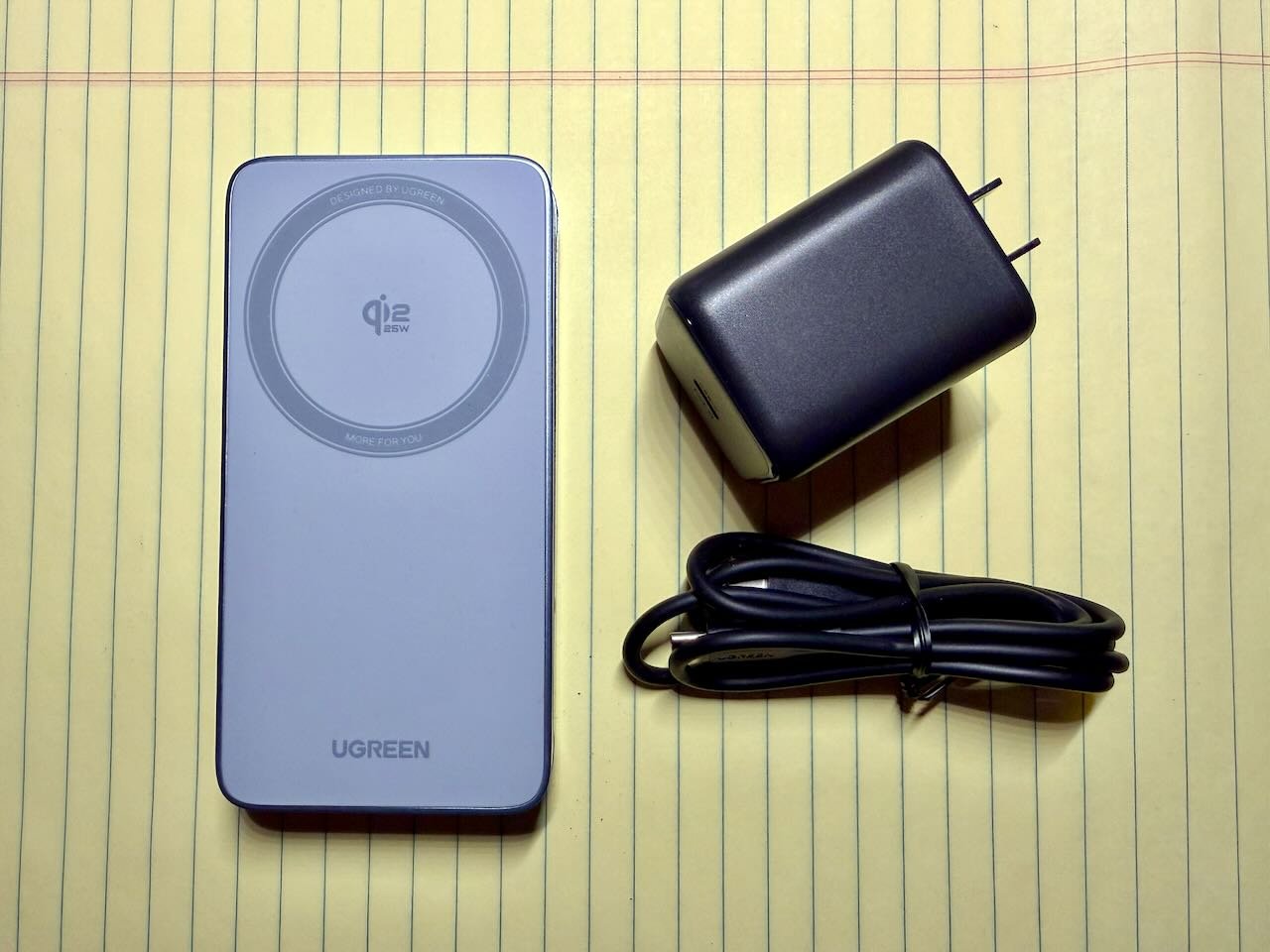
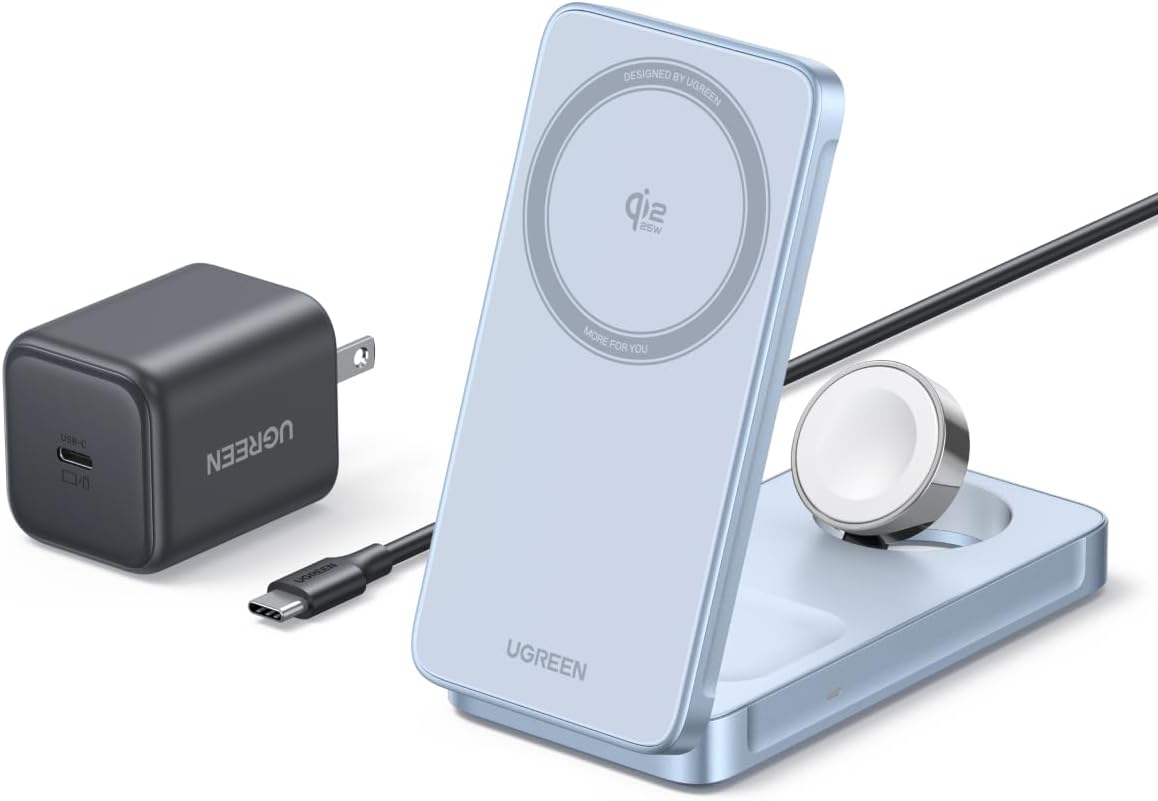
If you use multiple Apple products, a single charger that powers multiple devices at once is incredibly useful. The UGREEN 3-in-1 Foldable MagFlow Wireless Charger can charge an iPhone, Apple Watch, and AirPods simultaneously. It also folds up, making it an excellent travel charger. UGREEN sent me a review unit to evalute. I’ve been using it over the last few weeks, including twice when I traveled across the state and stayed in a hotel room for a night because I had a court hearing the next day. This device, which is currently on sale for $99.99 on Amazon, has worked very well for me.

The design

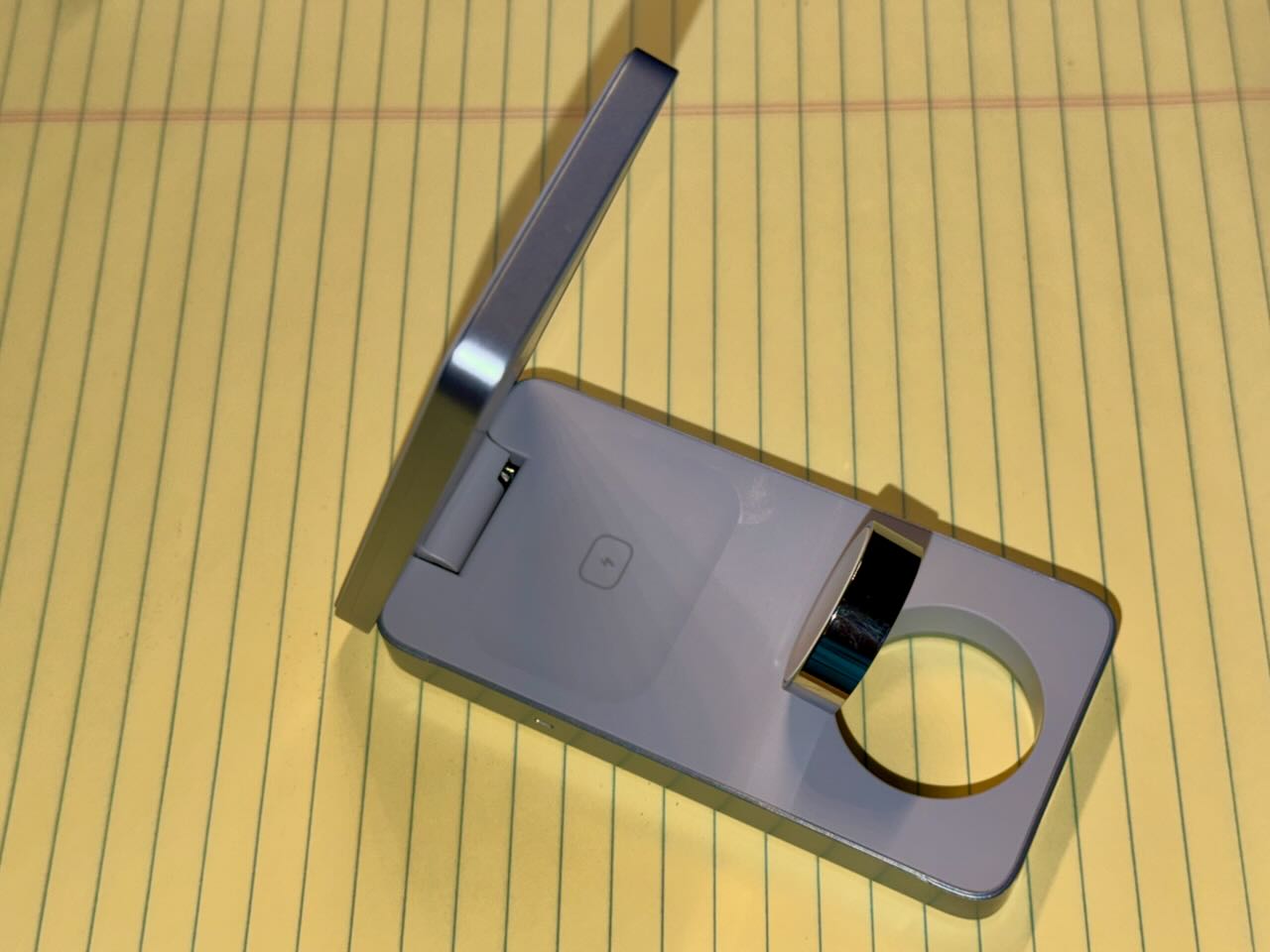
When folded, this device measures approximately 4.5" x 2.25" x 0.75". It fits easily in any purse, briefcase, bag, suitcase, etc., and it has no protruding parts.

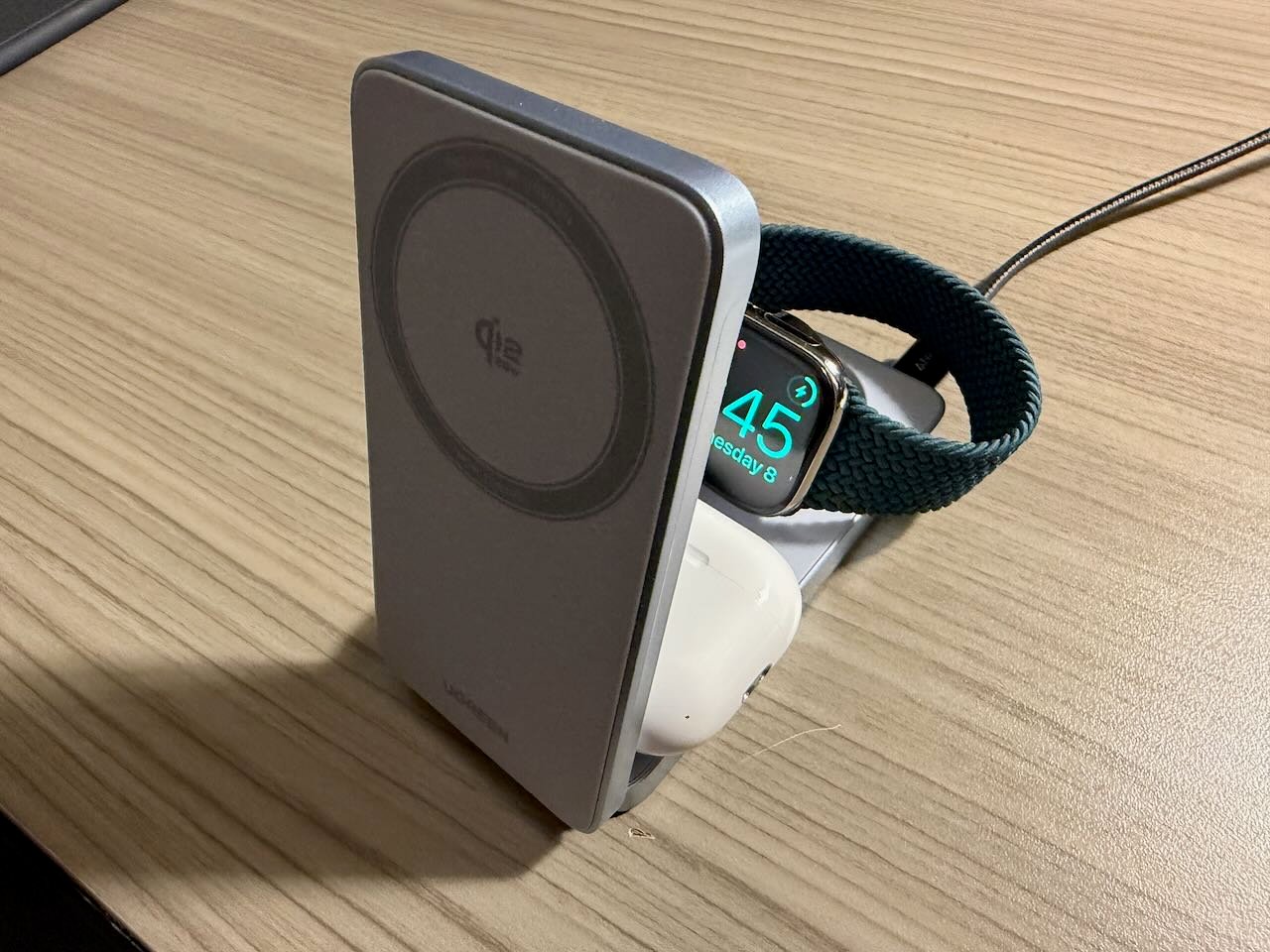
The top panel houses a Qi2 charger. Unfolding the top panel (up to 70º) reveals two additional charging surfaces, one for AirPods and one for an Apple Watch.

The Qi2 standard is based on Apple’s MagSafe. Thus, an iPhone magnetically attaches in either landscape or portrait orientation. Four rubber feet underneath the device keep it from sliding on a desk.

Charging speed

The Qi2 charger delivers up to 25W for iPhone, matching Apple’s fastest MagSafe charger. It provides up to 5W each for Apple Watch and AirPods.

Charger and cord

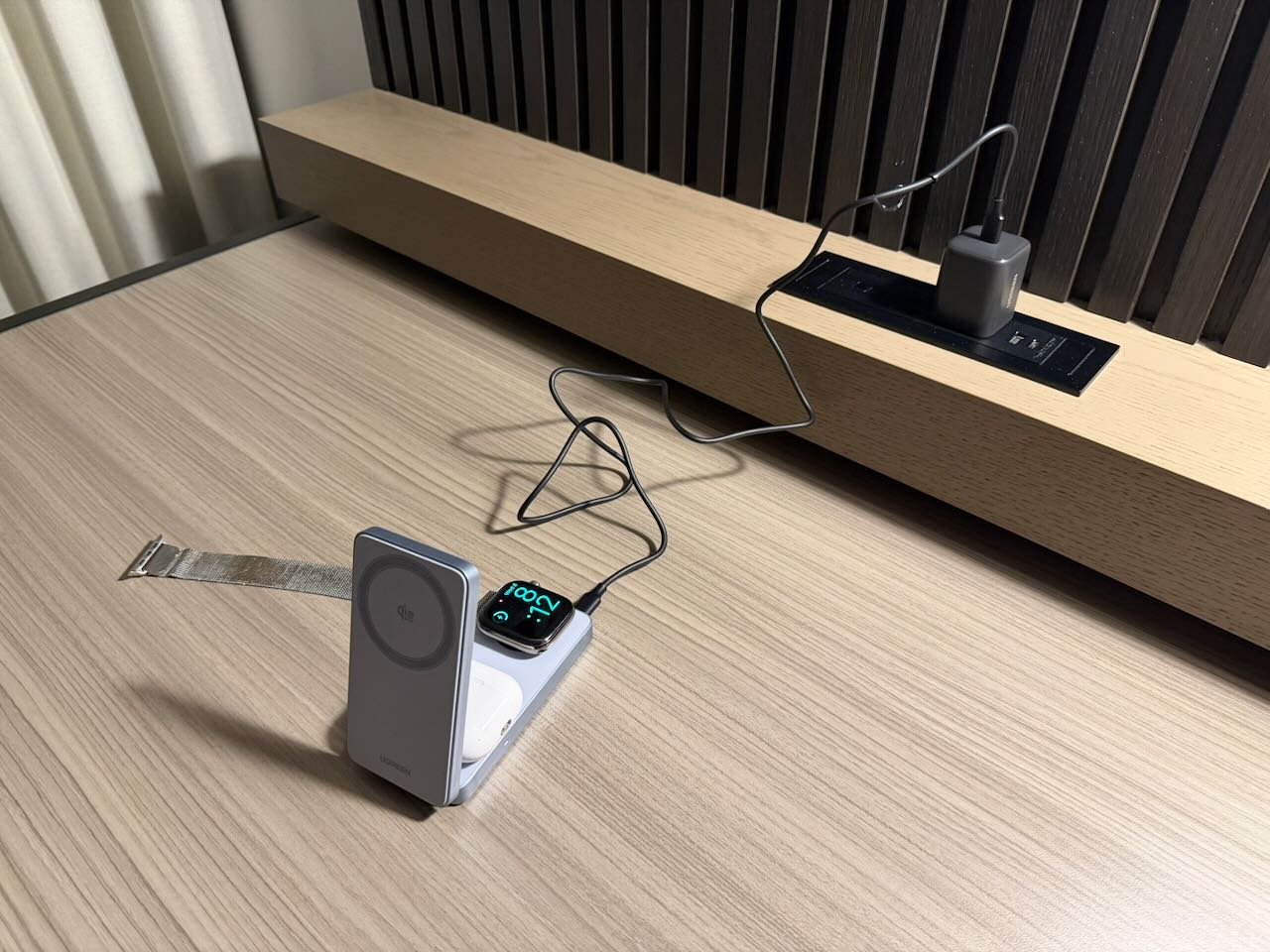
This device comes with a 45W USB-C power adapter and a 1m USB-C charging cable. In my experience, most hotel rooms now have an outlet on a table (or on a lamp on the table) that you can use for charging. Thus, a one-meter cable is typically long enough for travel.

At home or in the office, you may need to provide a USB-C cable that is longer than 1m to reach an outlet on the floor.

How it works

This device has worked great for me. The compact size is ideal for travel. I love that it uses a standard USB-C charger and cable, which can also be used with other devices. Alternatively, I can leave the included power supply and cable at home, and instead travel with my Anker Laptop Charger (140W, 4-Port, PD 3.1) (my review) and some longer USB-C cords so that I can use one cord to power this device, another cord to charge my iPad at night, and that way, I don’t have to worry about a 1m cord not being long enough to reach to an outlet.

I know how convenient it is to use a 3-in-1 charger because, for the past two years, I’ve been using an Anker 3-in-1 Cube with MagSafe at my desk. I love that the Anker product is so compact, but the iPhone charger on that device is 15W, so not as fast as the 25W on this UGREEN device. Moreover, while I have been using that Anker cube as a travel device for the past two years, it is actually rather heavy and the size is awkward in a carry-on. This UGREEN device is far better for travel. I love how it folds down. I use my Anker 3-in-1 cube below my computer monitor at work, and that works well because that Anker device is so short. This UGREEN device places the iPhone in landscape mode just a tiny bit higher, enough that it doesn’t fit under my monitor (which does not have an adjustable height), so for that reason, I’m continuing to use my Anker 3-in-1 cube at work. But if it wasn’t for that issue, which is unique to my current setup, I would prefer this UGREEN device.

The other 3-in-1 charger that I have been using for the past two years is the Twelve South HiRise 3 Deluxe, which also has a 15W iPhone charger. I use that Twelve South device on my nightstand, and it works great. I like that the iPhone is lifted up high with the Twelve South device, making it easy to see the clock that my iPhone displays in StandBy mode at night. However, the Twelve South device is too large to use as a travel charger. Plus, it uses a proprietary charging cord, which is not as convenient as USB-C.

For overnight charging, it makes little difference whether the iPhone charges at 15W or 25W. And if I need to charge my iPhone as fast as possible, I always use a cord, not wireless charging. But for the times when wireless charging makes the most sense, it is nice that the UGREEN device provides what is currently the fastest possible wireless charge for an iPhone.

UGREEN says that this device uses its Thermal Guard system to monitor the temperature as the device is charging. UGREEN says that the device also includes overcharge, overcurrent, and overpower protection, short circuit protection, and static electricity protection.

Conclusion

The UGREEN 3-in-1 Foldable MagFlow Wireless Charger has worked especially well for me as a travel charger. Whether you want something to use as a charger on a desk or table, you want to something compact to use while traveling, or both, this device works very well and I don’t hesitate to recommend it.

Click here to get the UGREEN 3-in-1 Foldable MagFlow Wireless Charger on Amazon (normally $139.99, but currently on sale for $99.99).

Podcast episode 218: Happy 800! 🎉 Nonplussed TV 📺 and 16,000 Selfies Every Second 📸

In the News

M5, M5, and M5. We begin this week’s episode of the podcast discussing the three new devices announced by Apple this week: the iPad Pro M5, the MacBook Pro M5, and the Vision Pro M5. Next, we address the rebranding of Apple TV, Steve Jobs on a coin, the camera improvements on the latest iPhones, bug hunters, F1 the movie, and F1 on Apple TV, and much more.

In our In the Know segment, Brett shares not one but three incredibly useful tips about the flashlight on the Apple Watch, and I discuss the DODOcase for iPad.

Click here to listen to the audio podcast, or just listen using your podcast player of choice. You can also watch the episode on YouTube:

In the News

In the News

Today happens to be the 800th In the News post on iPhone J.D., and Apple TV is nonplussed. What I mean is that one of many announcements from Apple this week was that the service formally known as Apple TV+ will now simply be called Apple TV. Goodbye, plus sign. I agree with the comment on this change from Jason Snell of Six Colors: “When everyone calls your service one thing, it’s probably best to just go with it and simplify.” Moreover, it was already a little confusing to have a streaming service, a hardware box connected to a television, and an app for watching videos that basically had the same name, so I don’t think that dropping the plus sign will cause much additional confusion; when someone says “Apple TV,” you can figure out from the context what they are talking about. But that’s not all that Apple had to say this week, so here is the rest of the news of note:

  • As I noted yesterday, Apple announced the iPad Pro M5 this week. But if you would prefer to use that speedy new chip in a laptop computer instead of an iPad, John Voorhees of MacStories notes that Apple also released a new MacBook Pro with an M5 chip.
  • Dan Moren of Six Colors notes that Apple also released the first new version of the Apple Vision Pro since it was previewed in 2023 and went on sale on February 2, 2024. Apple hasn’t changed the name—they are still calling this second version the Apple Vision Pro—but it now includes an M5 processor (a notable upgrade from the M2 in the original Vision Pro) and other enhancements. It also includes a new Dual Knit Band that provides more support (because it includes not only the strap that goes around your head but also a strap that goes on top of your head) and should be better balanced (because it includes tungsten inserts to provide a counterweight to the weight of the main part of the Vision Pro). If you already own a Vision Pro and you just want the new strap, you can purchase that for $99 from Apple.
  • As William Gallagher of AppleInsider notes, Apple also announced this week that, starting November 11, 2025, you will be able to purchase a PlayStation VR2 Sense controller from the Apple Store that can be used to play games on an Apple Vision Pro.
  • If you want to draw items in space while wearing an Apple Vision Pro, Apple worked with Logitech to release the Logitech Muse. It is sort of like a thicker version of the Apple Pencil that works in 3D. It costs $130, and while I’m interested in hearing how it works, it doesn’t seem like something that I would use.
  • If you own the original Apple Vision Pro and want to trade in that model towards the purchase of a new one, Hartley Charlton of MacRumors reports that you cannot do so. However, I still wonder if Apple will allow that option at some point in the future, but just isn’t ready to do so right now.
  • Apple giveth, but Apple also taketh away. This week, Apple removed its Clips app from the App Store and, as noted by Eric Slivka of MacRumors, announced in a support document that the app will no longer be supported for those who have it installed. Apple released the Clips app in 2017. Although I haven’t used it frequently, I did use the app a few times to quickly create some fun movies, and I found that it worked well.
  • In 2018, the U.S. Mint began releasing American Innovation dollar coins. The first version of the coin commemorated the first patent, and every coin released since then celebrates a state or U.S. territory, along with an invention or inventor associated with that region. For example, in 2023, the U.S. Mint released the Louisiana coin, which celebrates the Higgins boat—a boat invented in New Orleans that played a crucial role during World War II, including on D-Day. I mention all of this because, as noted by Marcus Mendes of 9to5Mac, this week the U.S. Mint announced that the California dollar coin will be released in 2026 and will honor Steve Jobs.
  • In an interview with Sahil Mohan Gupta of the Indian business publication BW Businessworld, Jon McCormack, who leads camera and photo software engineering at Apple, discussed the new front-facing camera on the newest iPhones. He says that Apple wanted to uncouple the orientation of your iPhone from the aspect ratio of your capture. He also notes an advantage that I had not thought of: “You’ll also notice everyone in the photo has better eye gaze because the camera preview is centred with the front camera rather than being off to the side.” Taking better selfies should be a popular new feature considering that Apple says that people around the world take 16,000 selfie photos every second. I’m fairly certain that a good portion of those are taken by my daughter.
  • David Sparks of MacSparky has been leasing a Rivian, and while he likes the car, he says that the lack of CarPlay is a problem.
  • Michael Simon of Macworld reports that Apple has doubled its top award from $1 million to $2 million for people who discover a security flaw with Apple’s operating systems and report that bug to Apple.
  • Alex Sherman of CNBC reports that Apple executive Eddy Cue said that Apple’s F1 movie is the highest-grossing sports film of all time. Apple also announced that the movie will come to Apple TV on December 12. I enjoyed the movie at an IMAX theater, and I look forward to watching it again on a virtual huge screen using my Vision Pro.
  • Jason Snell of Six Colors notes that there is heavy speculation that Apple is going to announce this weekend that it has purchased the exclusive U.S. broadcast rights to F1 racing, and Snell discusses the different ways that Apple could do that.
  • Apple TV released a trailer for Season 2 of the show Palm Royale, which starts on November 12, and I love that Carol Burnett—at 92 years old—is still in the show.
  • And finally, here is a short, fun video from Apple that celebrates design. This was the beginning of Apple’s recent introduction of the new iPhones, but even though I saw it before, I enjoyed watching it again.

Apple updates the iPad Pro

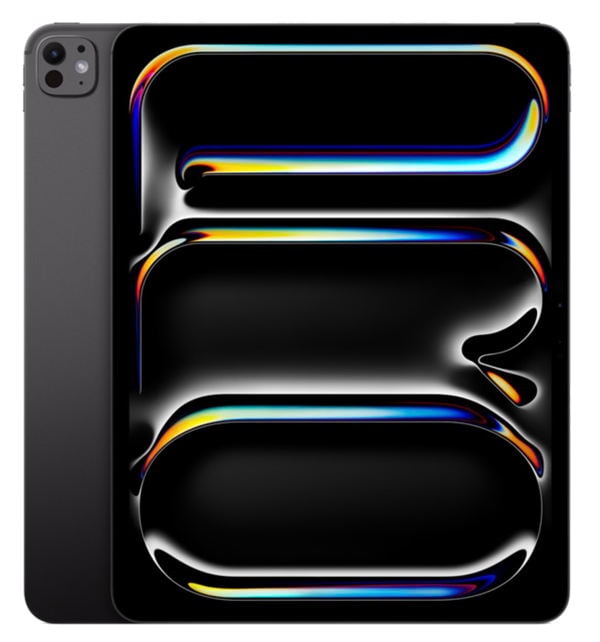
If you are a lawyer or other professional who wants a nice iPad that will be fantastic for getting your work done and will also be great for surfing the Internet, looking at pictures, and otherwise using that device when you are off the clock, the iPad Air is a fantastic option. It now includes many features that were previously only available with an iPad Pro, and it was just updated seven months ago to use the M3 processor. And at a starting price of only $599, you get a lot of bang for the buck. But if you consider yourself a power user, you can spend more to get the iPad Pro, which has a lot more features. On May 7, 2024, Apple introduced the iPad Pro M4. I’ve been using the iPad Pro M4 virtually every day since it came out, and I love that device for the reasons I noted in my review. Yesterday, Apple replaced the iPad Pro M4 with the iPad Pro M5, and the name tells you almost everything that you need to know about this device: Apple replaced the M4 processor with the faster M5 processor. If you are in the market for a high-end iPad, the iPad Pro M5 is now the iPad to get.

In today’s post, I’m going to discuss what has changed from the iPad Pro M4, what makes the iPad Pro such a good device to use, and who should instead save $400 and get an iPad Air (M3).

M5 > M4

A big reason that the M5 version of the iPad Pro is better than the M4 version is that it uses an M5 instead of an M4 processor. The M5 is a cousin of the A19 Pro chip that is used in the new iPhone 17 Pro, so it is a little bit faster than the M4 in most tasks. Apple says that the performance increase is most noticeable when your iPad uses the Neural Engine to do AI work: about 3.5x faster than the M4. It also features faster graphics performance (over 4x the peak GPU performance of the M4) and a faster CPU.

The iPad Pro M5 also has more memory if you get the least expensive models, the ones with 256GB or 512GB of storage: 12GB instead of the 8GB in the iPad Pro M4. That is also similar to what Apple did with the iPhone 17 Pro, where the memory is 12GB in the 2025 model versus 8GB in the 2024 model (the iPhone 16 Pro). I suspect that the additional memory is largely there because it makes on-device AI work so much better, but extra memory is more useful for any task, even if you are just keeping lots of browser tabs open in Safari. Note that if you opt for the 1TB or the 2TB models of the iPad Pro M5, you get 16GB of RAM, which fantastic, but it is the same as what you got with the 1TB and 2TB models of the iPad Pro M4.

Speaking of memory, the memory bandwidth is a little better: 153GB/second for the iPad Pro M5 versus 120GB/second for the iPad Pro M4. Thus, not only can you keep more tasks in memory thanks to the additional RAM, but things move in and out of memory 30% faster. Again, this helps with AI and multitasking.

Apple is also bringing its new C1X modem to the versions of the iPad Pro M5 models that feature a built-in modem. The only iPhone to feature an Apple-built modem is the iPhone Air; the other iPhone models use a Qualcomm modem, which is more powerful but more power-hungry. Apple says that the C1X modem uses 30% less energy than the modem used in the iPad Pro M4. It also features the same Apple-designed N1 wireless networking chip that Apple used in the iPhone Air. Apple says that the N1 chip offers networking improvements, but since the iPhone 17 Pro doesn’t use an N1, it seems that even Apple doesn’t believe that the N1 is always the best networking chip to use in a device. The N1 chip does mean that the iPad Pro M5 can work with the new Wi-Fi 7 standard; the iPad Pro M4 worked with Wi-Fi 6E.

All in all, these improvements are incremental, but they are still improvements. Having a faster processor, and having more and faster memory, means that the iPad Pro is even more “Pro” than ever before. I don’t think that anyone needs to upgrade from an iPad Pro M4, but if you are using an older version of the iPad Pro or a non-Pro iPad, you will have lots to appreciate.

M5 = M4

Aside from those improvements, this looks to be a great iPad for the same reasons that I love the iPad Pro M4 so much. First, it is the thinnest iPad and very light, which is very nice when I’m holding an iPad in my hands for a long time to read and annotate a document.

The screen is also amazing. The iPad Pro M4 and iPad Pro M5 both feature a Tandem OLED display, and it is the best display on any device—better than any computer, iPhone, TV, you name it, that I have ever seen. The display is crisp, the colors are vivid, the screen is bright, and it is a joy to use. Sure, when I am reading black-and-white briefs, having a better display is no big deal. But when I am looking at pictures or movies, it is wonderful.

I also appreciate that the iPad Pro now places the self-facing camera on the long edge, which works so much better for video calls because I virtually always keep my iPad in landscape orientation.

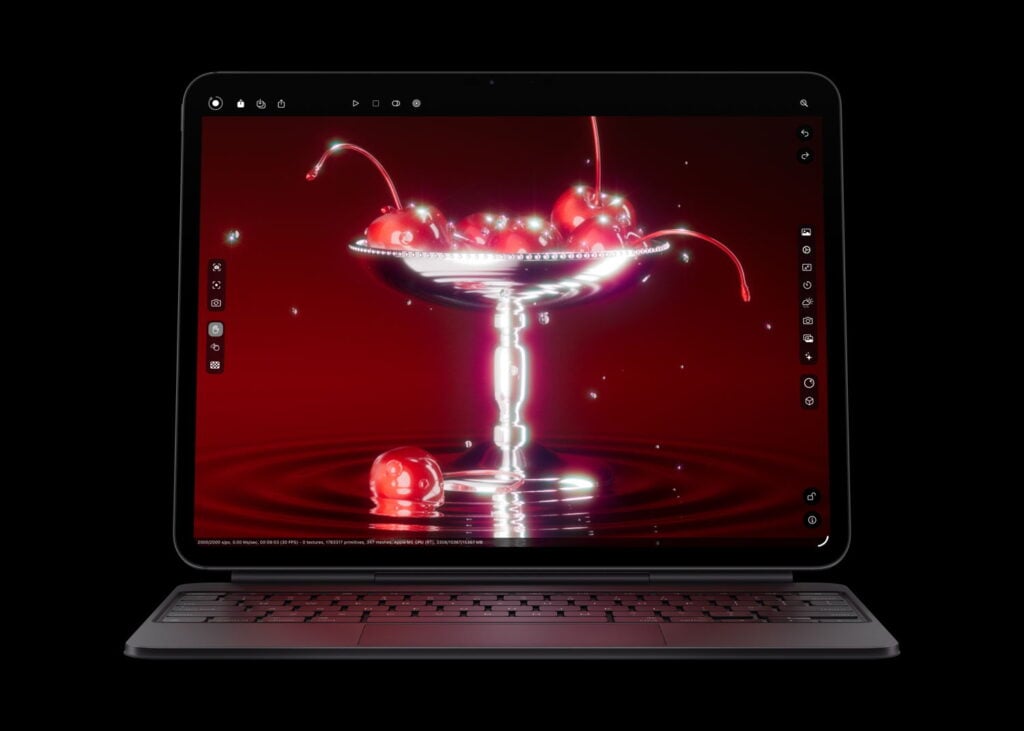
Finally, just like the iPad Pro M4, the iPad Pro M5 supports the Apple Pencil Pro, which is a nice improvement over the Apple Pencil. As I described in more detail in this post, it supports the squeeze gesture, it includes a gyroscope, it provides haptic feedback, and it includes Find My support if you lose the Pencil. This new iPad Pro also works with the latest and best version of Apple’s Magic Keyboard for iPad.

Etc.

A few other minor notes about the iPad Pro M5. If you prefer a nano-texture glass display to reduce glare, you have the option to spend $200 more for that display if you opt for the more expensive 1TB or 2TB models. With those two higher-end models, you also get a 10-core CPU instead of a 9-core CPU, which gives you a slight additional speed bump for certain tasks.

You can also charge the iPad Pro M5 a little faster if you use Apple’s new 40W Dynamic Power Adapter with 60W Max or another compatible adapter. That’s something that Apple also added to this year’s iPhone 17 models. For the iPad Pro M5, it means that you can charge up to 50% in 35 minutes.

If you use an iPad with an external display, the iPad Pro M5 can support a display with a 120Hz refresh rate. The current version of the Apple Studio Display supports 60Hz. This feature on the new iPad Pro makes me wonder if a new and improved Apple Studio Display is going to be released in the coming months.

M5 vs. Air

If you are using an older iPad and you are ready to upgrade, should you get this new iPad Pro M5 or should you get the iPad Air (M3) that was released earlier this year?

Although the iPad Air (M3) starts at $599, that model has 128GB of storage space. If you are storing lots of documents and videos, that may not be enough. The $699 version of the iPad Air (M3) has 256GB of storage space, which is the better size for many professional users. If you spend the extra $300 on the iPad Pro M5, the main things that you get are (1) a much nicer and brighter OLED screen, (2) more memory, and memory that is faster, (3) Face ID instead of Touch ID, (4) four built-in speakers instead of two, and (5) the speed of an M5 processor instead of an M3. I consider that to be a much better iPad, well worth the extra $300 for anyone who uses an iPad extensively. However, if those additional features don’t sound particularly important to you, or if you are a more casual iPad user, consider saving $300. The iPad Air is still a fantastic iPad.

Conclusion

In addition to the new iPad Pro, Apple also announced a new MacBook Pro and a new Vision Pro yesterday, both of which also include the new M5 processor. I love that Apple now considers the iPad Pro to be such an important device for professional users that it has decided to include the latest and improved processor family in the iPad Pro from Day 1. I cannot say enough good things about the iPad Pro M4. It has been a key part of my life for over a year now. The iPad Pro M5 has everything that I love about the iPad Pro M4, plus more. This device looks fantastic.

Podcast episode 217: Orange Fooforaw 🟧 Air to the Throne 💨 and We’re Blue! 🟦 Da Ba Dee Da Ba Di…

In the News

We begin this week’s episode of the podcast talking about the badge awards that you can earn in the Fitness app. Next, we talk about the Slide Over feature that used to exist on the iPad and the indications that something similar may be coming soon. We also talk about new reviews of the iPhone 17 Pro, new reviews of the iPhone Air, the potentially life-saving siren feature of the Apple Watch Ultra, sleep scores, external batteries, courtside seats thanks to the Apple Vision Pro, and more.

In our In the Know segment, Brett discusses the Control Center on the Apple Watch, and I discuss freeing your cursor from jail when you are using Universal Control.

Click here to listen to the audio podcast, or just listen using your podcast player of choice. You can also watch the episode on YouTube:

In the News

In the News

Today is 10/10. In addition to being a date that is fun to say, it is also World Mental Health Day, according to the World Health Organization. Apple is celebrating by letting you earn a badge award for the Fitness app: the World Mental Health Day Challenge. You can earn this award by using any app that adds mindfulness or meditation minutes to Apple’s Health app—such as the Mindfulness app on the Apple Watch—for ten minutes. Get it? It’s 10 minutes on 10/10. So why not take some deep breaths, and earn yourself a fun award today. And now, the news of note from the past week:

  • If you are thinking about getting an iPhone 17 Pro and want more help deciding if it is right for you, or if you have already purchased one and want to learn more about what you have, Dan Moren of Six Colors wrote a helpful review. And in case you missed it, here is my review. I love this device.
  • If it is the iPhone Air that has your attention, not the iPhone 17 Pro, Jason Snell of Six Colors wrote this helpful review.
  • And here is the take on the iPhone Air by Stephen Hackett of 512 Pixels.
  • As much as I love using an Apple Watch Series 10, I know that there are a few nice features that you can only get with the Apple Watch Ultra. William Gallagher of AppleInsider explains how a SCUBA driver says that the siren feature of the Ultra saved his life, even though he was still underwater.
  • Ryan Christoffel of 9to5Mac discusses two new health features in watchOS 26: hypertension notifications and sleep score.
  • Tim Hardwick of MacRumors reports that with iOS 26, you can now see your full call history with a contact. When I tried this, it worked perfectly for some folks, but didn’t seem to be working yet for other contacts.
  • There is a sale on Amazon for a product from Anker that I haven’t tried yet, but it looks really useful, especially for travel. It is the Anker Prime 6-in-1 USB C Charging Station, normally $109.99, on sale for $79.99. It is a long extension cord, and at the end, there is a device with two AC outlets, two USB-C ports, and two USB-A ports, and the whole thing is very slim, so it seems perfect for travel. You can plug this thing into an outlet near the floor and then place the device on a desk to provide easy access to all of the power options that you need.
  • Speaking of Anker, it is one of the few companies from which I typically purchase Lithium-ion batteries because I’ve always had a sense that batteries from lesser-known companies are unreliable. As John Gruber of Daring Fireball notes, based on a report from Lumafield discussed by Andrew Liszewski of The Verge, those cheaper batteries really can be dangerous.
  • iPadOS 26.1 is now in beta, and folks are reporting some interesting new features. For example, Jason Snell of Six Colors notes that Apple is bringing back Slide Over, which was the one feature of the pre-iPadOS 26 multitasking system that I know a lot of people missed.
  • Steve Troughton-Smith notes on Mastodon that it looks like iPadOS 26.1 may support putting your iPad in “clamshell mode” so that you can use it with an external monitor while the screen on the iPad itself is turned off. I know that only some people would find this useful, but for them, it would be really nice to have. I would love to see a related feature: mirror my iPad screen to an Apple Vision Pro but turn off the screen on the iPad itself; that way, I would get more privacy while working on confidential matters because someone passing by could not see my iPad’s screen (and of course, they wouldn’t see what I am seeing in the Vision Pro).
  • Speaking of the Vision Pro, Jason Snell of Six Colors reports that in 2026, you will be able to live-stream some Lakers games in Apple Immersive format to the Vision Pro, essentially giving you courtside seats. Watching live sporting events from impossibly good seats seems like a fantastic feature. When we get to the point where there is a lot of this content, I could see it convincing people to purchase an Apple Vision Pro or future versions of that platform.
  • I noted last week that Apple removed the ICEBlock app from the App Store because of pressure from the Trump administration. John Gruber of Daring Fireball offers an interesting analysis of Apple’s decision.
  • I loved the shows Breaking Bad and Better Call Saul, and Rhea Seehorn was especially good in Better Call Saul. Thus, I’m excited about the new show Pluribus, which starts in a few weeks on Apple TV+. The show stars Seehorn and was created by Vince Gilligan, the creator of Breaking Bad and Better Call Saul. Apple released a trailer this week.
  • And finally, in 2019, Apple released a video to tell the story of a scrappy team of four office workers trying to sell their great idea. It starred Ambrose Burzak, Edward Mawere, Mia Schauffler, and Stephen Thomas Young. They were called The Underdogs, and the video showed off how the iPad and other Apple products can be used to get work done. Sequels came out in 2020 (the team used Apple technology to work from home during the pandemic), 2022 (the team returned to the office after the pandemic), 2023 (the team tracked down a stolen Mac), and 2024 (the team traveled to Thailand). This week, Apple released the sixth video featuring the Underdogs, and it is cute. The video is called The Underdogs: BSOD (Blue Screen of Death), and it was obviously inspired by the BSOD issue in 2024 that affected banks, airlines, and other companies around the world.

Podcast episode 216: Foundational Intelligence 🧠 Lux-urious Cameras 📸 and Goodnotes Gets Gooder 📝

In the News

We begin this week’s episode of the In the News podcast discussing Apple’s approach to AI and how its Foundation Model, built into iOS 16, presents a fantastic opportunity for app developers to enhance their apps. We also talk about the latest update to iOS 26, hidden features in iOS 26, the latest reviews of the iPhone Air and the Apple Watch Ultra 3, the impressive cameras on the iPhone 17 Pro, the latest changes to the Goodnotes app, and apparent leaks that may give us a sneak peak of new Apple products coming soon.

In our In the Vision segment, we discuss visionOS 26 and what would make the Vision Pro a better tool for getting work done.

In our In the Show segment, we discuss five more years of Peanuts on Apple TV+ and some of the upcoming shows on Apple TV+.

In our In the Know segment, Brett discusses watching Apple TV+ shows on United flights, and I discuss a fast and easy way to use the Tapback feature in Messages.

Click here to listen to the audio podcast, or just listen using your podcast player of choice. You can also watch the episode on YouTube: